

Longplay
Adrian Schoenig Music iPhoneiPadiPod touch
Longplay is a paid Music app for iPhone and iPad by Adrian Schoenig. Rated 4.6/5 from 169 ratings. Requires iOS 17.6. Updated September 21, 2026.
- Rating
- 4.6
- 169 ratings
- Price
- 7.49 USD
- on the App Store
- Size
- 40 MB
- Age 4+
- Updated
- Sep 21
- 2026 · v2.6
Screenshots

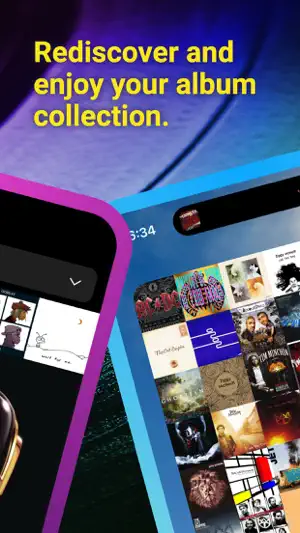


About Longplay
Do you have an album collection of dozens to thousands of albums? Does the next song of an album already start playing in your head when one finishes? Longplay is for you. Longplay presents a beautiful view of the album artworks of the (near) complete albums in your music collection. It let's you rediscover forgotten favorites or just play the music you love, and explore it with various smart sort options: - Orderliness: by artist, then by album - Addiction: by amount of time spent listening - Brightness: by the primary color of the album artwork - Negligence: by the time it’s been since you’ve last listened to the album, weighted by the rating - Recency: by date added - Memory: by last played - Stars: by the rating you’ve provided for each song - Random: a new order, every time you tap it You can organize your albums into collections, which sync across your devices. Infinite album shuffle let's you stay in the flow, with smart shuffle depending on your current collection or sort order. It comes with a home screen widget that displays the top albums by your nominated sort order. On the larger widget, tap an album to play it, on the smallest it doubles as a "Feeling lucky" button to start playback of one of them. It supports CarPlay, Siri, Shortcuts, and Spotlight.t supports CarPlay, Siri, and Shortcuts. It works well with Apple Music, music purchased from iTunes or synced manually. --- Important: Longplay does not ship with any music included, it is instead a player for your music library - be it from Apple Music, iTunes or your synced music. It provides a filtered view of just the albums of which you have all or most of the songs, as well as your playlists; thus focusing on your album collection without any singles or albums where you only have very few songs. --- Tap an item to play (or pause). Long tap for additional options, such as adding to your album queue or to a collection. It works with libraries big and small, and besides regular albums it also handles compilation albums and playlists. Comes with Shortcuts actions to play a random top album by a defined sort order, or a random album, optionally filtered by artist or genre. All of that with Longplay's logic that makes sure that it's an album for which you have all or most songs. It is compatible with iPhone, iPad and iPod Touch. Fully VoiceOver accessible.
Ratings & reviews
4.6
169 ratings
What’s new
Version 2.6 · Updated September 21, 2026
- Hello, Siri AI: Ask to play albums now, next or later. Ask for albums by title artist; or ask for something you have neglected, or recently listened to or one of your favorites. Ask Siri to search for albums in the app. Or try asking for details about the album you're listening to. - Robustness for the Spotlight integration - Some minor tweaks for iOS 27
App privacy
The developer, Adrian Schoenig, reported these privacy practices to Apple.
Data Not Linked to You
The following data, which may be collected but is not linked to your identity, may be used for the following purposes:
- Identifiers: Device ID
- Usage Data: Product Interaction
Used for: Analytics
Alternatives to Longplay
Looking for apps like Longplay? Here are 6 similar apps on the App Store. The highest rated is MusicBox: Catalog and Organize (4.8/5), and 2 of the 6 are free to download.
-
 SongCapsule
4.3
SongCapsule
4.3
-
 MusicBox: Catalog and Organize
4.8
MusicBox: Catalog and Organize
4.8
-
 Univershuffle: Discover Music
4.4
Univershuffle: Discover Music
4.4
-
 Cs Music Pro
4.3
Cs Music Pro
4.3
-
 Music Library Tracker
4.5
Music Library Tracker
4.5
-
 Marvis Pro
4.8
Marvis Pro
4.8
| App | Rating | Price | Last updated | Compare |
|---|---|---|---|---|
| Longplay | 4.6 / 5 (169 ratings) | 7.49 USD | September 21, 2026 | |
| SongCapsule | 4.3 / 5 (193) | 4.99 USD | Apr 15, 2026 | Compare |
| MusicBox: Catalog and Organize | 4.8 / 5 (223) | Free | Oct 6, 2026 | Compare |
| Univershuffle: Discover Music | 4.4 / 5 (33) | Free | Sep 20, 2026 | Compare |
| Cs Music Pro | 4.3 / 5 (1,823) | 3.99 USD | Oct 11, 2026 | Compare |
| Music Library Tracker | 4.5 / 5 (104) | 3.99 USD | Oct 6, 2026 | Compare |
| Marvis Pro | 4.8 / 5 (1,282) | 9.99 USD | Oct 6, 2026 | Compare |
Compare Longplay with the top alternatives: ratings, updates, ASO score and keyword gaps →