

Link File Share: Send via link
Whizpool Utilities iPhoneiPadiPod touch
Link File Share: Send via link is a free Utilities app for iPhone and iPad by Whizpool. Rated 4.7/5 from 112 ratings. Requires iOS 15.0.
- Rating
- 4.7
- 112 ratings
- Price
- Free
- on the App Store
- Size
- 59 MB
- Age 4+
- Updated
- Aug 25
- 2026 · v2.4.2
Screenshots


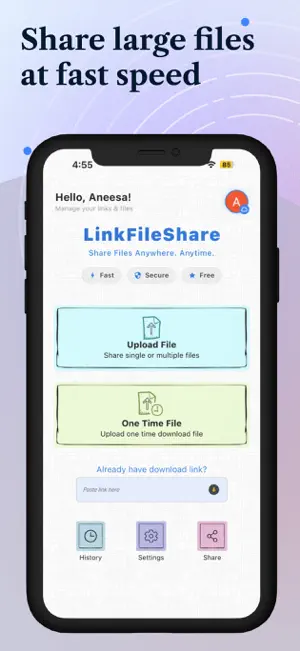
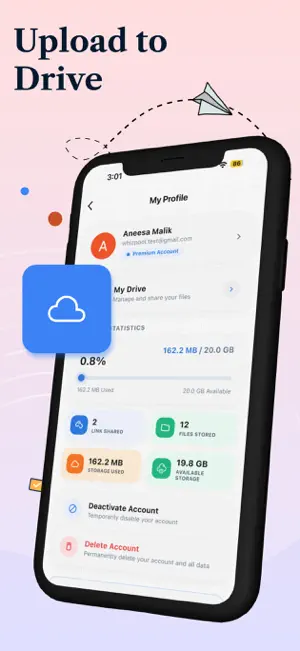
About Link File Share: Send via link
Want to send confidential files but afraid they might get stolen? ‘Link File Share’ allow you to share large files that are highly secured by a password protected link which is generated as soon as you upload the file for sharing. Link File Share is a user-friendly application for seamless file sharing, eliminating the need for log-in or registration. Simply upload the file, generate link and share without bandwidth limit restrictions. • MULTIPLE FILE SHARING Transfer single or multiple files of any type between your devices with a single click. You can select multiple documents, photos, videos and send them all at once. This feature is particularly useful when you need to transfer several files quickly, as it saves you time and effort compared to sending files one by one. • ONE-TIME ACCESS FOR YOUR FILES Now your confidential file access is in your control! If you're sharing a file that you want to be accessed only once, this feature ensures that the link expires after the first download automatically. It's a powerful tool for scenarios where limited access is crucial for security reasons. • SET YOUR OWN EXPIRY DATE Your files have never been more secure while using mobile apps for sharing. Now you can set expiry date, and can control the duration that the shared files will be accessible to the recipient. Once expired, the link becomes invalid, and the recipient will not be able to access the shared files. Link File Share gives the flexibility to extend or modify the expiry date according to your needs. After the expiry date, the data is automatically erased and the link is no longer usable. • NO BANDWIDTH LIMITATION: Worried about large files slowing down the transfer process? One of the major advantages of using Link File Share is that it does not have any bandwidth limitations. This means that you can transfer files without any restrictions or extra charges. Link File Share allows you to share anything that is stored in your phone’s memory as well as SD card, without any limitation of bandwidth, making it an ideal choice for transferring large files like high-definition videos. •FLEXIBILITY IN SHARING LINKS: Sharing links shouldn't be a one-size-fits-all deal, right? Well, Link File Share recognizes that. Link file share gives you variety of options for sharing the password-protecting links. You can simply copy the link if you want a quick share, or you can make things super efficient by sending files to multiple recipients via email. •MAINTAIN HISTORY: Can’t remember which file you shared and with whom? Link File Share automatically saves the history of each file you have shared and downloaded, including file name, date, time and other details. This feature also provides security to for shared files •MULTILINGUAL: By supporting multiple languages, the app ensures that users can use the app in their preferred language, which makes it a regional app. Link File Share support multiple languages Swedish, Chinese (Simplified / Traditional), French, German and many others. At Link File Share, user feedback is not just welcomed, it's essential. The development team is committed to continuous improvement, actively seeking input and suggestions from users. Have an idea for a cool feature? Your input can shape the future of Link File Share. Submit your suggestions to [email protected] , and become a part of the app's evolution.
Ratings & reviews
4.7
112 ratings
What’s new
Version 2.4.2 · Updated August 25, 2026
Sign in to keep everything backed up and synced across your devices. Organize your uploads with folders — keep shared links tidy and easy to find. New Premium plans: more storage, bigger group transfers, and links that never expire. We've also squashed a few bugs and made things run smoother overall.
App privacy
The developer, Whizpool, reported these privacy practices to Apple.
Data Used to Track You
The following data may be used to track you across apps and websites owned by other companies:
- Usage Data: Advertising Data
Data Linked to You
The following data, which may be collected and linked to your identity, may be used for the following purposes:
- Usage Data: Advertising Data
Used for: Third-Party Advertising
Alternatives to Link File Share: Send via link
Looking for apps like Link File Share: Send via link? Here are 6 similar apps on the App Store. The highest rated is LIFE LINK - FILE SHARING (5.0/5), and all 6 are free to download.
-
 DropSend- File Transfer&Share
4.5
DropSend- File Transfer&Share
4.5
-
 LIFE LINK - FILE SHARING
5.0
LIFE LINK - FILE SHARING
5.0
-
 ShareMe - ShareIt File Cleanup
-
 File Transfer:PhotoSync Tool
4.2
File Transfer:PhotoSync Tool
4.2
-
 ShareMe: iShare File Transfer
4.5
ShareMe: iShare File Transfer
4.5
-
 Quick Share - File Transfer
4.0
Quick Share - File Transfer
4.0
| App | Rating | Price | Last updated | Compare |
|---|---|---|---|---|
| Link File Share: Send via link | 4.7 / 5 (112 ratings) | Free | August 25, 2026 | |
| DropSend- File Transfer&Share | 4.5 / 5 (20) | Free | Sep 14, 2026 | Compare |
| LIFE LINK - FILE SHARING | 5.0 / 5 (2) | Free | Nov 3, 2023 | Compare |
| ShareMe - ShareIt File Cleanup | – | Free | Oct 31, 2024 | Compare |
| File Transfer:PhotoSync Tool | 4.3 / 5 (44) | Free | Aug 7, 2026 | Compare |
| ShareMe: iShare File Transfer | 4.5 / 5 (97) | Free | Apr 24, 2024 | Compare |
| Quick Share - File Transfer | 4.0 / 5 (8) | Free | Dec 15, 2025 | Compare |