

ISEC7 MAIL for Intune
ISEC7 Group Productivity iPhoneiPadiPod touch
ISEC7 MAIL for Intune is a free Productivity app for iPhone and iPad by ISEC7 Group. Requires iOS 17.0. Updated September 11, 2026.
- Price
- Free
- on the App Store
- Size
- 104 MB
- Age 4+
- Updated
- Sep 11
- 2026 · v1.10.8
Screenshots


About ISEC7 MAIL for Intune
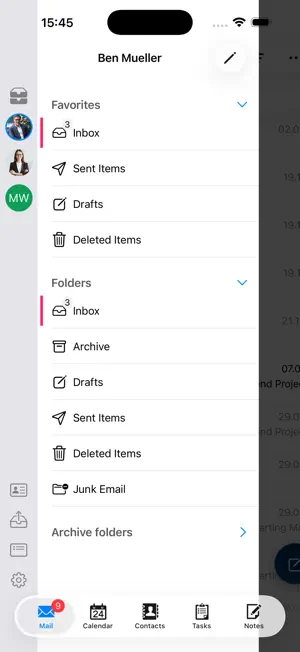
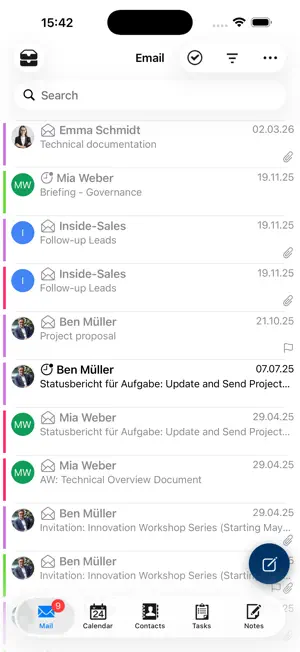
IMPORTANT NOTE: MAIL for Intune is specially designed for Microsoft Intune managed devices. ISEC7 MAIL enables access to Microsoft Exchange and Office 365 environments with secure Personal Information Management (PIM) data such as contacts, calendar, tasks, and notes. ISEC7 MAIL also allows for mailbox delegation capabilities and public folder integration. ISEC7 MAIL operates with modern and certificate-based authentication (CBA) and allows users to securely send, receive, and enforce encrypted and signed emails (S/MIME). As the top priorities of ISEC7 MAIL are security, classification, and authentication, it is an ideal tool for managing classified or sensitive information, organizational or group mailboxes, and supporting executive leadership and their staff. Easiliy manage inboxes from your mobile device Easily managed from a mobile device, ISEC7 MAIL enables mobile access to Microsoft Exchange accounts with the ability to delegate access for approved staff. Delegation gives authorized users read and write access to email, calendar, public folders and more. No complex technical skills are required, simply add delegates from the Outlook client. With access to a delegated account, the user can book or change calendar appointments with ISEC7 Mail's Smart Scheduler, monitor and respond to emails, and access content in the public folders–directly from any mobile device. KEY BENEFITS • Easily access and delegate access to email, calendar, contacts, public folders, and more • Ability to use functional & shared mailboxes and multiple email domains • Utilize helpful classification tool ISEC7 CLASSIFY and automation of deployment • Share your business card with a touch of a button • Improve productivity and response time with significant impact on customer satisfaction • Maintain security of sensitive information and comply with security policies • Build greater team collaboration and transparency of knowledge share ISEC7 MAIL is free to download and use with limited features. Upgrading to Premium removes the restrictions of the free version mentioned below and is available through an auto-renewing subscription. A yearly subscription is available for $32.99. Free version: • Only one master account • Only one delegate access • Only 3 default folders for the master account (inbox, contacts, calendar) • Only 3 default folders for the delegate access (inbox, contacts, calendar) • No access to public folders • No action possible, such as create/forward/delete e-mails; create/delete appointments and contacts • Only the last 10 emails are displayed • In the calendar, only the current week is available Subscription automatically renews unless auto-renew is turned off at least 24-hours before the end of the current period. Account will be charged for renewal within 24-hours prior to the end of the current period, and identify the cost of the renewal. Subscriptions may be managed by the user and auto-renewal may be turned off by going to the user's Account Settings after purchase. No cancellation of the current subscription is allowed during active subscription period. Technical Requirements • Microsoft Exchange Server 2007 SP1 or higher, 2010, 2013 or 2016 • Microsoft Office 365 • Microsoft Exchange WebService must be activated and available to connect to If you are unsure if your company is using Microsoft Intune, please contact your company’s IT administrator. If you are not an enterprise user, please consider ISEC7 MAIL at: https://itunes.apple.com/us/app/isec7-mobile-exchange-delegate/id1045017598. Privacy policy available at: https://apps.isec7.com/privacy/https://apps.isec7.com/privacy/ISEC7_DataPrivacyPolicy_ISEC7_MAIL.pdf End User License Agreement available at: https://apps.isec7.com/eula/ISEC7_EULA.pdf
What’s new
Version 1.10.8 · Updated September 11, 2026
New Features This update introduces new ways to organize your workflow, including a task list filter to quickly find what you need and enhanced flagged emails that now support custom due dates, reminders, and a dedicated folder. We've also improved folder management in the side menu and added new configuration settings to let you disable archive actions or Apple Intelligence writing tools. Improvements We’ve streamlined the app experience with smarter mail recipient suggestions, clearer directory display names, and a convenient summarized view for out-of-office messages and mailtips. You'll also notice a new banner that lets you know when you're offline, upgraded email filtering controls, and easier appointment attendee management featuring automatic searches and quick swipe actions. Several bugs have been fixed.
App privacy
The developer, ISEC7 Group, reported these privacy practices to Apple.
Data Not Linked to You
The following data, which may be collected but is not linked to your identity, may be used for the following purposes:
- Contact Info: Email Address
- Identifiers: User ID, Device ID
Used for: App Functionality
Alternatives to ISEC7 MAIL for Intune
Looking for apps like ISEC7 MAIL for Intune? Here are 6 similar apps on the App Store.
-
 FileOrbis for Intune
-
 Anniversa
-
 TeamDrive 5 SecureOffice
-
 ClevverMail Admin
-
 tablano
-
 Threadly : Email ∙ Client
| App | Rating | Price | Last updated | Compare |
|---|---|---|---|---|
| ISEC7 MAIL for Intune | – | Free | September 11, 2026 | |
| FileOrbis for Intune | – | Free | Sep 21, 2026 | Compare |
| Anniversa | – | Free | May 4, 2026 | Compare |
| TeamDrive 5 SecureOffice | – | Free | Jul 4, 2025 | Compare |
| ClevverMail Admin | – | Free | Jan 24, 2026 | Compare |
| tablano | – | Free | Aug 26, 2026 | Compare |
| Threadly : Email ∙ Client | – | Free | Feb 13, 2026 | Compare |