

Cones Calculator Pro
Imran Pinjara Utilities iPhoneiPadiPod touch
Cones Calculator Pro is a paid Utilities app for iPhone and iPad by Imran Pinjara. Rated 1.0/5 from 1 ratings. Requires iOS 16.1. Updated August 21, 2026.
- Rating
- 1.0
- 1 ratings
- Price
- 3.99 USD
- on the App Store
- Size
- 2 MB
- Age 4+
- Updated
- Aug 21
- 2026 · v3.0
Screenshots

About Cones Calculator Pro
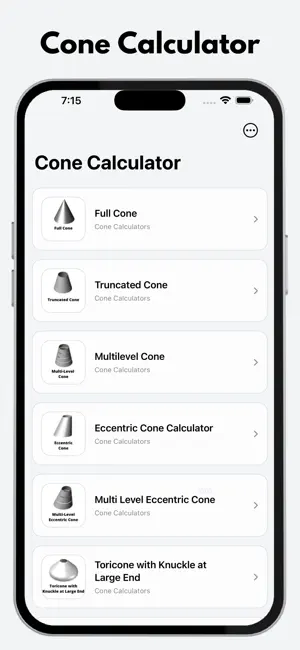
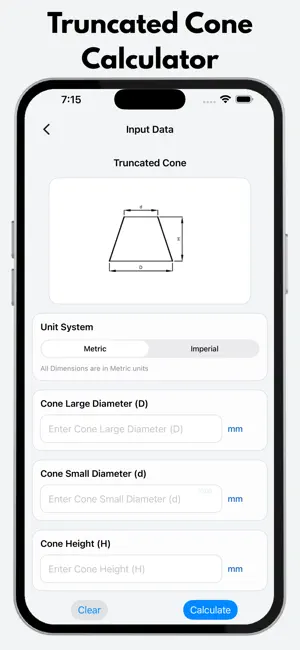
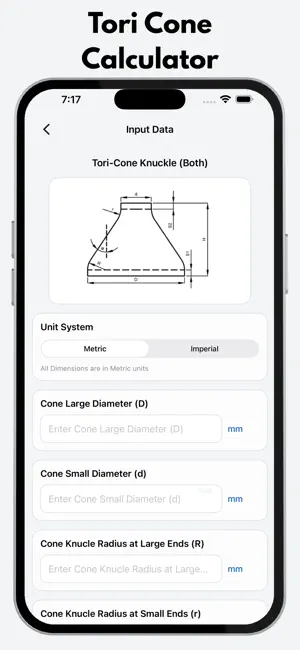
Cone Calculator is a professional engineering and fabrication tool for developing accurate flat pattern layouts for different types of cones and conical components. Designed for fabrication engineers, fitters, mechanical engineers, workshop professionals, and industrial manufacturers, the app simplifies complex cone development calculations and provides practical dimensions for plate marking, cutting, and fabrication. It is useful for pressure vessel fabrication, process equipment, piping, heat exchangers, storage tanks, ducting, and general sheet metal fabrication. Supported Cone Layouts • Full Cone Development • Half Cone Development • Truncated Cone Development • Multi-Level Truncated Cone • Eccentric Cone Development • Multi-Level Eccentric Cone • Tori Cone / Knuckle Cone • Tori Cone with Knuckle at Large End • Tori Cone with Knuckles at Both Ends Full, Half & Truncated Cone Generate flat pattern developments for concentric conical shapes. Calculate the required development dimensions, radius, angles, and cord lengths for plate layout and fabrication. Multi-Level Truncated Cone Develop large truncated cones in multiple sections when the complete cone cannot be manufactured from a single plate or when available sheet or plate size is limited. This provides practical development information for fabrication and assembly of large conical components. Eccentric Cone Generate flat pattern layouts for eccentric cone transitions using the supported development method. The calculator provides development information and marking dimensions for the top and bottom profiles, making it useful for offset and eccentric fabrication applications. Multi-Level Eccentric Cone Develop large eccentric cones in multiple sections for applications where a single-piece development is impractical because of component size, plate dimensions, or fabrication requirements. Tori / Knuckle Cone Calculate flat pattern development for conical components incorporating knuckle geometry. Supported configurations include: • Knuckle at Large End • Knuckle at Both Ends • Straight Face Dimensions Features • Accurate cone flat pattern development • Full cone layout • Half cone layout • Truncated cone development • Multi-level cone development • Eccentric cone development • Multi-level eccentric cone development • Tori / knuckle cone development • Development radius calculation • Development angles • Cord length calculations • Fabrication-ready marking dimensions • Metric and Imperial unit support • Automatic unit conversion • Simple and professional interface • Fast calculations • No internet connection required • No distracting advertisements Applications Cone Calculator is useful for: • Pressure Vessel Fabrication • Process Equipment Fabrication • Heat Exchanger Manufacturing • Storage Tank Fabrication • Piping Fabrication • Sheet Metal Fabrication • Ducting and Transition Fabrication • Industrial Equipment Manufacturing • General Fabrication • Workshop Layout and Marking Designed For • Fabrication Engineers • Mechanical Engineers • Design Engineers • Production Engineers • Fabrication Fitters • Workshop Supervisors • Fabrication Contractors • Piping Professionals • Process Equipment Manufacturers • Engineering Students Cone Calculator helps reduce manual geometry calculations, save fabrication time, minimize layout errors, and improve accuracy when transferring developed dimensions onto plate or sheet metal. Whether you are developing a simple full cone, truncated cone, eccentric cone, large multi-level cone, or knuckle cone, Cone Calculator provides a convenient engineering tool for practical fabrication and layout development. For fabrication-ready results, using appropriate mean dimensions during layout development is recommended where applicable.
What’s new
Version 3.0 · Updated August 21, 2026
Upgraded to Higher SDK Level Support. Changes in UI/UX. Removed Decimal Fraction Chart. Added better Units systems. Added Units Display in Result data. Improved Input Field labes and place holders. fix minor bugs/issues.
App privacy
The developer, Imran Pinjara, reported these privacy practices to Apple.
Data Not Collected
The developer does not collect any data from this app.
Alternatives to Cones Calculator Pro
Looking for apps like Cones Calculator Pro? Here are 6 similar apps on the App Store. The highest rated is Flange Hole Marker Calculator (5.0/5), and 2 of the 6 are free to download.
-
 Pump Power Calculator
-
 Flange Hole Marker Calculator
5.0
Flange Hole Marker Calculator
5.0
-
 FiberView
-
 Screw Flight Calculator
1.0
Screw Flight Calculator
1.0
-
 MapYourOTDR
-
 Paint Advisor: Calculator
| App | Rating | Price | Last updated | Compare |
|---|---|---|---|---|
| Cones Calculator Pro | 1.0 / 5 (1 rating) | 3.99 USD | August 21, 2026 | |
| Pump Power Calculator | – | 2.99 USD | Nov 19, 2025 | Compare |
| Flange Hole Marker Calculator | 5.0 / 5 (1) | 3.99 USD | Apr 14, 2026 | Compare |
| FiberView | – | 1.99 USD | Apr 27, 2026 | Compare |
| Screw Flight Calculator | 1.0 / 5 (1) | 1.99 USD | Nov 24, 2025 | Compare |
| MapYourOTDR | – | Free | Jun 18, 2026 | Compare |
| Paint Advisor: Calculator | – | Free | Sep 28, 2026 | Compare |