

Mindo: Huge Mind Maps with AI
涛 董 Productivity iPhoneiPadiPod touchMac
Mindo: Huge Mind Maps with AI is a free Productivity app for iPhone and iPad by 涛 董. Rated 4.0/5 from 4 ratings. Requires iOS 16.0. Updated August 26, 2026.
- Rating
- 4.0
- 4 ratings
- Price
- Free
- on the App Store
- Size
- 37 MB
- Age 4+
- Updated
- Aug 26
- 2026 · v3.4.9
Screenshots


About Mindo: Huge Mind Maps with AI
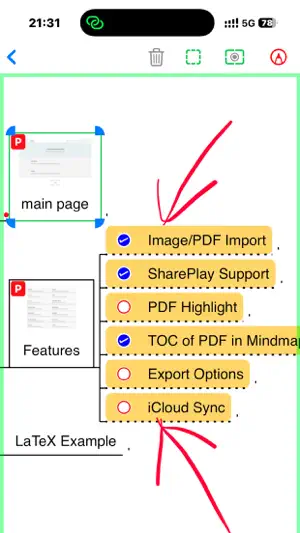
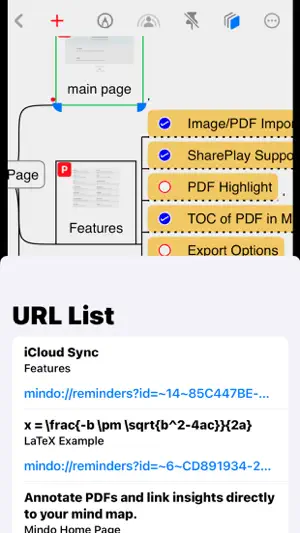
Mindo: AI-Powered Knowledge Base built on mind maps Built for Huge mind maps. Think bigger. Stay fluid. Mindo is a powerful mind-mapping tool that helps you build a personal knowledge base with AI support. AI can provide expert level solutions with the support of the personal knowledge base built on mind maps. Designed for efficiency and ease of use, it enhances both learning and productivity. § Key Features § 0. AI-Powered Knowledge Integration Mindo leverages large language model technology to parse entire PDF files, with an AI-based Agent automatically constructing mind maps that comprehensively cover all PDF content. The AI can analyze the mind maps or PDF content to extract expert-level insights based on user queries, and transform AI-generated content into structured data—seamlessly integrating it into the mind maps to form a closed-loop data system. 1. Robust Mind Mapping Capabilities Supports advanced features such as math formulas, topic summarization, topic aggregation, and connecting lines to create multidimensional knowledge structures. 2. Smart PDF Integration Automatically establishes bidirectional links between PDFs and mind maps, connecting the dots and forming a comprehensive knowledge system. 3. Seamless Multi-Device Sync Stores data in Apple’s iCloud database, enabling automatic synchronization across all devices under the same Apple ID for easy access anywhere, anytime. 4. Flexible Hyperlink Functionality Links topics across mind maps, exports topics to the Reminders app, and builds an interconnected knowledge network. 5. Effortless Collaboration Supports both real-time and cloud collaboration modes to meet diverse learning and teamwork needs. 6. Comprehensive Handwriting Support Allows direct handwriting on mind maps and PDFs, making your notes intuitive and creative. 7. Multiple Export Options Ensures the safety of mind map content while allowing flexible sharing. § Easily Build a Personal Knowledge Base That AI Understands § With Mindo, you can: • Efficiently Manage Knowledge Use mind maps to organize and visualize your knowledge framework. Import PDFs to quickly generate branches based on their content, building a three-dimensional knowledge system. • Flexibly Link Content Utilize the hyperlink feature to establish connections between topics within or across mind maps. Export topics to the Reminders app to create focused to-do lists, helping you organize and manage your learning goals. • Enhance Team Collaboration Whether through real-time or cloud collaboration, Mindo empowers teams to collaboratively build high-quality knowledge bases, seamlessly integrating learning and work. • Boost AI-Generated Content By providing a high-quality knowledge base, Mindo enables AI to offer more precise content generation, fostering creativity and innovation for individuals and teams. § Secure, Reliable, and Flexible § • Real-Time Sync for Peace of Mind All actions are synced in real-time to iCloud, ensuring data safety and timely updates. • Effortless Multi-Device Integration Leveraging Apple’s ecosystem, Mindo allows mind maps to sync seamlessly across devices, supporting a variety of usage scenarios. • Balanced Export and Sharing Export mind maps as files for local backup or easy sharing. Use collaborative modes to flexibly brainstorm with your team. Mindo is renowned for being free, efficient, and feature-packed, offering comprehensive support for lifelong learners to build their personal knowledge base. Download now and explore endless possibilities!
What’s new
Version 3.4.9 · Updated August 26, 2026
* Improved PDF-to-mind-map reliability, including interruption recovery, cancellation, restart, and continued node generation * Enhanced SharePlay collaboration so changes continue to be received and saved after switching maps on both iPhone and iPad * Reduced lag when dragging branches containing Markdown or code blocks * Fixed connector lines not updating immediately after moving nodes * Refined DeepSeek Pro reasoning controls and overall stability
App privacy
The developer, 涛 董, reported these privacy practices to Apple.
Data Not Linked to You
The following data, which may be collected but is not linked to your identity, may be used for the following purposes:
- Purchases: Purchase History
- Identifiers: User ID
Used for: Analytics, Product Personalization, App Functionality
Alternatives to Mindo: Huge Mind Maps with AI
Looking for apps like Mindo: Huge Mind Maps with AI? Here are 6 similar apps on the App Store. The highest rated is MindThread (5.0/5), and all 6 are free to download.
-
 MindMap - Mind Mapping Tools
1.0
MindMap - Mind Mapping Tools
1.0
-
 MindThread
5.0
MindThread
5.0
-
 Deer: Note, Outline, MindMap
4.8
Deer: Note, Outline, MindMap
4.8
-
 NodeNote-Mind Map & Flow Chart
4.2
NodeNote-Mind Map & Flow Chart
4.2
-
 TodoMaps- Mind Map for todo
4.6
TodoMaps- Mind Map for todo
4.6
-
 MindTwigs
4.9
MindTwigs
4.9
| App | Rating | Price | Last updated | Compare |
|---|---|---|---|---|
| Mindo: Huge Mind Maps with AI | 4.0 / 5 (4 ratings) | Free | August 26, 2026 | |
| MindMap - Mind Mapping Tools | 1.0 / 5 (1) | Free | Oct 2, 2026 | Compare |
| MindThread | 5.0 / 5 (12) | Free | Apr 7, 2026 | Compare |
| Deer: Note, Outline, MindMap | 4.8 / 5 (6) | Free | Sep 17, 2026 | Compare |
| NodeNote-Mind Map & Flow Chart | 4.2 / 5 (5) | Free | May 26, 2026 | Compare |
| TodoMaps- Mind Map for todo | 4.6 / 5 (54) | Free | May 6, 2025 | Compare |
| MindTwigs | 4.9 / 5 (10) | Free | Sep 28, 2026 | Compare |