

Screen Recorder,Video Recorder
VIDEOSHOW PTE. LTD. Photo & Video iPhoneiPadiPod touchMac
Screen Recorder,Video Recorder is a free Photo & Video app for iPhone and iPad by VIDEOSHOW PTE. LTD. Rated 4.7/5 from 70,915 ratings. Requires iOS 13.0.
- Rating
- 4.7
- 70.9K ratings
- Price
- Free
- on the App Store
- Size
- 309 MB
- Age 4+
- Updated
- Sep 16
- 2026 · v3.7.0.0
Screenshots


About Screen Recorder,Video Recorder
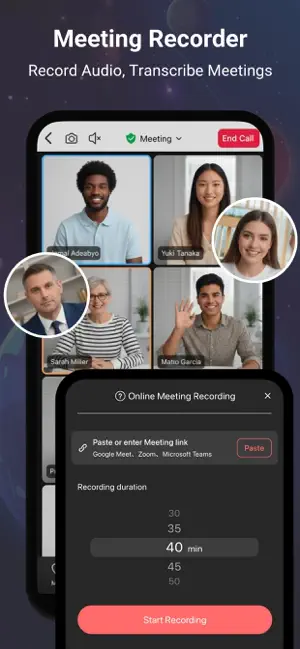
V Recorder - VideoShow Screen Recorder is a powerful and free screen recorder that offers high-quality screen recording, video recording, voice recording, and online meeting recording. This stable 4K HD video recorder is an all-in-one tool, functioning as a professional game recorder, voice recorder, voice-to-text transcriber, and video editor. Whether you want to capture your gameplay, video calls, livestreams, tutorials, reaction videos, or online meetings with complete video and audio, this screen recording app provides everything you need. With this advanced screen recorder - V Recorder, you can easily record screen content while playing games, watching videos, having video chats, or attending online meetings. The meeting recording feature helps capture video footage and audio clearly and completely, ensuring that you never miss any important details. You can also enhance your video recordings using the built-in video editor, which allows you to apply filters, transitions, music, stickers, and subtitles. Additionally, AI noise reduction ensures crystal-clear audio by removing background noise, AI voice changer lets you modify your voice for fun, making your video recordings more professional and engaging. Key Features: Face Cam & Audio Commentary: Record your face cam while capturing screen content, and add real-time microphone commentary to create engaging gameplay, tutorials, or reaction videos. Online Meeting Recording: Capture complete meeting video and audio clearly, combine with AI noise reduction, voice to text transcription, and AI summaries for easy review and follow-ups. 4K HD Video Recording: Support 4K high-quality screen recording and customizable settings for recorded videos. Unlimited Screen Recording: Ideal for recording online videos, tutorials, livestreams, and online meetings, or using it as a game recorder with sound. AI Noise Reduction: Advanced AI removes background noise while keeping your voice clear, making this an ideal voice recorder for any environment. Smart Subtitles: AI-powered speech recognition adds subtitles to your recordings automatically. AI Voice Transformer: Modify your voice with our AI voice changer for fun and creative effects. Floating Teleprompter: Display transcripts on any application with adjustable font size and speed, perfect for presentations, meetings, and vlogs. Easy to Use: Start recording with just one tap and customize resolution & FPS. Professional Video Editing: Easily cut, trim, split, rotate, reverse, and adjust speed. Enhance videos with trendy filters, stickers, text, licensed music, and smooth transitions. Seamless Social Sharing: Support multiple aspect ratios and 4K HD export. Share gameplay, videos, and moments instantly to social platforms with ease. With V Recorder - VideoShow Screen Recorder, you get a feature-packed screen recorder, video recorder, voice recorder, voice-to-text transcriber, and video editor in one! Whether you need to capture gameplay, record online meetings with full audio and transcripts, create polished videos, or use Face Cam to capture your reactions, this app delivers a seamless experience. Download now and start capturing your moments effortlessly! Disclaimer: 1. This application is not related to YouTube. It is a recording tool. Please strictly abide by YouTube's platform terms before using this application to record. 2. We respect the copyright of the owners. Please confirm that you have obtained the owners' permission or authorization before using this application for recording. 3. This application is only for your personal study and research use. The recording content should not exceed the scope of personal use. Privacy Policy: https://d10nkoc3mu17gd.cloudfront.net/privacy/VRecorder_iOS_Privacy_Policy.html Terms of use: https://d10nkoc3mu17gd.cloudfront.net/privacy/VRecorder_iOS_Terms_of_Use_Agreement.html
Ratings & reviews
4.7
70.9K ratings
What’s new
Version 3.7.0.0 · Updated September 16, 2026
Thank you for choosing us to capture your precious moments! This update includes: - [New Live Activity Experience]: View recording status on Dynamic Island and the Lock Screen, and control recordings more conveniently. - [New System Quick Controls]: Quickly access features from Control Center, the Lock Screen, and the Action Button. - [New Home Screen Widgets]: View recordings and storage status at a glance, and quickly access commonly used tools. If you have any questions, please feel free to contact us at any time via "Settings > Help & Feedback" within the app. We would be delighted to assist you.
App privacy
The developer, VIDEOSHOW PTE. LTD., reported these privacy practices to Apple.
Data Used to Track You
The following data may be used to track you across apps and websites owned by other companies:
- Identifiers: Device ID
Data Not Linked to You
The following data, which may be collected but is not linked to your identity, may be used for the following purposes:
- Identifiers: Device ID
- Usage Data: Product Interaction
- Diagnostics: Crash Data, Performance Data, Other Diagnostic Data
Used for: Third-Party Advertising, Developer’s Advertising or Marketing, Analytics, App Functionality, Other Purposes
Alternatives to Screen Recorder,Video Recorder
Looking for apps like Screen Recorder,Video Recorder? Here are 6 similar apps on the App Store. The highest rated is Super Screen Recorder: Full HD (4.6/5), and all 6 are free to download.
-
 DU Recorder - Screen Recorder
4.4
DU Recorder - Screen Recorder
4.4
-
 Screen Recorder Voice & Video
4.5
Screen Recorder Voice & Video
4.5
-
 Screen Recorder
4.5
Screen Recorder
4.5
-
 Super Screen Recorder: Full HD
4.6
Super Screen Recorder: Full HD
4.6
-
 Screen Recorder - Stream Games
3.9
Screen Recorder - Stream Games
3.9
-
 Screen Recorder-recording app.
4.5
Screen Recorder-recording app.
4.5
| App | Rating | Price | Last updated | Compare |
|---|---|---|---|---|
| Screen Recorder,Video Recorder | 4.7 / 5 (70,915 ratings) | Free | September 16, 2026 | |
| DU Recorder - Screen Recorder | 4.4 / 5 (56,373) | Free | Aug 7, 2025 | Compare |
| Screen Recorder Voice & Video | 4.5 / 5 (20,849) | Free | Sep 21, 2026 | Compare |
| Screen Recorder | 4.5 / 5 (33,889) | Free | Sep 9, 2026 | Compare |
| Super Screen Recorder: Full HD | 4.6 / 5 (2,472) | Free | Sep 9, 2026 | Compare |
| Screen Recorder - Stream Games | 3.9 / 5 (398) | Free | Mar 11, 2025 | Compare |
| Screen Recorder-recording app. | 4.5 / 5 (841) | Free | Mar 23, 2026 | Compare |