

PDF Scanner • Document Scanner
Golden Mind Services LTD Business iPhoneiPadiPod touch
PDF Scanner • Document Scanner is a free Business app for iPhone and iPad by Golden Mind Services LTD. Rated 4.8/5 from 950 ratings. Requires iOS 14.0.
- Rating
- 4.8
- 950 ratings
- Price
- Free
- on the App Store
- Size
- 21 MB
- Age 4+
- Updated
- Jun 16
- 2026 · v6.6
Screenshots


About PDF Scanner • Document Scanner
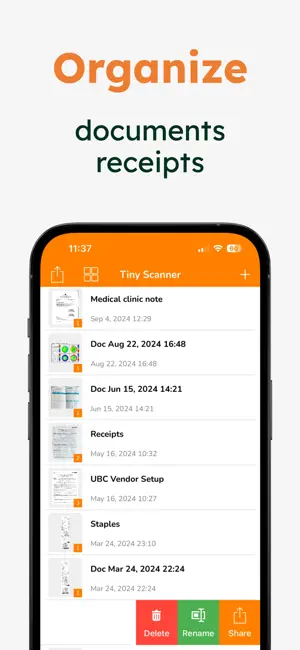
Scan any document in seconds and seamlessly export, share, or email it as a PDF or JPG – all at no cost. This app is designed to be your go-to solution for document management, offering advanced features that are and always will be free. Key Features: • Multi-Page Scanning: Effortlessly scan multiple pages into a single document. • Flexible Document Editing: Rearrange pages before exporting to ensure everything is in order. • Various Export Options: Choose to export or share your document as a single PDF or multiple JPGs. • Easy File Importing: Import image files from your gallery or iCloud Drive, and even open PDFs directly from iCloud. • Smart OCR Technology: Extract text from any page using our state-of-the-art Optical Character Recognition (OCR). • Precision Border Detection: Automatically recognize document edges with options for manual adjustments. • Instant Printing: Print your documents directly from your phone in just a few taps. All-in-One PDF Toolbox: PDF Scanner also includes a built-in PDF toolbox, offering the following powerful tools: • Merge PDFs: Combine two or more PDFs into a single file. • Split PDFs: Divide a PDF into multiple files effortlessly. • Extract Pages: Select and export specific pages from a PDF. • Encrypt PDFs: Add a password to protect sensitive files. • PDF to Long JPG: Convert an entire PDF into one continuous JPG image. • Create Posters: Turn your PDF into a poster by selecting the number of columns. PDF Scanner is built on trusted technology, including OCR support from SwiftyTesseract, available under the MIT license (see details: https://github.com/SwiftyTesseract/SwiftyTesseract). Get scanning with PDF Scanner today – the only scanning app you’ll ever need! Terms of Use: https://www.apple.com/legal/internet-services/itunes/dev/stdeula/
Ratings & reviews
4.8
950 ratings
What’s new
Version 6.6 · Updated June 16, 2026
• We have updated the metadata
App privacy
The developer, Golden Mind Services LTD, reported these privacy practices to Apple.
Data Used to Track You
The following data may be used to track you across apps and websites owned by other companies:
- Identifiers: Device ID
- Usage Data: Product Interaction
Data Not Linked to You
The following data, which may be collected but is not linked to your identity, may be used for the following purposes:
- Identifiers: Device ID
- Usage Data: Product Interaction
Used for: Third-Party Advertising, Analytics
Alternatives to PDF Scanner • Document Scanner
Looking for apps like PDF Scanner • Document Scanner? Here are 6 similar apps on the App Store. The highest rated is SCAN ACE · PDF Scanner App (4.8/5), and all 6 are free to download.
-
 SCAN ACE · PDF Scanner App
4.8
SCAN ACE · PDF Scanner App
4.8
-
 Tiny Scanner - PDF Scanner App
4.8
Tiny Scanner - PDF Scanner App
4.8
-
 Scan Now: PDF Document Scanner
4.8
Scan Now: PDF Document Scanner
4.8
-
 Scanner App ‧ Scan to PDF
4.4
Scanner App ‧ Scan to PDF
4.4
-
 eScan: PDF Scanner App
4.6
eScan: PDF Scanner App
4.6
-
 Ora Scanner: Doc & Pdf Scanner
3.5
Ora Scanner: Doc & Pdf Scanner
3.5
| App | Rating | Price | Last updated | Compare |
|---|---|---|---|---|
| PDF Scanner • Document Scanner | 4.8 / 5 (950 ratings) | Free | June 16, 2026 | |
| SCAN ACE · PDF Scanner App | 4.8 / 5 (39,256) | Free | May 13, 2026 | Compare |
| Tiny Scanner - PDF Scanner App | 4.8 / 5 (183,667) | Free | Sep 13, 2026 | Compare |
| Scan Now: PDF Document Scanner | 4.8 / 5 (2,042) | Free | May 14, 2026 | Compare |
| Scanner App ‧ Scan to PDF | 4.4 / 5 (31) | Free | Jun 5, 2026 | Compare |
| eScan: PDF Scanner App | 4.6 / 5 (3,954) | Free | Oct 9, 2026 | Compare |
| Ora Scanner: Doc & Pdf Scanner | 3.5 / 5 (24) | Free | Apr 28, 2026 | Compare |