

Timesheet IO - Time Tracker
Timesheet - Mobile Time Tracking OG Productivity iPhoneiPadiPod touchApple Watch
Timesheet IO - Time Tracker is a free Productivity app for iPhone and iPad by Timesheet - Mobile Time Tracking OG. Rated 4.5/5 from 99 ratings.
- Rating
- 4.5
- 99 ratings
- Price
- Free
- on the App Store
- Size
- 107 MB
- Age 4+
- Updated
- Oct 20
- 2026 · v26.10.23
Screenshots


About Timesheet IO - Time Tracker
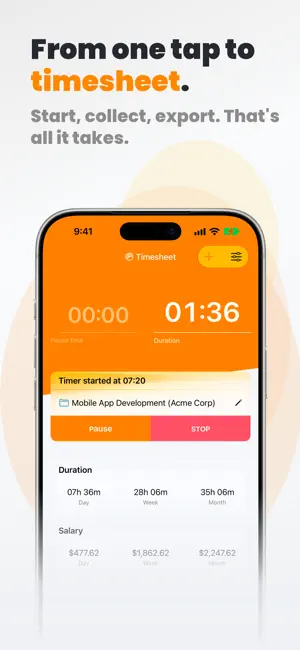
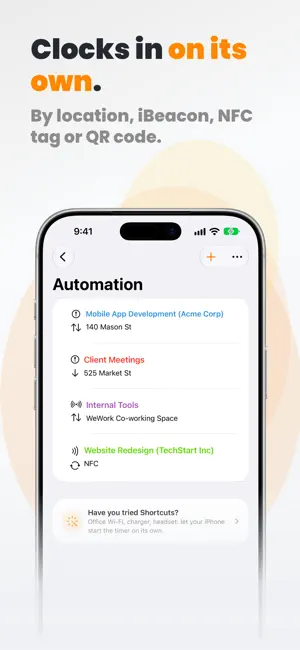
Timesheet — the time tracker for freelancers, contractors, and self-employed professionals. Log billable hours in seconds. Start a timer with one tap, photograph a receipt to log an expense, and turn tracked work into invoice-ready timesheets. No clutter, no admin overhead — just precise time tracking on iPhone, iPad, and Apple Watch. Built for people who get paid by the hour Whether you bill clients, log overtime for HR, or track personal projects, Timesheet keeps every minute accounted for. Add notes, tags, rates, and mileage to each entry. Tag work as billable, paid, or invoiced. Export to Excel or CSV when it's time to bill. Smart automation that respects your battery • Location-based timer — start tracking automatically when you arrive at a client site • NFC tag automation — tap an NFC sticker to start or stop the timer • Wi-Fi triggers — start the timer when you connect to your office network • Smart Break Reminders with three modes: – Time-based: simple interval reminders – Health-aware: uses Apple Health (heart rate, steps) to suggest breaks – Adaptive: learns from your personal work patterns • Forgotten timer detection — get notified when a timer has been running unusually long • Tracking reminders — learns when you usually work and nudges you if you forget to start Powerful on every Apple device • Apple Watch app — start, stop, and check elapsed time from your wrist • CarPlay — start, pause, and stop the timer from the car screen, with automatic mileage on the drive • Control Center toggle and Action Button support (iOS 18) • Home Screen widgets — at-a-glance daily, weekly, and monthly totals • Siri Shortcuts and Universal Links — automate your workflow • Dark Mode, Dynamic Type, full accessibility support Built-in reports and exports • Daily, weekly, monthly statistics with project breakdowns • Export to Excel (.xlsx) and CSV with custom sorting • Work Patterns — evenings, nights and weekends worked, computed on device • Local backup and restore • Offline-first — works without an internet connection Privacy-first by design • Your data stays on your device unless you opt into Cloud Sync • No ads, no third-party trackers • Local SQLite database Timesheet Plus — Continue your work on every device • Cloud sync between iPhone, iPad, and Apple Watch • Automatic, GDPR-compliant cloud backups • Smart tag suggestions based on project and time of day Timesheet Pro — Everything Plus, plus the tools serious freelancers and small teams need • Calendar Sync — your tracked hours appear in iOS Calendar automatically • Invoices from your phone — PDF with your branding, ready to send • AI Insights — work rhythm, projects, finances and breaks • Web app access at my.timesheet.io — manage everything from any browser • Advanced analytics and reports with custom export fields • Scheduled email reports to clients • Team collaboration with shared projects and role-based permissions • QuickBooks and Zapier integrations • API access for developers • Priority support Timesheet Plus and Pro are auto-renewing subscriptions. Payment is charged to your Apple ID at confirmation of purchase. Your subscription renews automatically unless cancelled at least 24 hours before the end of the current period. Manage and cancel anytime in Settings → Apple ID → Subscriptions. Questions or feedback? Contact us anytime: [email protected] Download Timesheet today and take control of your time. Privacy Policy: https://timesheet.io/en/privacy Terms of Use: https://www.apple.com/legal/internet-services/itunes/dev/stdeula/
Ratings & reviews
4.5
99 ratings
What’s new
Version 26.10.23 · Updated October 20, 2026
We are constantly working to make Timesheet faster, easier, and more reliable. Here's what's new: * New: Timesheet makes the most of iPhone Duo. Unfold it for a wider layout, and your input stays in place when you fold it again. * New: if a different timer is running on another device, a card on the Timer screen lets you choose how to continue, without a pop-up. * Fixed: to-dos now sync to the web and to your other devices. * Fixed: a crash when lists were updated right after syncing, and a "Database is suspended" error on the Mac. * Fixed: rates your team hides from members stay hidden in statistics, exports, Siri and on Apple Watch. Thank you for using Timesheet! Your feedback is invaluable and helps us continuously improve the app.
App privacy
The developer, Timesheet - Mobile Time Tracking OG, reported these privacy practices to Apple.
Data Linked to You
The following data, which may be collected and linked to your identity, may be used for the following purposes:
- Purchases: Purchase History
- Contact Info: Email Address
- Identifiers: User ID, Device ID
Used for: Analytics, App Functionality
Data Not Linked to You
The following data, which may be collected but is not linked to your identity, may be used for the following purposes:
- Location: Coarse Location
- Usage Data: Product Interaction
- Diagnostics: Crash Data
Used for: Analytics, App Functionality
Alternatives to Timesheet IO - Time Tracker
Looking for apps like Timesheet IO - Time Tracker? Here are 6 similar apps on the App Store. The highest rated is Working Timer - Timesheet (4.9/5), and all 6 are free to download.
-
 Working Timer - Timesheet
4.9
-
 WorkingHours • Time Tracker
4.8
-
 WorkTime: Hours Tracker Log
4.8
-
 Tyme | Time Tracking
4.5
-
 Timemator: Time Tracker
4.7
-
 Work Hours Tracker - Timesheet
4.7
| App | Rating | Price | Last updated | Compare |
|---|---|---|---|---|
| Timesheet IO - Time Tracker | 4.5 / 5 (99 ratings) | Free | October 20, 2026 | |
| Working Timer - Timesheet | 4.9 / 5 (13) | Free | Oct 24, 2026 | Compare |
| WorkingHours • Time Tracker | 4.8 / 5 (359) | Free | Oct 27, 2026 | Compare |
| WorkTime: Hours Tracker Log | 4.8 / 5 (651) | Free | Oct 23, 2026 | Compare |
| Tyme | Time Tracking | 4.5 / 5 (54) | Free | Oct 15, 2026 | Compare |
| Timemator: Time Tracker | 4.7 / 5 (172) | Free | Oct 8, 2026 | Compare |
| Work Hours Tracker - Timesheet | 4.7 / 5 (113) | Free | Oct 24, 2026 | Compare |