

Symbols – Unicode Keyboard
Alexandr Nadtoka Utilities iPhoneiPadiPod touch
Symbols – Unicode Keyboard is a free Utilities app for iPhone and iPad by Alexandr Nadtoka. Rated 4.5/5 from 11 ratings. Requires iOS 17.0.
- Rating
- 4.5
- 11 ratings
- Price
- Free
- on the App Store
- Size
- 19 MB
- Age 4+
- Updated
- Oct 5
- 2026 · v2.0.3
Screenshots


About Symbols – Unicode Keyboard
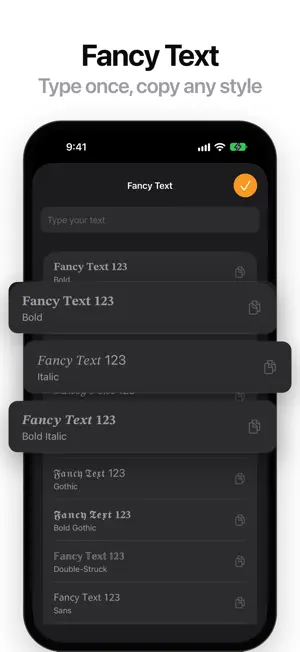
Fancy fonts for your bio, posts and messages, and every symbol one tap away. Turn any text into cool, aesthetic letters: bold, italic, cursive, gothic, Ⓒⓘⓡⓒⓛⓔⓓ and more, frame your name with decorations, and add cute kaomoji text faces. Then search, copy and paste more than 26,000 special characters: arrows, hearts, stars, check marks, math signs, currency signs, letters from every script and more, straight from the Unicode 18 standard. FANCY TEXT • Type anything and copy it as fancy letters in Ⓒⓘⓡⓒⓛⓔⓓ and more • 23 text styles: bold, italic, script, gothic, double-struck, circled, squared, wide, small caps, upside down, strikethrough and more • Paste it anywhere: bios, messages, posts and notes • Bold, Italic and Strikethrough are free; every style comes with Symbols Pro DECORATIONS AND KAOMOJI • Frame your name with more than 30 decorations: stars, hearts, sparkles, brackets and more • Over 80 kaomoji text faces for every mood: happy, love, sad, angry, shy, animals and more • Tap to copy, then paste into your bio, nickname or chat • A few decorations and faces in every group are free; all of them come with Symbols Pro FIND ANY CHARACTER • Search by name ("arrow", "check mark", "degree") or by hex code ("2192") • Browse all 249 Unicode blocks, or group by category • Filter by letters, marks, numbers, punctuation, symbols or spaces COPY IT YOUR WAY • Tap any character to copy it instantly, with optional sound and haptic feedback • Long-press to copy its code: Unicode (U+2192), HTML (→), HTML hex, CSS, Swift or JavaScript • Share characters to any app SYMBOLS KEYBOARD • Type any character in any app with the Symbols keyboard • Characters are grouped into symbols, punctuation, numbers, letters, marks and spaces • Symbols never records what you type FAVORITES AND HISTORY • Save the characters you use most to Favorites • Every character you copy is kept in History, ready to use again SYMBOLS PRO • No ads • All 23 Fancy Text styles • Every decoration and kaomoji • Home Screen and Lock Screen widgets with your favorite and recent characters • Your Favorites and Recents inside the Symbols keyboard Symbols Pro is available as a weekly or monthly auto-renewable subscription, or as a one-time lifetime purchase. Prices are shown in the app and may vary by country. Payment is charged to your Apple Account when you confirm the purchase. A subscription renews automatically unless it is cancelled at least 24 hours before the end of the current period, and your account is charged for renewal within 24 hours before the period ends. You can manage or cancel your subscription in your App Store account settings at any time after purchase. Any unused part of a free trial, if offered, is forfeited when you purchase a subscription. Terms of Use (EULA): https://www.apple.com/legal/internet-services/itunes/dev/stdeula/ Privacy Policy: https://kreatimont.com/apps/symbols/privacy.html
Ratings & reviews
4.5
11 ratings
What’s new
Version 2.0.3 · Updated October 5, 2026
New: Decorations and Kaomoji • Frame your name with more than 30 decorations: stars, hearts, sparkles, brackets and more • Over 80 kaomoji text faces for every mood, from happy and shy to angry and animals • Find both in Fancy Text: tap Decorations or Kaomoji at the top • A few in every group are free to try; Symbols Pro unlocks them all
App privacy
The developer, Alexandr Nadtoka, reported these privacy practices to Apple.
Data Used to Track You
The following data may be used to track you across apps and websites owned by other companies:
- Identifiers: User ID, Device ID
Data Linked to You
The following data, which may be collected and linked to your identity, may be used for the following purposes:
- Identifiers: User ID, Device ID
Used for: Third-Party Advertising
Alternatives to Symbols – Unicode Keyboard
Looking for apps like Symbols – Unicode Keyboard? Here are 6 similar apps on the App Store. The highest rated is Symbol Keys (5.0/5), and 5 of the 6 are free to download.
-
 uniChrars
4.9
-
 Unicode Keyboard Type All Char
3.0
-
 Symbol Keys
5.0
-
 CharMap — Unicode Characters
4.0
-
 Unicode Pad Pro with keyboards
4.5
-
 Special Characters & Symbols
5.0
| App | Rating | Price | Last updated | Compare |
|---|---|---|---|---|
| Symbols – Unicode Keyboard | 4.5 / 5 (11 ratings) | Free | October 5, 2026 | |
| uniChrars | 4.9 / 5 (12) | Free | Jan 28, 2024 | Compare |
| Unicode Keyboard Type All Char | 3.0 / 5 (2) | Free | Nov 26, 2024 | Compare |
| Symbol Keys | 5.0 / 5 (6) | Free | Sep 19, 2026 | Compare |
| CharMap — Unicode Characters | 4.0 / 5 (57) | Free | Oct 18, 2026 | Compare |
| Unicode Pad Pro with keyboards | 4.5 / 5 (200) | 6.99 USD | Dec 23, 2024 | Compare |
| Special Characters & Symbols | 5.0 / 5 (1) | Free | Jul 28, 2024 | Compare |