

Reverse Cam- Slow Motion Video
Mithilesh Kumar Photo & Video iPhoneiPadiPod touch
Reverse Cam- Slow Motion Video is a free Photo & Video app for iPhone and iPad by Mithilesh Kumar. Requires iOS 15.0. Updated July 2, 2025.
- Price
- Free
- on the App Store
- Size
- 13 MB
- Age 4+
- Updated
- Jul 2
- 2025 · v1.8
Screenshots


About Reverse Cam- Slow Motion Video
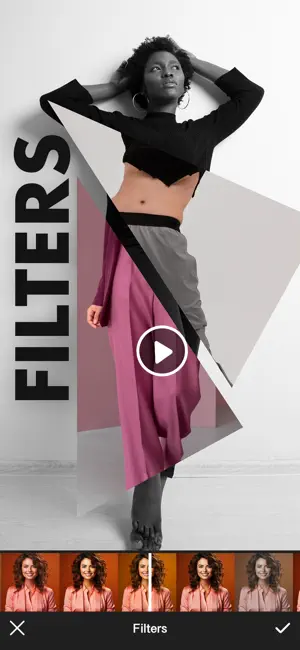
Reverse Cam is a versatile and intuitive video editing app designed for both casual and professional users looking to enhance their videos with advanced editing tools. With Reverse Cam, users can easily trim video clips to focus on key moments, add overlays and custom images, make adjustments for the perfect look, apply creative filters, and experiment with speed effects and reverse playback to bring their content to life. The quickest and easiest way to control video speed, reverse and instant video play. Introduced new features to enhance media editing capabilities, including speed adjustment options for videos, precise trimming functionality, and advanced controls for adjusting image exposure. These updates aim to provide users with more flexibility and precision in customizing their media content. Key Features: Video Trimming:- Easily trim videos to desired lengths by selecting the start and end points. Precision trimming with frame-by-frame adjustment to capture exactly what you need. Image Overlay:- Add images on top of videos to personalize your content. Flexible positioning and resizing of images for full control over the overlay. Set transparency levels and blend modes to make overlays blend seamlessly with the video background. Reverse Video:- Play video clips in reverse for a unique and captivating effect. Smooth playback without sacrificing quality. Speed Adjustment:- Control the playback speed of your videos with easy-to-use speed adjustment tools. Variable speed controls for fine-tuning different sections of the video with precision. Adjustments:- Fine-tune video brightness, contrast, saturation, and sharpness for professional-looking results. Color balance adjustments to match the aesthetic you desire. Simple sliders for easy adjustments and real-time previews. Filters and Effects:- Choose from a wide selection of filters to enhance the look and feel of your videos, from cinematic tones to retro styles. Customizable filter intensity to control the strength of the effect. SUBSCRIPTION: You can subscribe to premium features, choosing from the following plans: – 1 Week – 1 month – Lifetime (One Time Purchase) The subscription automatically renews unless auto-renewal is turned off at least 24 hours before the end of the current period. Payment will be charged to your iTunes account at confirmation of purchase. Account will be charged for renewal within 24 hours of the end of the current period, and the cost of the renewal will be provided. Subscriptions may be managed by the user. Auto-renewal may be turned off by going to the user’s Account Settings after purchase. No cancellation of the current subscription is allowed during active subscription period. Any unused portion of a free trial period, if offered, will be forfeited when the user purchases a subscription to that publication. Terms of Use: https://iosapps.home.blog/2019/12/20/terms-of-use/ Privacy Policy: https://iosapps.home.blog/2019/03/18/privacy-policy/
What’s new
Version 1.8 · Updated July 2, 2025
- Improved user interface and resolved various bugs.
App privacy
The developer, Mithilesh Kumar, reported these privacy practices to Apple.
Data Used to Track You
The following data may be used to track you across apps and websites owned by other companies:
- Usage Data: Advertising Data
Data Not Linked to You
The following data, which may be collected but is not linked to your identity, may be used for the following purposes:
- Identifiers: Device ID
- Usage Data: Advertising Data
Used for: Third-Party Advertising, Developer’s Advertising or Marketing, Analytics, Product Personalization, App Functionality
Alternatives to Reverse Cam- Slow Motion Video
Looking for apps like Reverse Cam- Slow Motion Video? Here are 6 similar apps on the App Store. The highest rated is Reverse Video Editor - ReVideo (5.0/5), and all 6 are free to download.
-
 Slow Fast Reverse Motion Video
3.8
Slow Fast Reverse Motion Video
3.8
-
 Reverse Video - Backwards Play
2.5
Reverse Video - Backwards Play
2.5
-
 Reverse Video: Trim & Rewind
4.8
Reverse Video: Trim & Rewind
4.8
-
 Reverse Video Editor - ReVideo
5.0
Reverse Video Editor - ReVideo
5.0
-
 VideoReverser: Reverse Video
4.0
VideoReverser: Reverse Video
4.0
-
 Slow Motion : Video Editor
| App | Rating | Price | Last updated | Compare |
|---|---|---|---|---|
| Reverse Cam- Slow Motion Video | – | Free | July 2, 2025 | |
| Slow Fast Reverse Motion Video | 3.8 / 5 (11) | Free | Jun 10, 2025 | Compare |
| Reverse Video - Backwards Play | 2.5 / 5 (2) | Free | Jan 15, 2026 | Compare |
| Reverse Video: Trim & Rewind | 4.8 / 5 (18) | Free | Jun 4, 2026 | Compare |
| Reverse Video Editor - ReVideo | 5.0 / 5 (2) | Free | Jul 4, 2024 | Compare |
| VideoReverser: Reverse Video | 4.0 / 5 (1) | Free | Oct 5, 2026 | Compare |
| Slow Motion : Video Editor | – | Free | Sep 25, 2024 | Compare |