

Lockey: Lock Your Messages
UI CHAN HONG Productivity iPhoneiPadiPod touch
Lockey: Lock Your Messages is a free Productivity app for iPhone and iPad by UI CHAN HONG. Requires iOS 16.0. Updated November 7, 2026.
- Price
- Free
- on the App Store
- Size
- 10 MB
- Age 4+
- Updated
- Nov 7
- 2026 · v2.0.0
Screenshots
Save to Pinterest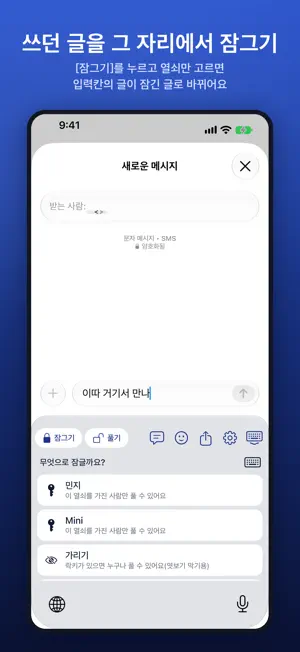


About Lockey: Lock Your Messages
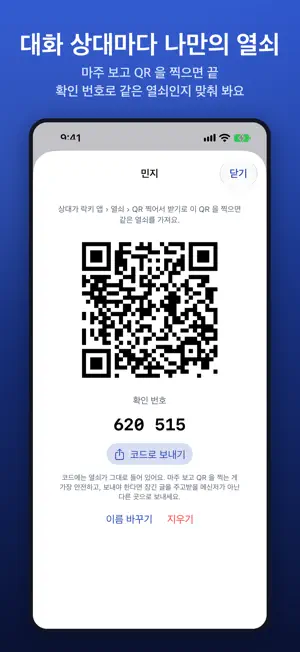
Lockey is a keyboard that locks what you send. In any chat, mail or social app, tap Lock in the keyboard and the text you wrote turns into a locked message that only people with the same key can open with Lockey. ■ A key for each contact · Scan each other's QR code face to face to share a key only the two of you have. · If both phones show the same check number, you're set. · Far apart? Send an invite code through another messenger. · Keys are kept only in your phone's Keychain — never sent to our server and never included in backups. ■ Lock or veil · Tap Lock, choose a key, and the text in the field becomes a locked message. Undo brings it back. · Veil: hides text from anyone looking over your shoulder; anyone with Lockey can open it. · Links can be locked too. ■ Photos, locked · Photos are encrypted on your phone and only the encrypted file is uploaded. The key to open it is inside the locked message. · Files are kept for 7 days and then deleted automatically. Not even we can see your photos. ■ Unlock in the keyboard · Select or copy a locked message and tap Unlock in the keyboard. · What you unlock is shown only inside the keyboard — it's never typed into the field or saved. · Text veiled with the old Lockeyboard can still be opened. ■ Quick phrases · Save the phrases you use most and insert them from the keyboard in one tap. ■ A full Korean and English keyboard · Dubeolsik, Cheonjiin, Naratgul, Vega, Danmoum and Sebeolsik, plus English QWERTY · Light and dark mode, 7 skins or your own, emoji, sound, haptics and key height ■ Privacy · What you type is never stored or sent. · Locking and unlocking happen on your phone. No account, no login, no ads. · The only thing sent to our server is the encrypted file of a locked photo. ■ Turning it on Settings › General › Keyboard › Keyboards › Add New Keyboard › Lockey, then tap Lockey and turn on "Allow Full Access". Full Access lets the keyboard read the keys you create in the app. To unlock copied text, set Settings › Lockey › Paste from Other Apps › Allow.
What’s new
Version 2.0.0 · Updated November 7, 2026
Lockeyboard is now Lockey 2.0 — rebuilt from the ground up. · A key for each contact, shared by QR code and confirmed with a check number · Lock and send photos — only the encrypted file is kept, for 7 days · Tap Unlock in the keyboard to read locked messages right away · New keyboard with Hangul layouts, light and dark mode, and custom skins · Quick phrases you can insert in one tap · Text veiled with the old app can still be opened. Messages locked with 2.0 need 2.0 or later.
App privacy
The developer, UI CHAN HONG, reported these privacy practices to Apple.
Data Not Linked to You
The following data, which may be collected but is not linked to your identity, may be used for the following purposes:
- Diagnostics: Crash Data
- User Content: Photos or Videos
Used for: Analytics, App Functionality
Alternatives to Lockey: Lock Your Messages
Looking for apps like Lockey: Lock Your Messages? Here are 6 similar apps on the App Store. The highest rated is 데일리 루틴 플래너 - 하루한칸 (5.0/5), and all 6 are free to download.


| App | Rating | Price | Last updated | Compare |
|---|---|---|---|---|
| Lockey: Lock Your Messages | – | Free | November 7, 2026 | |
| 번역키보드 | – | Free | Jul 1, 2026 | Compare |
| 뱅크다K | – | Free | Oct 18, 2026 | Compare |
| 금강하구둑알리미 | – | Free | Sep 11, 2026 | Compare |
| 데일리 루틴 플래너 - 하루한칸 | 5.0 / 5 (1) | Free | Sep 28, 2026 | Compare |
| 폰편지 | – | Free | Nov 4, 2026 | Compare |
| SMART LOTTO - 내가 만드는 스마트한 로또 | 5.0 / 5 (1) | Free | Jun 27, 2026 | Compare |