

TimeCrunch: Homework Tool
Lzctrl LLC Education iPhoneiPadiPod touchApple Watch
TimeCrunch: Homework Tool is a free Education app for iPhone and iPad by Lzctrl LLC. Rated 4.7/5 from 27 ratings. Requires iOS 15.
- Rating
- 4.7
- 27 ratings
- Price
- Free
- on the App Store
- Size
- 26 MB
- Age 4+
- Updated
- Sep 17
- 2026 · vv3.1.0
Screenshots

About TimeCrunch: Homework Tool
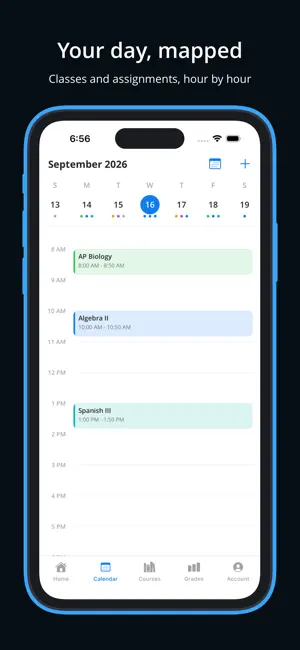
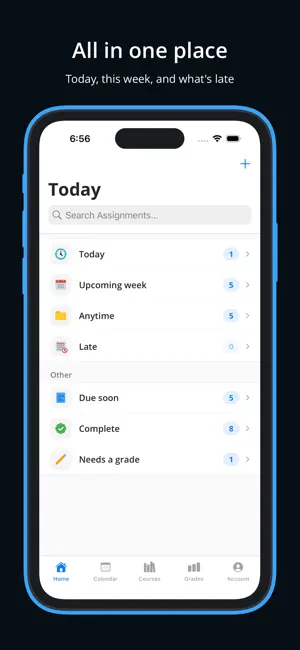
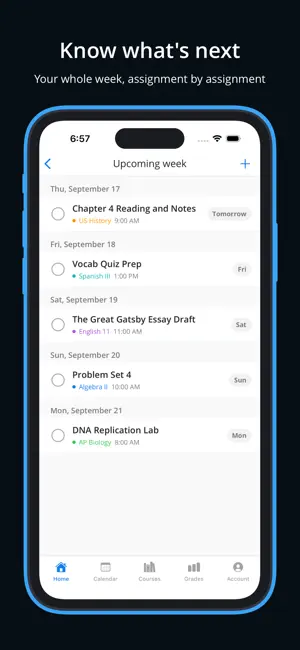
TimeCrunch is a planner built for students in school, college, and university. It keeps your classes, assignments, due dates, and grades in one place, with a clean design that stays out of your way so you can focus on the work itself. HOW IT WORKS 1. Set up your term with its start and end dates. 2. Add the courses you are taking this term. 3. Add your assignments and check them off by swiping or tapping as you finish them. 4. Enter your scores as they come back and watch your course grades and GPA update on their own. GRADES AND GPA See exactly where you stand in every class. TimeCrunch works out your grade in each course and your GPA for the term, and it recalculates the moment you add a new score. You can set it up the way your school actually grades, with weighted categories, custom grade scales, and credit hours, so the numbers you see match the ones on your transcript. ASSIGNMENTS Add as many assignments as you need all year, with or without a course attached. Each one can carry a due date, a reminder, and notes, and TimeCrunch suggests a sensible due date so there is less to fill in every time. Everything you complete is saved, so you can search back through it whenever you need it. COURSES Build out your courses for the term, then keep them for reference once the term ends, so you always have a record of what you have taken. NOTES AND ATTACHMENTS Keep handouts, worksheets, photos, and links with the assignment they belong to. Scan paper documents straight in with your camera and they save as a clean PDF, right next to your notes. CALENDAR See your whole term at a glance and move through your assignments by date. WIDGETS Put your next assignments and your current GPA on your Home Screen and Lock Screen, so one glance tells you what is due and how you are doing. REMINDERS Things slip when life gets busy. Reminders give you a nudge before a due date so nothing catches you off guard. SYNC Your term goes with you. TimeCrunch stays in sync across your iPhone and iPad, and it keeps working when you are offline, then catches up once you are back online. APPLE WATCH Check off assignments from your wrist, look over your courses, and keep track of when your term starts and ends. TIMECRUNCH PRO Pro opens up the tools for students who want the full picture: Weighted grade categories, so tests, homework, and projects count the way your syllabus says they should. Custom grade scales for each course, because an A is not always ninety percent. A grade goal calculator that shows the exact score you need on what is left to hit your target. Unlimited courses, terms, and reminders. More ways to customize, including default assignment times and calendar styling. Early access to new features through beta testing, with a direct line to send your feedback. Privacy Policy: https://www.lzctrl.com/policies/timecrunch-privacy-policy Terms of Use (Apple Standard EULA): https://www.apple.com/legal/internet-services/itunes/dev/stdeula Additional Terms of Use: https://www.lzctrl.com/policies/timecrunch-terms-of-use
Ratings & reviews
4.7
27 ratings
What’s new
Version v3.1.0 · Updated September 17, 2026
TimeCrunch v3.1.0: Know Where You Stand Grades come to TimeCrunch, and your schoolwork now lives right on your home screen. This one is all about seeing how you're doing at a glance. WHAT'S NEW Grades and GPA • Add a score to any assignment and watch your course grade update • See your term GPA the moment you enter a grade • Set your grading scale exactly how your school does it, so an A can start at 90 or 94, whichever is right for you • Give a course weighted categories like exams and homework, add credit hours, and mark honors or AP classes for the extra GPA bump The Grades Tab • A new home for your GPA and every course grade in one place • Tap any course to see how the grade breaks down Home and Lock Screen Widgets • Keep what's due today and coming up next right on your home screen • Add a Lock Screen widget for a quick glance without unlocking • See your GPA at a glance, wherever you like it Faster Everywhere • Add a grade straight from an assignment, no extra steps • New assignments already know your next class day, so the due date is set for you Scan Right Into an Assignment • Snap a syllabus or a handout and TimeCrunch turns it into a clean, multi page PDF attachment Thank you for using TimeCrunch! We're hard at work on what's next and can't wait to share it. If TimeCrunch is helping you stay on top of things, a review on the App Store goes a long way.
App privacy
The developer, Lzctrl LLC, reported these privacy practices to Apple.
Data Linked to You
The following data, which may be collected and linked to your identity, may be used for the following purposes:
- Contact Info: Email Address, Name
- Identifiers: User ID
- Purchases: Purchase History
Used for: Analytics, Product Personalization, App Functionality
Data Not Linked to You
The following data, which may be collected but is not linked to your identity, may be used for the following purposes:
- Diagnostics: Crash Data
Used for: Analytics
Alternatives to TimeCrunch: Homework Tool
Looking for apps like TimeCrunch: Homework Tool? Here are 6 similar apps on the App Store. The highest rated is Due Tomorrow: Homework Manager (5.0/5), and all 6 are free to download.
-
 Homework Tracker by Backpack
4.6
Homework Tracker by Backpack
4.6
-
 Due Tomorrow: Homework Manager
5.0
Due Tomorrow: Homework Manager
5.0
-
 Classify — School Planner
4.6
Classify — School Planner
4.6
-
 B4Grad: Homework Planner App
4.3
B4Grad: Homework Planner App
4.3
-
 Schooly: School Organiser
4.7
Schooly: School Organiser
4.7
-
 Assignment Planner
4.7
Assignment Planner
4.7
| App | Rating | Price | Last updated | Compare |
|---|---|---|---|---|
| TimeCrunch: Homework Tool | 4.7 / 5 (27 ratings) | Free | September 17, 2026 | |
| Homework Tracker by Backpack | 4.6 / 5 (100) | Free | Oct 13, 2026 | Compare |
| Due Tomorrow: Homework Manager | 5.0 / 5 (6) | Free | Sep 3, 2026 | Compare |
| Classify — School Planner | 4.6 / 5 (223) | Free | Jul 8, 2025 | Compare |
| B4Grad: Homework Planner App | 4.3 / 5 (1,933) | Free | Apr 14, 2024 | Compare |
| Schooly: School Organiser | 4.7 / 5 (82) | Free | Sep 15, 2025 | Compare |
| Assignment Planner | 4.7 / 5 (190) | Free | Jun 21, 2024 | Compare |