

Train Maker
monois Inc. Games iPhoneiPadiPod touch
Train Maker is a free Games app for iPhone and iPad by monois Inc. Rated 4.7/5 from 866 ratings. Requires iOS 15.0. Updated February 11, 2026.
- Rating
- 4.7
- 866 ratings
- Price
- Free
- on the App Store
- Size
- 127 MB
- Age 4+
- Updated
- Feb 11
- 2026 · v1.9.0
Screenshots
About Train Maker
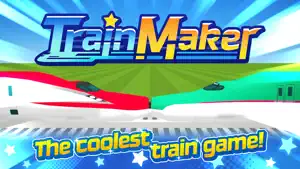
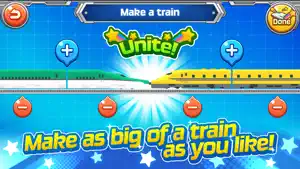
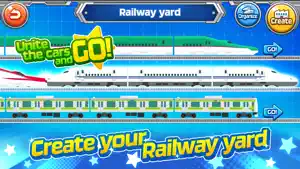
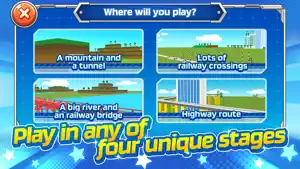
Create your own trains by freely uniting the carriages of bullet trains and regular trains in any way you want! The trains you create will travel through tunnels and railway crossings. You can experience the bumpy experience with the vibration feature once your train gets going. This is the perfect game app for anyone who loves trains. User feedback "It's really cool that so many trains are united with the rail yard!" "It's so fun to unite the white bullet train with the yellow bullet train!" "It's exciting to see the carriages of the united bullet trains moving up slopes!" Features of this app *You are free to unite your own choice of "leading carriages," "middle carriages," and "tail carriages" of bullet trains and trains. *You can choose from eight different stages that your train will travel through: "a mountain and a tunnel", "lots of railway crossings", "a big river and a railway bridge", "highway route","Japanese scenery","Jet coaster","Inbound and outbound" and "Pass through many". *You can switch between camera views and watch your running train from your favorite angle. *You can use the "UP" and "DOWN" buttons to change the speed of your train or stop it. *You can get new trains by accumulating "track miles," which you earn according to the distance you have traveled, and by turning the train roulette. How to play 1. The game begins at the rail yard. First, tap the "Create" button to create your train. 2. After selecting your first train, tap the "+" button to select the next train. 3. You can tap the "-" button to remove carriages. 4. When you are done, tap the "Finish" button in the top right corner to return to the rail yard. The train you have created will be shown at the top. 5. Tap the "GO" button on the right and select your preferred stage in the stage selection screen. 6. On the play screen, you can adjust the speed of your train using the bottom left button, change the camera distance with the bottom right button, focus the camera on your choice of carriage using the top right button, and freely adjust the camera position by dragging the area outside of the train. Give it a go and find the coolest angle! 7. You can tap and hold to stop the camera. It is also exciting to wait for a passing train to come back. 8.Tap the arrow button on the upper left to return to the railroad yard from the play screen. You can then check how many "Track miles" you've earned for the distance you've traveled. 9.100 Track Miles lets you play Train Roulette one time. You can link up the trains you win in Train Roulette to have more fun. 10.Check your Train Collection to see the trains you've collected so far. (You can check your Train Collection from the rail yard screen.) 11. You can tap the "Organizing" button at the rail yard to change the order of trains or delete trains that you do not want. 12. From the Settings button on the title screen, you can also toggle settings such as music, sound effects, image quality, vocal effects, and vibration mode.
Ratings & reviews
4.7
866 ratings
What’s new
Version 1.9.0 · Updated February 11, 2026
Minor bug fixes.
Play today's Frostfire puzzle
Balance fire and ice: half of each in every row and column. A free daily puzzle from Fiplay, same board for everyone. It plays right here, no download.
App privacy
The developer, monois Inc., reported these privacy practices to Apple.
Data Used to Track You
The following data may be used to track you across apps and websites owned by other companies:
- Identifiers: Device ID
- Usage Data: Product Interaction, Advertising Data
- Other Data: Other Data Types
Data Not Linked to You
The following data, which may be collected but is not linked to your identity, may be used for the following purposes:
- Identifiers: Device ID
- Usage Data: Product Interaction, Advertising Data
- Other Data: Other Data Types
Used for: Third-Party Advertising, Analytics, App Functionality
Alternatives to Train Maker
Looking for apps like Train Maker? Here are 6 similar apps on the App Store. The highest rated is Train Tsumi Tsumi (4.7/5), and all 6 are free to download.
-
 Train Tsumi Tsumi
4.7
Train Tsumi Tsumi
4.7
-
 Railroad Crossing Game
4.3
Railroad Crossing Game
4.3
-
 Labo Christmas Train:Kids Game
4.6
Labo Christmas Train:Kids Game
4.6
-
 Train Link Slide Puzzle
3.7
Train Link Slide Puzzle
3.7
-
 Conduct THIS! – Train Action
4.6
Conduct THIS! – Train Action
4.6
-
 Labo Construction Truck:Kids
4.7
Labo Construction Truck:Kids
4.7
| App | Rating | Price | Last updated | Compare |
|---|---|---|---|---|
| Train Maker | 4.7 / 5 (866 ratings) | Free | February 11, 2026 | |
| Train Tsumi Tsumi | 4.7 / 5 (23) | Free | Jan 15, 2026 | Compare |
| Railroad Crossing Game | 4.3 / 5 (79) | Free | Aug 11, 2025 | Compare |
| Labo Christmas Train:Kids Game | 4.6 / 5 (326) | Free | Dec 18, 2025 | Compare |
| Train Link Slide Puzzle | 3.7 / 5 (3) | Free | Jan 19, 2026 | Compare |
| Conduct THIS! – Train Action | 4.6 / 5 (2,933) | Free | Sep 30, 2026 | Compare |
| Labo Construction Truck:Kids | 4.7 / 5 (103) | Free | Apr 11, 2024 | Compare |
Compare Train Maker with the top alternatives: ratings, updates, ASO score and keyword gaps →