

Scholarly - Smart Reading AI
Ryan Schefske Productivity iPhoneiPadiPod touch
Scholarly - Smart Reading AI is a free Productivity app for iPhone and iPad by Ryan Schefske. Rated 4.6/5 from 10 ratings. Requires iOS 17.3.
- Rating
- 4.6
- 10 ratings
- Price
- Free
- on the App Store
- Size
- 15 MB
- Age 4+
- Updated
- Dec 4
- 2025 · v2.1
Screenshots


About Scholarly - Smart Reading AI
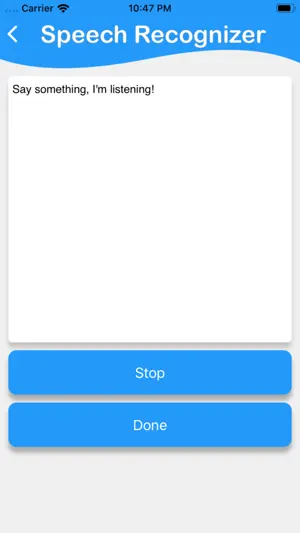
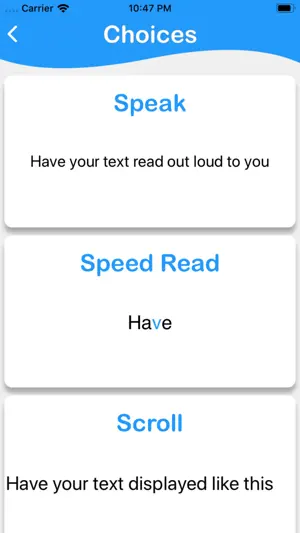
Transform any text into your preferred reading experience. Scholarly helps you read faster, focus better, and learn more with three powerful reading modes, smart text input, and AI-powered insights. THREE WAYS TO READ - Speed Reading (RSVP) Master speed reading with Rapid Sequential Visual Presentation. Display one word at a time in large, clear text with adjustable words-per-minute control. Read 2-3x faster while maintaining comprehension. Perfect for articles, documents, and study materials. - Text-to-Speech Reading Listen while you multitask with natural-sounding voices. Real-time word highlighting keeps you engaged as the text is read aloud. Choose from system voices or upgrade to Premium AI voices powered by OpenAI for the most natural speech synthesis available. - Auto-Scroll Reading Smooth, continuous scrolling at your preferred pace. Adjust speed in real-time with an intuitive slider. Perfect for focused reading without manual scrolling distractions. SMART TEXT INPUT Camera Document Scanning - Point your camera at any document, book, or printed text. Advanced OCR technology instantly extracts text with high accuracy. Speech-to-Text Dictation - Speak naturally and watch your words appear. Perfect for capturing ideas, notes, or content hands-free. Photo Upload - Import images from your library and extract text instantly. Great for digitizing old documents or screenshots. Manual Input - Traditional text entry with a clean, distraction-free editor. AI-POWERED INTELLIGENCE (Pro Feature) Smart Summaries - Get instant key points and comprehensive summaries powered by Apple Intelligence. Perfect for quickly understanding long articles or documents before deep reading. TRACK YOUR PROGRESS Reading Statistics - Monitor words read, time spent, sessions completed, and average reading speed. Build consistent reading habits with streak tracking and daily breakdowns. Reading History - Access your last 10 reading sessions (free) or unlimited history (Pro). Quickly revisit previous texts with automatic word count and date tracking. Streak Tracking - Build momentum with daily reading streaks. Watch your longest streak grow as you develop consistent reading habits. PRODUCTIVITY FEATURES - Adjustable reading speed for all modes - Skip forward/backward controls in speed reading - Real-time word highlighting in speech mode - Share texts and reading stats with friends - Clean, modern SwiftUI interface - Full iPad support with landscape mode - Haptic feedback for enhanced interaction - Dark mode support PERFECT FOR • Students reading textbooks, research papers, and study materials • Professionals processing reports, emails, and business documents• Busy readers who want to read more in less time • Anyone with dyslexia, ADHD, or visual processing differences • Commuters and multitaskers who prefer audio learning • Language learners practicing reading comprehension • Researchers scanning and analyzing documents • Anyone building consistent reading habits SCHOLARLY PRO Upgrade to unlock premium features: Premium AI Voices - 6 natural-sounding voices AI Summaries - Instant key points and comprehensive text analysis Unlimited History - Keep every reading session forever Advanced Statistics - All-time stats with detailed breakdowns Ad-Free Experience - Pure, distraction-free reading USE CASES Speed through lengthy documents in minutes. Listen to articles while commuting or exercising. Scan physical documents and read them digitally. Build a daily reading habit with streak tracking. Study more efficiently with AI-powered summaries. Practice speed reading techniques. Improve focus with distraction-free RSVP. Access reading material hands-free. Start reading smarter today with Scholarly! Privacy Policy: https://ryanschefske.github.io/scholarlyPrivacyPolicyindex Terms and Conditions: https://ryanschefske.github.io/scholarlyTermsAndConditionsindex Apple's EULA: https://www.apple.com/legal/internet-services/itunes/dev/stdeula/
Ratings & reviews
4.6
10 ratings
What’s new
Version 2.1 · Updated December 4, 2025
- Flashcards powered by Apple Intelligence: turn any passage into study cards, flip with a smooth animation, and track reviews in your stats. - AI Summary highlights: clearer “Requires Apple Intelligence” badge for supported devices. - Home refresh: simpler welcome layout with quick actions to scan, upload, dictate, or revisit history. - Stability: fixes for TTS error visibility and smoother scrolling prep (scroll mode temporarily hidden while we improve it).
App privacy
The developer, Ryan Schefske, reported these privacy practices to Apple.
Data Used to Track You
The following data may be used to track you across apps and websites owned by other companies:
- Identifiers: Device ID
- Usage Data: Advertising Data
Data Linked to You
The following data, which may be collected and linked to your identity, may be used for the following purposes:
- Identifiers: Device ID
- Usage Data: Advertising Data
- Purchases: Purchase History
Used for: Third-Party Advertising, Analytics, App Functionality
Alternatives to Scholarly - Smart Reading AI
Looking for apps like Scholarly - Smart Reading AI? Here are 6 similar apps on the App Store. The highest rated is Summarize - Text Summary (4.8/5), and all 6 are free to download.
-
 Summarizing Tool
4.5
Summarizing Tool
4.5
-
 Revise AI: Flashcards Maker
4.2
Revise AI: Flashcards Maker
4.2
-
 Speed Reading UpRead
4.2
Speed Reading UpRead
4.2
-
 Papers by ReadCube
3.7
Papers by ReadCube
3.7
-
 Paperpile
4.5
Paperpile
4.5
-
 Summarize - Text Summary
4.8
Summarize - Text Summary
4.8
| App | Rating | Price | Last updated | Compare |
|---|---|---|---|---|
| Scholarly - Smart Reading AI | 4.6 / 5 (10 ratings) | Free | December 4, 2025 | |
| Summarizing Tool | 4.5 / 5 (4) | Free | Jan 21, 2026 | Compare |
| Revise AI: Flashcards Maker | 4.2 / 5 (17) | Free | Jul 30, 2026 | Compare |
| Speed Reading UpRead | 4.2 / 5 (116) | Free | Feb 19, 2025 | Compare |
| Papers by ReadCube | 3.7 / 5 (556) | Free | Oct 14, 2026 | Compare |
| Paperpile | 4.5 / 5 (131) | Free | Oct 27, 2023 | Compare |
| Summarize - Text Summary | 4.8 / 5 (207) | Free | Nov 27, 2023 | Compare |