

moment - Photo Time Stamp Cam
Changhun Lee Photo & Video iPhoneiPadiPod touch
moment - Photo Time Stamp Cam is a free Photo & Video app for iPhone and iPad by Changhun Lee. Rated 5.0/5 from 14 ratings. Requires iOS 17.
- Rating
- 5.0
- 14 ratings
- Price
- Free
- on the App Store
- Size
- 68 MB
- Age 4+
- Updated
- Sep 8
- 2026 · v1.23.0
Screenshots


About moment - Photo Time Stamp Cam
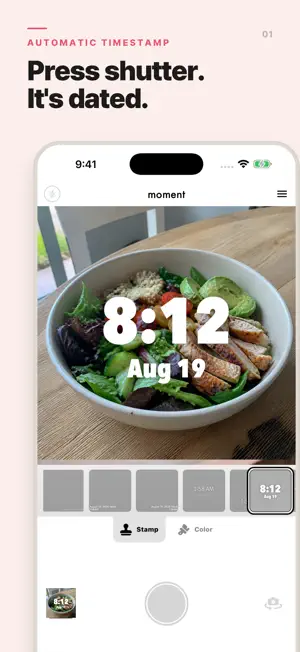
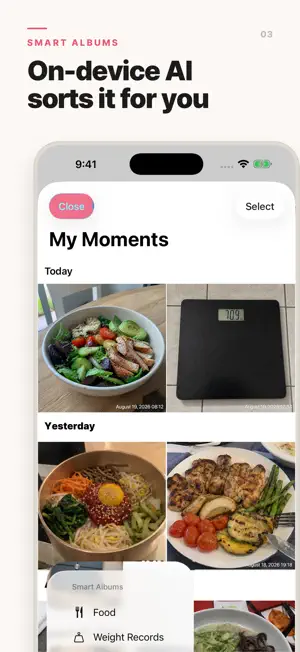
Add a clear photo time or photo date stamp to every picture. Document workouts, meals, travel, study sessions, and daily progress with moment. Choose a ready-made stamp style and color, then save or share your photo. ADD TIME AND DATE TO EVERY PHOTO moment is a timestamp camera for creating clear, consistent photo records. Take a new picture and add the current date and time automatically, or choose an existing photo and stamp the date it was taken when that information is available. Use moment whenever the date and time are part of the story: • Workout progress and fitness check-ins • Meals, food diaries, and nutrition records • Weight measurements and body-progress logs • Study sessions and morning routines • Work, attendance, and project records • Travel, family memories, and everyday photo journals • Daily habits, challenges, and before-and-after progress WHY YOU'LL LOVE MOMENT • Add a photo time and date stamp in seconds • Shoot in 1:1 or 4:3, in portrait or landscape • Create easy-to-understand records without writing separate notes • Keep timestamped photos together in the built-in moment gallery • Find food and weight records faster with Smart Albums • Correct an AI result by removing a tag directly from a photo • Save stamped photos to your photo library and share them with other apps STAMP STYLES FOR YOUR RECORDS Choose from a range of timestamp styles designed for different photos. Available styles combine different fonts, sizes, date and time arrangements, and stamp positions. Select a color that stays readable on your image, preview the result, and switch between 12-hour and 24-hour time. Whether you prefer a compact corner timestamp, a bold centered time, or a layout that includes the weekday, moment makes it easy to give each record a clear and consistent look. CHOOSE YOUR FRAME Switch between a square 1:1 frame and a classic 4:3 frame with one tap. Hold your phone upright or sideways: the stamp follows the way you hold it, so landscape shots come out level with the timestamp in the right place. Photos from your library are cropped to the same ratio, keeping your records consistent. WORKS WITH EXISTING PHOTOS Your photo does not have to be taken inside moment. Select a picture from your photo library, crop it, preview the timestamp, and apply a style before saving. When the photo's capture date is available from your library, moment uses it for the stamp. The original photo remains unchanged while the stamped result is saved as a new photo. ON-DEVICE SMART ALBUMS As your collection grows, moment can organize matching photos automatically: • Food Smart Album groups photos of meals and food • Weight Records Smart Album groups photos showing a weight measurement Photo classification runs on your device. If a result is not right, remove the tag yourself and keep your gallery organized the way you want. PRIVATE BY DESIGN, USEFUL OFFLINE No account is needed to capture, stamp, organize, or share your records. Core camera, timestamp, gallery, and Smart Album classification features work offline. moment stores stamped photos locally on your device, and photos are not uploaded to an external server for AI classification. SAVE AND SHARE Every stamped photo is kept in moment's dedicated gallery. Turn on automatic saving to add new results to your photo library, or share a photo through your favorite apps whenever you choose. GET STARTED IN THREE STEPS 1. Choose a stamp style and color. 2. Take a photo or select one from your library. 3. Save, organize, and share your timestamped record. Capture the time. Keep the context. Find the moment again. Send feedback through the app or contact [email protected].
Ratings & reviews
5.0
14 ratings
What’s new
Version 1.23.0 · Updated September 8, 2026
A smoother, more reliable camera. • Improved camera recovery when returning to the app or switching cameras. • Clearer camera permission guidance with an updated design. • Improved photo-saving behavior and preview performance.
App privacy
The developer, Changhun Lee, reported these privacy practices to Apple.
Data Not Linked to You
The following data, which may be collected but is not linked to your identity, may be used for the following purposes:
- Identifiers: Device ID
- Usage Data: Product Interaction
- Diagnostics: Crash Data
Used for: Developer’s Advertising or Marketing, Analytics, Product Personalization, App Functionality
Alternatives to moment - Photo Time Stamp Cam
Looking for apps like moment - Photo Time Stamp Cam? Here are 6 similar apps on the App Store. The highest rated is moments - Timestamp Camera (5.0/5), and all 6 are free to download.
-
 moments - Timestamp Camera
5.0
moments - Timestamp Camera
5.0
-
 Timestamp Camera: ShowYourTime
4.8
Timestamp Camera: ShowYourTime
4.8
-
 Timestamp Camera stampix
4.5
Timestamp Camera stampix
4.5
-
 Timestamp Photo Proof Camera
4.8
Timestamp Photo Proof Camera
4.8
-
 Timesnap: Time & Date Stamper
4.7
Timesnap: Time & Date Stamper
4.7
-
 Timestamp Camera: Photo Date
4.7
Timestamp Camera: Photo Date
4.7
| App | Rating | Price | Last updated | Compare |
|---|---|---|---|---|
| moment - Photo Time Stamp Cam | 5.0 / 5 (14 ratings) | Free | September 8, 2026 | |
| moments - Timestamp Camera | 5.0 / 5 (5) | Free | Oct 13, 2026 | Compare |
| Timestamp Camera: ShowYourTime | 4.8 / 5 (5) | Free | Mar 17, 2026 | Compare |
| Timestamp Camera stampix | 4.5 / 5 (15) | Free | Oct 2, 2026 | Compare |
| Timestamp Photo Proof Camera | 4.8 / 5 (17) | Free | Feb 28, 2026 | Compare |
| Timesnap: Time & Date Stamper | 4.7 / 5 (19) | Free | Jun 17, 2026 | Compare |
| Timestamp Camera: Photo Date | 4.7 / 5 (6,819) | Free | Jul 17, 2026 | Compare |