

Ohrangutang Studio
Digital Primates LLC Photo & Video iPhoneiPadiPod touch
Ohrangutang Studio is a free Photo & Video app for iPhone and iPad by Digital Primates LLC. Rated 4.4/5 from 237 ratings. Requires iOS 26.0.
- Rating
- 4.4
- 237 ratings
- Price
- Free
- on the App Store
- Size
- 104 MB
- Age 4+
- Updated
- Sep 4
- 2026 · v5.1.0
Screenshots


About Ohrangutang Studio
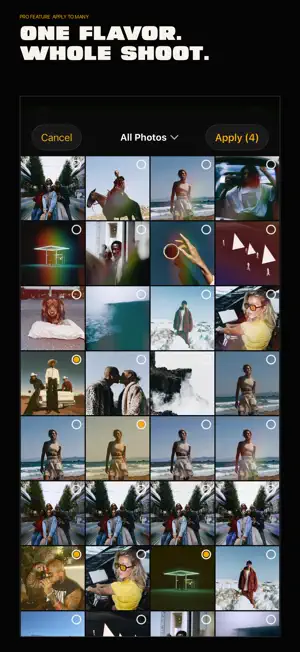
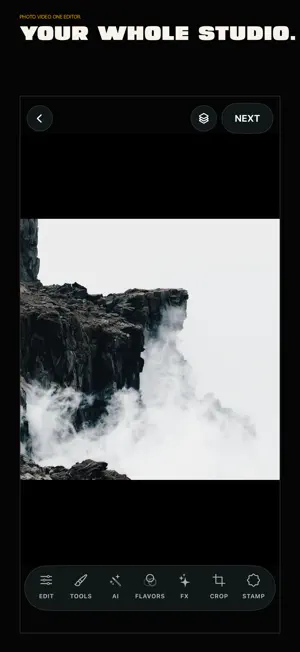
YOUR PHOTOS AND VIDEOS, WITH A SIGNATURE. Create a distinctive look for one frame or carry it across an entire shoot. Ohrangutang Studio is a professional photo and video editor for photographers and visual creators who want precise control, reusable styles, and a workflow that stays out of the way. MORE THAN A PRESET Start with 112 built-in Flavors or create your own. A Flavor is an editable recipe for color, light, texture, grain, effects, and more. Refine each layer, control its intensity, reorder your choices, and return to earlier steps without flattening the entire edit. ONE FLAVOR. A WHOLE SHOOT. Use Apply to Many to carry one signature across photos and videos. Follow progress, pause, resume, or cancel, and keep editing while supported jobs render. Save and favorite Flavors, then export, import, or share them through iOS. CREATE THE COVER Choose from three artist-designed Covers, each crafted for 4:5, 9:16, and 16:9. Customize the text, color, and framing for photos or videos. Keep a Cover visible throughout a video or create a separate still Cover from an exported frame. PRIVATE AI. ON DEVICE. • AI Masks for Subject, Foreground, Background, and Depth • Shift Edge and Feather controls for cleaner mask transitions • A smooth precision brush for adding or removing mask areas • Clean Up for object removal and retouching • Cutout for isolated subjects and layered compositions • High Resolution for photos enhanced up to 4x AI processing happens on your device. Your work stays yours until you choose to export or share it. BUILT FOR THE DETAILS • 21 controls for light, color, detail, and atmosphere • RGB Curves, selective HSL, and three-way color toning • Chroma, Shift, Grain, Lights, Dust, Double Exposure, and animated video textures • Crop and transform tools, plus Trim for video • Frame, Date, and Cover tools • Layer visibility, intensity, ordering, and edit history • JPEG, PNG, and TIFF photo export • H.264 and HEVC video export with improved support for 24–120 FPS and variable frame rates • Built for iPhone and iPad START FREE. TAKE THE WHOLE STUDIO WITH PRO. Use the core photo editor and standard photo export for free. Preview every built-in Flavor, AI tool, and premium effect before upgrading. Ohrangutang Studio Pro unlocks every built-in Flavor, advanced color and effect tools, private AI, Flavor creation, Apply to Many, all video exports, full-resolution photo exports, and format and resolution controls. Choose Monthly, Annual, or Pro Lifetime. The Annual plan includes a 7-day free trial for eligible subscribers. Monthly and Annual subscriptions renew automatically unless canceled at least 24 hours before the end of the current period. Manage or cancel subscriptions in your Apple Account settings. Pro Lifetime is a one-time purchase. Privacy Policy: https://ohrangutangstudio.com/legal/privacy Terms of Use: https://ohrangutangstudio.com/legal/terms Subscription Terms: https://ohrangutangstudio.com/legal/subscriptions Support: https://ohrangutangstudio.com/contact
Ratings & reviews
4.4
237 ratings
What’s new
Version 5.1.0 · Updated September 4, 2026
CREATE THE COVER. KEEP THE FLOW. • Three artist-designed Covers for photos and videos in 4:5, 9:16, and 16:9 • More precise text editing with automatic focus for small labels • Create a separate Cover from any exported video frame • Refined private, on-device AI Masks with Shift Edge, Feather, and a smoother precision brush • Apply to Many can keep rendering while you continue editing, with clear progress, pause, resume, and cancel controls • More reliable video export across 24–120 FPS, variable frame rates, audio, and modern formats • Unified JPEG, PNG, and TIFF sharing • Stability and performance improvements across iPhone and iPad Build your signature from one frame to the whole shoot.
App privacy
The developer, Digital Primates LLC, reported these privacy practices to Apple.
Data Used to Track You
The following data may be used to track you across apps and websites owned by other companies:
- Purchases: Purchase History
- Identifiers: Device ID
- Usage Data: Product Interaction
Data Linked to You
The following data, which may be collected and linked to your identity, may be used for the following purposes:
- Purchases: Purchase History
- Identifiers: Device ID
- Usage Data: Product Interaction
Used for: Third-Party Advertising, Analytics, App Functionality
Data Not Linked to You
The following data, which may be collected but is not linked to your identity, may be used for the following purposes:
- Diagnostics: Crash Data, Performance Data
- Other Data: Other Data Types
Used for: Analytics, App Functionality
Alternatives to Ohrangutang Studio
Looking for apps like Ohrangutang Studio? Here are 6 similar apps on the App Store. The highest rated is BeenTo - Photography Community (5.0/5), and all 6 are free to download.
-
 Paradeo - Photo Editor
4.7
-
 Tint: Photo Editor
4.7
-
 L8R Cam - Vintage Film Camera
4.8
-
 BeenTo - Photography Community
5.0
-
 Pop Editor - Film Emulator
4.7
-
 Aura - Disposable Retro Photos
5.0
| App | Rating | Price | Last updated | Compare |
|---|---|---|---|---|
| Ohrangutang Studio | 4.4 / 5 (237 ratings) | Free | September 4, 2026 | |
| Paradeo - Photo Editor | 4.7 / 5 (26) | Free | Oct 30, 2025 | Compare |
| Tint: Photo Editor | 4.7 / 5 (64) | Free | Dec 20, 2023 | Compare |
| L8R Cam - Vintage Film Camera | 4.8 / 5 (96) | Free | Oct 28, 2026 | Compare |
| BeenTo - Photography Community | 5.0 / 5 (3) | Free | Oct 22, 2026 | Compare |
| Pop Editor - Film Emulator | 4.7 / 5 (27) | Free | Jun 3, 2025 | Compare |
| Aura - Disposable Retro Photos | 5.0 / 5 (17) | Free | Mar 17, 2025 | Compare |
Compare Ohrangutang Studio with the top alternatives: ratings, updates, ASO score and keyword gaps →