

EazyDraw
DEKORRA OPTICS LLC Productivity iPhoneiPadiPod touch
EazyDraw is a free Productivity app for iPhone and iPad by DEKORRA OPTICS LLC. Rated 4.1/5 from 9 ratings. Requires iOS 27.0. Updated October 16, 2026.
- Rating
- 4.1
- 9 ratings
- Price
- Free
- on the App Store
- Size
- 64 MB
- Age 4+
- Updated
- Oct 16
- 2026 · v4.3.1
Screenshots



About EazyDraw
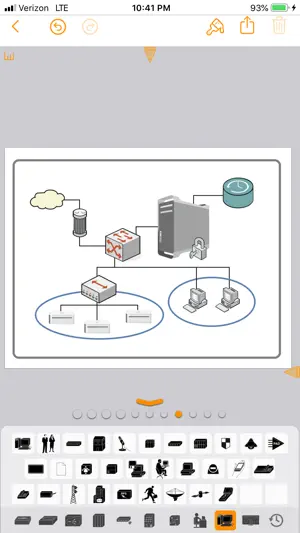
EazyDraw helps you communicate ideas visually. Words alone are often not enough — diagrams, symbols, and drawings make concepts clearer. EazyDraw combines vector drawing, structured text, and symbols so you can express knowledge with precision and clarity. EazyDraw for iPad and iPhone works seamlessly with EazyDraw for Mac. Use Handoff, copy and paste between devices, or rely on iCloud to create and edit drawings anywhere — on iPad, iPhone, MacBook, or desktop. Designed for efficient drawing on mobile Optimize screen space with the resizable keyboard. Move it to the bottom, left, or right side of the screen. The keyboard integrates text entry, color selection, inspectors, and a large library of ready-to-use tools and symbols. Choose from seven customizable keyboards with a single tap. Drag and drop keys to rearrange them, or open a keyboard for full editing. Select from collections of scientific symbols, charting tools, emoji, and world languages — or build your own from the complete Unicode character set. Powerful vector drawing tools Enhance drawings with gradients, drop shadows, arrows, dashes, textures, and vector hatching. Inspect and select colors using eight integrated color pickers. Create scaled technical drawings with Auto-Dimensions, grids, guides, rulers, and snapping tools. Build diagrams and flowcharts with integrated typeset text and automatic connectors. Built for iPadOS workflows EazyDraw fully supports Split View, multitasking, and drag and drop. Import content from other apps or devices and continue editing instantly. Flexible export options Export to PDF, PNG, JPG, or TIFF. Send images directly to Photos or share with other apps. EazyDraw is fully color-managed and supports both sRGB and P3 wide-gamut color. The color wheel inspector automatically generates complementary palettes to help you design with confidence.
Ratings & reviews
4.1
9 ratings
What’s new
Version 4.3.1 · Updated October 16, 2026
• iPhone Duo Compatibility: EazyDraw is now fully iPhone Duo aware! Your canvas, drawing displays, and inspector panels dynamically adapt to screen islands and system safe areas. • Seamless Display Resizing: Canvas content automatically resizes at full vector resolution whether folded, unfolded, or rotated in any orientation. • iOS 27 Enhancements: Resolves several stability issues and performance edge cases on iOS 27. • Updated Visuals: Check out our new App Store screenshots highlighting the updated interface tailored for iPhone Duo!
App privacy
The developer, DEKORRA OPTICS LLC, reported these privacy practices to Apple.
Data Not Collected
The developer does not collect any data from this app.
Alternatives to EazyDraw
Looking for apps like EazyDraw? Here are 6 similar apps on the App Store. The highest rated is Vizonare (5.0/5), and all 6 are free to download.
-
 iPocket Draw Lite
3.6
-
 TouchDraw 2
3.9
-
 iDesign
2.6
-
 Arrette Sketch drafting tools
3.4
-
 Vizonare
5.0
-
 SynergyXR
| App | Rating | Price | Last updated | Compare |
|---|---|---|---|---|
| EazyDraw | 4.1 / 5 (9 ratings) | Free | October 16, 2026 | |
| iPocket Draw Lite | 3.6 / 5 (16) | Free | Aug 3, 2026 | Compare |
| TouchDraw 2 | 3.9 / 5 (21) | Free | Jul 20, 2026 | Compare |
| iDesign | 2.6 / 5 (87) | Free | Oct 17, 2026 | Compare |
| Arrette Sketch drafting tools | 3.4 / 5 (9) | Free | Nov 20, 2023 | Compare |
| Vizonare | 5.0 / 5 (3) | Free | Feb 15, 2026 | Compare |
| SynergyXR | – | Free | Oct 19, 2026 | Compare |
Compare EazyDraw with the top alternatives: ratings, updates, ASO score and keyword gaps →