

Convert PDF to JPG,PDF to PNG
Tu Phan Photo & Video iPhoneiPadiPod touch
Convert PDF to JPG,PDF to PNG is a free Photo & Video app for iPhone and iPad by Tu Phan. Rated 4.7/5 from 770 ratings. Requires iOS 12.0.
- Rating
- 4.7
- 770 ratings
- Price
- Free
- on the App Store
- Size
- 8 MB
- Age 4+
- Updated
- Jun 2
- 2026 · v5.1
Screenshots


About Convert PDF to JPG,PDF to PNG
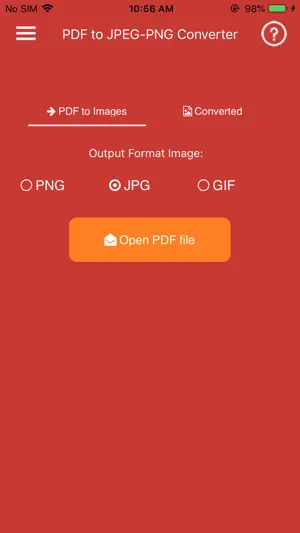
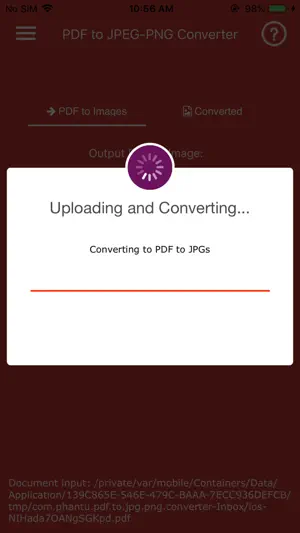
PDF to JPG/PNG Converter is a simple and powerful app that helps you convert PDF documents into high-quality images on your iPhone or iPad. Choose between two conversion modes: • Pages to Images – Convert every PDF page into JPG or PNG images. • Extract Images – Extract all embedded images from a PDF without quality loss. For multi-page PDF documents, converted images can be automatically packaged into a ZIP file for easier storage and sharing. The app is fast, lightweight, and easy to use. Simply select a PDF file, choose your preferred conversion mode and output format, then export your images in seconds. Premium Features: • Convert PDF pages to JPG images • Convert PDF pages to PNG images • Extract original images embedded in PDF files • Two conversion modes: Pages to Images and Extract Images • Automatic ZIP export for multi-page PDF conversions • Fast and efficient conversion engine • High-quality image output • Simple and intuitive user interface • Share converted images with other apps • Handles large PDF files efficiently • Lightweight and stable performance • Optimized for iPhone and iPad Why Choose PDF to JPG/PNG Converter? • No complicated setup • Quick conversion process • High-quality results • Easy image sharing • Supports both page rendering and image extraction • Ideal for students, professionals, and everyday users Note: Password-protected, encrypted, or corrupted PDF files may not be supported.
Ratings & reviews
4.7
770 ratings
What’s new
Version 5.1 · Updated June 2, 2026
Improved performance and bug fixes.
App privacy
The developer, Tu Phan, reported these privacy practices to Apple.
Data Linked to You
The following data, which may be collected and linked to your identity, may be used for the following purposes:
- Location: Precise Location
Used for: Developer’s Advertising or Marketing, Analytics
Data Not Linked to You
The following data, which may be collected but is not linked to your identity, may be used for the following purposes:
- User Content: Photos or Videos
- Identifiers: Device ID
- Usage Data: Advertising Data
Used for: Developer’s Advertising or Marketing, Analytics, App Functionality
Alternatives to Convert PDF to JPG,PDF to PNG
Looking for apps like Convert PDF to JPG,PDF to PNG? Here are 6 similar apps on the App Store. The highest rated is Image Converter - JPG PNG HEIC (4.8/5), and all 6 are free to download.
-
 JPG/PNG Converter
4.6
JPG/PNG Converter
4.6
-
 Image Converter - JPG PNG HEIC
4.8
Image Converter - JPG PNG HEIC
4.8
-
 JPEG-PNG Image file converter
4.7
JPEG-PNG Image file converter
4.7
-
 Convert JPEG PNG ConvertMagic
4.6
Convert JPEG PNG ConvertMagic
4.6
-
 JPG PNG Image Photo Converter
4.0
JPG PNG Image Photo Converter
4.0
-
 HEIC to JPEG - Image Converter
4.3
HEIC to JPEG - Image Converter
4.3
| App | Rating | Price | Last updated | Compare |
|---|---|---|---|---|
| Convert PDF to JPG,PDF to PNG | 4.7 / 5 (770 ratings) | Free | June 2, 2026 | |
| JPG/PNG Converter | 4.6 / 5 (451) | Free | Sep 14, 2026 | Compare |
| Image Converter - JPG PNG HEIC | 4.8 / 5 (247) | Free | Oct 2, 2026 | Compare |
| JPEG-PNG Image file converter | 4.7 / 5 (17,267) | Free | Jan 14, 2026 | Compare |
| Convert JPEG PNG ConvertMagic | 4.6 / 5 (157) | Free | Jul 18, 2026 | Compare |
| JPG PNG Image Photo Converter | 4.0 / 5 (40) | Free | Oct 19, 2026 | Compare |
| HEIC to JPEG - Image Converter | 4.3 / 5 (1,512) | Free | Oct 13, 2025 | Compare |