

OffScreen: Screen Time Control
MD Studio Health & Fitness iPhoneiPadiPod touchApple Watch
OffScreen: Screen Time Control is a free Health & Fitness app for iPhone and iPad by MD Studio. Rated 4.5/5 from 2,561 ratings. Requires iOS 17.0.
- Rating
- 4.5
- 2.5K ratings
- Price
- Free
- on the App Store
- Size
- 114 MB
- Age 4+
- Updated
- Oct 21
- 2026 · v3.22.1
Screenshots

About OffScreen: Screen Time Control
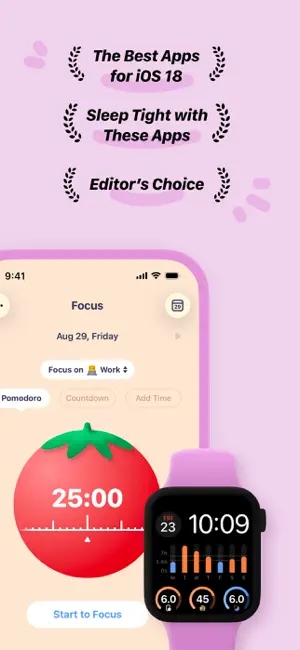
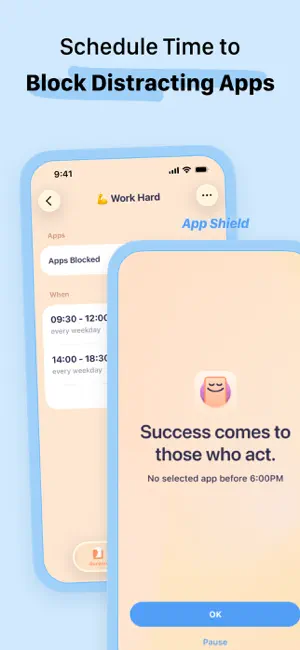
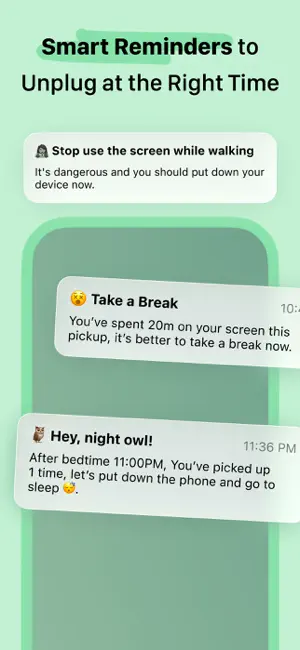
OffScreen helps you track phone usage and keeps you stay focused. With OffScreen, you can: - Track screen time • Set up your screen time goal, and get daily insight. • See screen time activities: Pickups, Average Usage, While Walking, Stationary Life, Last Pickup, First Pickup, Best Break, and Sleep Time • Read sleep data from the Health app • Show data on your favorite watch face - OFF Time • Set disable time for social apps and enjoy OFF time - Focus Mode • Supports three modes: Pomodoro, countdown, and time accumulation • Support lock screen and flip screen focus • Supports live activity and StandBy • If you need to use your phone to look up a dictionary or use other applications during the concentration process, you can set a concentration app whitelist • Categories your focus sessions by tag • Pause at any time when you need the phone to help you study or search while you're in focus mode • Focus on the watch - Visualize and share your data. • View data in week/month/year view. • Well-designed share card is ready for you. - Breaking digital detox challenges • Screen time challenge • Pick up challenge • Sleep challenge - Sync sleep time and focus mindfulness time on Apple HealthKit. --------- To collect the walking time data, this app tracks your location in the background and can affect battery life. * Subscription payments will be charged to your iTunes account at confirmation of your purchase. * Subscriptions will automatically renew and payment will be charged to your iTunes account unless auto-renew is turned off at least 24 hours prior to the end of the current Privacy Policy: https://miidii.super.site/miidii-tech/privacy-policy Terms Of Use: https://miidii.super.site/miidii-tech/terms-of-use
Ratings & reviews
4.5
2.5K ratings
What’s new
Version 3.22.1 · Updated October 21, 2026
- Added support for iPhone Duo, with layouts optimized for both inner and outer displays. - Improved layouts for Focus, Screen Time, and Settings when folding or unfolding your device or resizing the app window. Recent updates: - Fixed an issue where opening Notification Center could incorrectly increase the pickup count. - Fixed a crash that could prevent the Apple Watch app from launching. - Fixed an issue where bars and date labels could be misaligned in the Screen Time and Pickups charts on Apple Watch. - Fixed an issue on devices without Always-On display (non-AOD) running the latest iOS where screen time could continue to accumulate after locking the device.
App privacy
The developer, MD Studio, reported these privacy practices to Apple.
Data Not Linked to You
The following data, which may be collected but is not linked to your identity, may be used for the following purposes:
- Usage Data: Product Interaction
- Diagnostics: Crash Data
- Health & Fitness: Health, Fitness
- Location: Coarse Location
Used for: Analytics, App Functionality
Alternatives to OffScreen: Screen Time Control
Looking for apps like OffScreen: Screen Time Control? Here are 6 similar apps on the App Store. The highest rated is Mindllama Anxiety Relief (4.9/5), and all 6 are free to download.
-
 Grow: Health & Fitness
4.7
-
 Mindllama Anxiety Relief
4.9
-
 Gentler Streak Workout Tracker
4.7
-
 (Not Boring) Habits
4.8
-
 TIDE: Sleep, Focus, Meditation
4.8
-
 stoic. journal & mental health
4.8
| App | Rating | Price | Last updated | Compare |
|---|---|---|---|---|
| OffScreen: Screen Time Control | 4.5 / 5 (2,561 ratings) | Free | October 21, 2026 | |
| Grow: Health & Fitness | 4.7 / 5 (4,624) | Free | Oct 21, 2026 | Compare |
| Mindllama Anxiety Relief | 4.9 / 5 (9,429) | Free | Oct 22, 2026 | Compare |
| Gentler Streak Workout Tracker | 4.7 / 5 (8,826) | Free | Oct 22, 2026 | Compare |
| (Not Boring) Habits | 4.8 / 5 (6,274) | Free | Oct 21, 2026 | Compare |
| TIDE: Sleep, Focus, Meditation | 4.8 / 5 (8,345) | Free | Oct 22, 2026 | Compare |
| stoic. journal & mental health | 4.8 / 5 (36,065) | Free | Oct 22, 2026 | Compare |