

Wifi Signal Strength Analyzer
Old Man Sitting LLC Utilities iPhoneiPadiPod touch
Wifi Signal Strength Analyzer is a free Utilities app for iPhone and iPad by Old Man Sitting LLC. Rated 4.2/5 from 2,575 ratings. Requires iOS 13.0.
- Rating
- 4.2
- 2.5K ratings
- Price
- Free
- on the App Store
- Size
- 65 MB
- Age 17+
- Updated
- Jun 10
- 2025 · v8.3
Screenshots
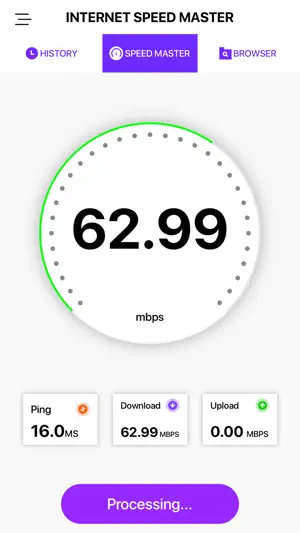


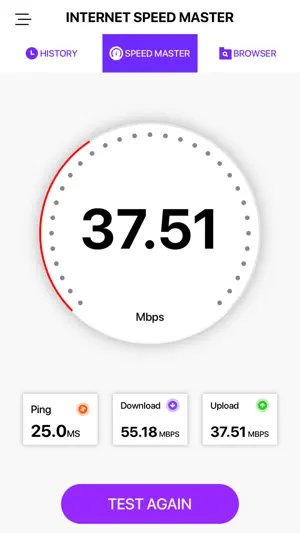
About Wifi Signal Strength Analyzer
With our Speed Test App you will be able to check your Internet’s connection, receive detailed information of any network you work with, boost every research you do online, get the whole potential of your network and device with a completely secure browser, and consider how effective your connection is, with the tools Speed Test brings directly to your screen. • Discover your network’s download, upload, and ping speed with just a single tap on the screen and a couple of seconds with an accurate, trustworthy, and easy-to-use interface. • Check your History, and get detailed information of every speed test you did in the past to learn about how effective your Internet connection was. • Search information in a safe way with our completely private in-app browser, and take the maximum of your network’s speed right in the same tool. • Look at real-time graphics and receive speed test results in a friendly, intuitive, and easy-to-use user interface. • Select your preferences and set the scales you want the app show you the results of every test. Get the information you need, at the moment you need it, in a one-click platform. More details in less time is what makes Speed Test one tool that you just can’t miss. Become PRO by subscribing: $2.99 weekly with 3 days free trial $5.99 monthly SAVE +50% $29.99 yearly SAVE +80% - Payment will be charged to iTunes Account at confirmation of purchase - Subscription automatically renews unless auto-renew is turned off at least 24-hours before the end of the current period. You can turn of the auto-renew subscription from iPhone setting - Account will be charged for renewal within 24-hours prior to the end of the current period, and identify the cost of the renewal - Subscriptions may be managed by the user and auto-renewal may be turned off by going to the user's Account Settings after purchase - Privacy Policy: https://oldmansittingllc.wordpress.com/privacy-policy/ - Terms of use: https://oldmansittingllc.wordpress.com/terms-of-use/ - Any unused portion of a free trial period, if offered, will be forfeited when the user purchases a subscription to that publication where applicable - Speed test adds features above and are available through an auto-renewing subscription. Subscriptions will be charged to your credit card through your iTunes account. Your subscription will automatically renew unless cancelled at least 24 hours before the end of your current subscription, and you can cancel a subscription during the active period. You can manage your subscription at any time, either by viewing your account in iTunes from your Mac or PC, or Account Settings on your device after purchase.
Ratings & reviews
4.2
2.5K ratings
What’s new
Version 8.3 · Updated June 10, 2025
Unlock the next level of speed testing with improved accuracy, faster results, and a refined user experience. Our latest update brings smoother performance and optimized network diagnostics!
App privacy
The developer, Old Man Sitting LLC, reported these privacy practices to Apple.
Data Used to Track You
The following data may be used to track you across apps and websites owned by other companies:
- Usage Data: Product Interaction, Other Usage Data
Data Linked to You
The following data, which may be collected and linked to your identity, may be used for the following purposes:
- Usage Data: Product Interaction, Other Usage Data
- Diagnostics: Crash Data, Other Diagnostic Data
Used for: Third-Party Advertising, Analytics, App Functionality
Data Not Linked to You
The following data, which may be collected but is not linked to your identity, may be used for the following purposes:
- Location: Precise Location
Used for: App Functionality
Alternatives to Wifi Signal Strength Analyzer
Looking for apps like Wifi Signal Strength Analyzer? Here are 6 similar apps on the App Store. The highest rated is Ubiquiti WiFiman (4.8/5), and all 6 are free to download.
-
 Wifi Analizer Signal Strength
3.9
Wifi Analizer Signal Strength
3.9
-
 NetSpot WiFi Analyzer
3.7
NetSpot WiFi Analyzer
3.7
-
 Network Analyzer: WiFi Scan
4.6
Network Analyzer: WiFi Scan
4.6
-
 Ubiquiti WiFiman
4.8
Ubiquiti WiFiman
4.8
-
 nOversight WiFi Analyzer
3.3
nOversight WiFi Analyzer
3.3
-
 Internet Quality
4.0
Internet Quality
4.0
| App | Rating | Price | Last updated | Compare |
|---|---|---|---|---|
| Wifi Signal Strength Analyzer | 4.2 / 5 (2,575 ratings) | Free | June 10, 2025 | |
| Wifi Analizer Signal Strength | 3.9 / 5 (14,639) | Free | Aug 8, 2025 | Compare |
| NetSpot WiFi Analyzer | 3.7 / 5 (343) | Free | Sep 27, 2025 | Compare |
| Network Analyzer: WiFi Scan | 4.6 / 5 (6,820) | Free | Sep 13, 2026 | Compare |
| Ubiquiti WiFiman | 4.8 / 5 (40,297) | Free | Jul 28, 2026 | Compare |
| nOversight WiFi Analyzer | 3.3 / 5 (23) | Free | May 20, 2026 | Compare |
| Internet Quality | 4.0 / 5 (4) | Free | Sep 22, 2026 | Compare |