

Photo Markup - Draw & Annotate
Nikhil Anshuman Photo & Video iPhoneiPadiPod touch
Photo Markup - Draw & Annotate is a paid Photo & Video app for iPhone and iPad by Nikhil Anshuman. Rated 3.5/5 from 6 ratings. Requires iOS 11.0.
- Rating
- 3.5
- 6 ratings
- Price
- 2.99 USD
- on the App Store
- Size
- 4 MB
- Age 4+
- Updated
- Feb 21
- 2024 · v2.0
Screenshots

About Photo Markup - Draw & Annotate
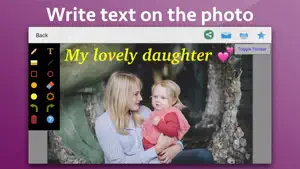
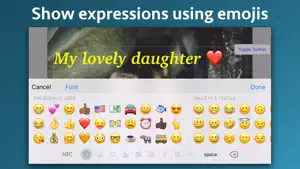
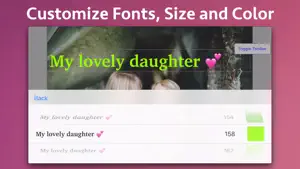
Add notes, highlight, draw lines, circle an object, add smileys, emojis and many more. The application supports more than 300 smileys and emojis to enhance the images. Smileys and emojis also help to show expression making the photos better and more expressive. You could also directly draw on the images. You could write using your fingers or Apple Pencil to show your messages in more expressive way. Handwritten messages or text adds more meaning to the images. You could take a screenshot on the phone and edit it in the application. In the application, you could write text on screenshots, add emojis and smileys, draw using your fingers, highlight using rectangle or circle and underline text as well. Using the image markup, you could easily explain things on the screenshots or the images to the other people. Using the image markup, you could easily point to important things in an image. For example, you could highlight yourself in a group of people. The application also comes with various other tools. For example : Using eraser, the drawn content could be deleted. The application has the undo and redo options. The application also comes with options to change the drawing color and thickness of the borders of the drawn objects. Using the application you could draw randomly on the screen, draw a line, rectangle or circle, write text on the screen and highlight an area . When you write the text, you could change the Font, Size and colour as well.
Ratings & reviews
3.5
6 ratings
What’s new
Version 2.0 · Updated February 21, 2024
- Minor bug fixes. In case of any questions, please write to us on [email protected]. We will be happy to assist.
App privacy
The developer, Nikhil Anshuman, reported these privacy practices to Apple.
Data Not Collected
The developer does not collect any data from this app.
Alternatives to Photo Markup - Draw & Annotate
Looking for apps like Photo Markup - Draw & Annotate? Here are 6 similar apps on the App Store. The highest rated is Add Text: Write on Videos (4.8/5), and all 6 are free to download.
-
 PhotoSave
-
 Photo Combiner: Stitch Photos
3.0
-
 Nightscape - Filters for night
-
 Micro Drone Fly
3.0
-
 Glasses Glare Remover AI
4.0
-
 Add Text: Write on Videos
4.8
| App | Rating | Price | Last updated | Compare |
|---|---|---|---|---|
| Photo Markup - Draw & Annotate | 3.5 / 5 (6 ratings) | 2.99 USD | February 21, 2024 | |
| PhotoSave | – | Free | Jun 9, 2026 | Compare |
| Photo Combiner: Stitch Photos | 3.0 / 5 (2) | Free | Sep 17, 2024 | Compare |
| Nightscape - Filters for night | – | Free | Jun 10, 2026 | Compare |
| Micro Drone Fly | 3.0 / 5 (3) | Free | Oct 14, 2025 | Compare |
| Glasses Glare Remover AI | 4.0 / 5 (1) | Free | Sep 7, 2026 | Compare |
| Add Text: Write on Videos | 4.8 / 5 (27) | Free | May 4, 2026 | Compare |