

Quick Video Editor
Kevin Ghori Photo & Video iPhoneiPadiPod touch
Quick Video Editor is a free Photo & Video app for iPhone and iPad by Kevin Ghori. Rated 5.0/5 from 2 ratings. Requires iOS 13.0. Updated January 7, 2025.
- Rating
- 5.0
- 2 ratings
- Price
- Free
- on the App Store
- Size
- 21 MB
- Age 4+
- Updated
- Jan 7
- 2025 · v1.2
Screenshots



About Quick Video Editor
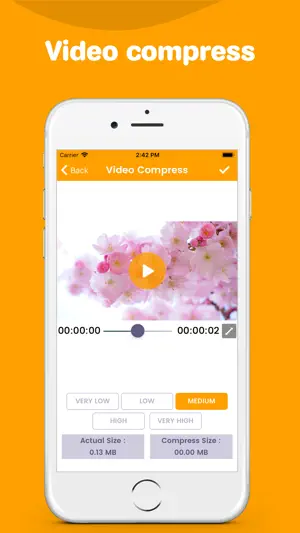
Powerful and easy-to-use video editor app. A useful and handy collection of features to edit and update videos. Easy and modern UI is implemented in the All Video Editor app. Various features are inbuilt into the All video Editor app like crop video, add watermark to video, compress video, extract photo from video, Video to gif, video to audio, slow motion, fast motion, trim video, merge videos, photo to video etc. Components of All Video Editor app are briefed below: 1. Crop Video The display section of the video can be trimmed with the help of the crop option. 2. Add Watermark Watermark can be added to the selected video to make the video authentic and user-specific. Various stickers and text options with Font, color, opacity and shadow features are facilitated. 3. Video Compressor Selected video is subjected to video compressor for compression, with minimal degradation in video quality. 4. Extract photo from Video Specific moments from the video can be captured easily and saved into the phone library in seconds of time. 5. Add/Remove audio from Video Audio from video can be removed easily by a single tap mechanism. galore of audio options are inbuilt into the app to add pleasant and soothing audio to videos. 6. Video to gif Sections of video can be turned into gifs which are funny, refreshing and innovative. High-quality gifs are generated. 7. Video to audio Audio from the video can be extracted and a new audio file is generated. 8. Slow Motion Selected video can be handed to slow motion maker tool inbuilt in the All Video Editor app to invoke slow motion effect into videos. 9. Fast Motion Selected video is given as input to the Fast motion tool to generate fast motion effect in videos. 10. Merger Videos Maximum two videos can be merged at a given time. They can be freely adjusted into the frames. 11. Photo to Video Video with a maximum of 50 photos can be generated in a short span of time. Duration of display of photos in video can be manually set by user. 12. Trim Video A new video can be created from the original video by trim option. Select only the required section of the video with the aid of left and right sliding scissor symbols. All Video Editor app is a multipurpose app while dealing with modification in video formats. All Video Editor app is effective and efficient in functioning and provides the best user experience.
What’s new
Version 1.2 · Updated January 7, 2025
- Bug fixes.
App privacy
The developer, Kevin Ghori, reported these privacy practices to Apple.
Data Used to Track You
The following data may be used to track you across apps and websites owned by other companies:
- Identifiers: Device ID
- Usage Data: Advertising Data
- Diagnostics: Performance Data
Data Not Linked to You
The following data, which may be collected but is not linked to your identity, may be used for the following purposes:
- Identifiers: Device ID
- Diagnostics: Performance Data
- Usage Data: Advertising Data
Used for: Third-Party Advertising, Analytics
Alternatives to Quick Video Editor
Looking for apps like Quick Video Editor? Here are 6 similar apps on the App Store. The highest rated is Video Editor - Vlog Star (4.7/5), and all 6 are free to download.
-
 Video Editor : Slow-Mo Video
-
 Ivy Professional Video Editor
4.1
Ivy Professional Video Editor
4.1
-
 Video Editor - Vlog Star
4.7
Video Editor - Vlog Star
4.7
-
 WeVideo - Video Editor & Maker
4.6
WeVideo - Video Editor & Maker
4.6
-
 Video Editor .
4.6
Video Editor .
4.6
-
 Magisto Video Editor & Maker
4.6
Magisto Video Editor & Maker
4.6
| App | Rating | Price | Last updated | Compare |
|---|---|---|---|---|
| Quick Video Editor | 5.0 / 5 (2 ratings) | Free | January 7, 2025 | |
| Video Editor : Slow-Mo Video | – | Free | Jul 11, 2024 | Compare |
| Ivy Professional Video Editor | 4.1 / 5 (171) | Free | Nov 23, 2023 | Compare |
| Video Editor - Vlog Star | 4.7 / 5 (7,135) | Free | Dec 27, 2023 | Compare |
| WeVideo - Video Editor & Maker | 4.6 / 5 (39,865) | Free | Sep 2, 2025 | Compare |
| Video Editor . | 4.6 / 5 (12,043) | Free | Oct 13, 2026 | Compare |
| Magisto Video Editor & Maker | 4.6 / 5 (123,401) | Free | Mar 26, 2025 | Compare |
Compare Quick Video Editor with the top alternatives: ratings, updates, ASO score and keyword gaps →