

ExpensePoint
GlobalPoint Technologies Incorporated Business iPhoneiPadiPod touch
ExpensePoint is a free Business app for iPhone and iPad by GlobalPoint Technologies Incorporated. Rated 1.4/5 from 17 ratings. Requires iOS 15.0.
- Rating
- 1.4
- 17 ratings
- Price
- Free
- on the App Store
- Size
- 71 MB
- Age 4+
- Updated
- Oct 7
- 2026 · v3.11.41
Screenshots



About ExpensePoint
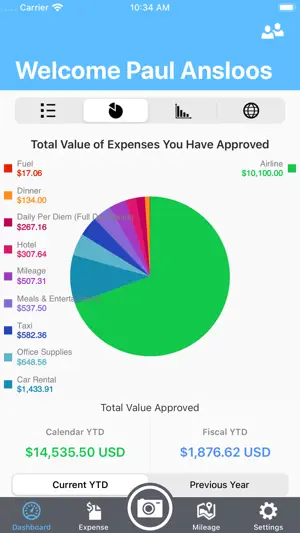
Expense reporting at your fingertips! “It’s simple to use, I can add expenses and receipts to my report as they occur. I never have to block time to do my expense report….I love it!!”…. Ryan Santschi EXPENSE ENTRY ExpensePoint Mobile allows you to manage your entire expense reporting process effortlessly. Capturing expenses is now a snap! With this easy to use mobile interface you can add any expense in seconds. With our Receipt Reader system you can just take a photo of your receipts and we’ll read them automatically for you and we’ll even match them to your imported Corporate Card transactions. ExpensePoint will also automatically track your mileage on the go with our GPS MileageTracker™ system making the expensing of mileage an absolute breeze. Reports can be viewed in summary, detail or even by a rich color graph view which displays the percentage of spend by category. Users can also see reports that are pending manager approval and reports that have been approved. REPORT APPROVAL Managers can even review and approve expense reports and easily see all associated expenses and receipts via report summary or detailed view screens. Managers can approve or decline expenses at the whole report level at the individual expense level. Access all of your company links and documents as well via the Company Links button. Everything entered in ExpensePoint Mobile is automatically available when you log into your regular ExpensePoint account. • Create expense reports • Receipt Reader™ • MileageTracker™ • Add expenses via easy user interface • Assign credit card charges to reports • Link receipt images to expense items • Split expenses • Report summary view • Report detail view • Report graph view • Approve reports • Approve or decline single line items • Add cash advances and advance returns • See reports in progress, reports you have submitted for approval and all your approved reports • See your company links and documents
Ratings & reviews
1.4
17 ratings
What’s new
Version 3.11.41 · Updated October 7, 2026
We update the ExpensePoint app as often as possible to make it even more useful to users like you. Here's what you'll find in the latest version: - various stability improvements and bug fixes
App privacy
The developer, GlobalPoint Technologies Incorporated, reported these privacy practices to Apple.
Data Linked to You
The following data, which may be collected and linked to your identity, may be used for the following purposes:
- Location: Precise Location, Coarse Location
Used for: App Functionality
Alternatives to ExpensePoint
Looking for apps like ExpensePoint? Here are 6 similar apps on the App Store. The highest rated is OK Alone - Lone Worker App (4.5/5), and all 6 are free to download.
-
 NetSuite SuiteProjects Pro
4.2
NetSuite SuiteProjects Pro
4.2
-
 OK Alone - Lone Worker App
4.5
OK Alone - Lone Worker App
4.5
-
 VitalEdge ID MobileAccess
1.9
VitalEdge ID MobileAccess
1.9
-
 Spend Clarity Enterprise
4.5
Spend Clarity Enterprise
4.5
-
 SMRT Operations Manager
3.1
SMRT Operations Manager
3.1
-
 NuORDER 4.0
4.3
NuORDER 4.0
4.3
| App | Rating | Price | Last updated | Compare |
|---|---|---|---|---|
| ExpensePoint | 1.4 / 5 (17 ratings) | Free | October 7, 2026 | |
| NetSuite SuiteProjects Pro | 4.2 / 5 (821) | Free | Nov 27, 2025 | Compare |
| OK Alone - Lone Worker App | 4.5 / 5 (4) | Free | Sep 1, 2026 | Compare |
| VitalEdge ID MobileAccess | 1.9 / 5 (11) | Free | Oct 9, 2026 | Compare |
| Spend Clarity Enterprise | 4.5 / 5 (7,344) | Free | Aug 25, 2026 | Compare |
| SMRT Operations Manager | 3.1 / 5 (227) | Free | Aug 27, 2026 | Compare |
| NuORDER 4.0 | 4.3 / 5 (21) | Free | Sep 10, 2026 | Compare |
Compare ExpensePoint with the top alternatives: ratings, updates, ASO score and keyword gaps →