

HCSS Fleet: Monitor & manage
Heavy Construction Systems Specialists, Inc. Reference iPhoneiPadiPod touch
HCSS Fleet: Monitor & manage is a free Reference app for iPhone and iPad by Heavy Construction Systems Specialists, Inc. Rated 5.0/5 from 2 ratings.
- Rating
- 5.0
- 2 ratings
- Price
- Free
- on the App Store
- Size
- 30 MB
- Age 4+
- Updated
- Oct 15
- 2026 · v2026.11.0
Screenshots



About HCSS Fleet: Monitor & manage
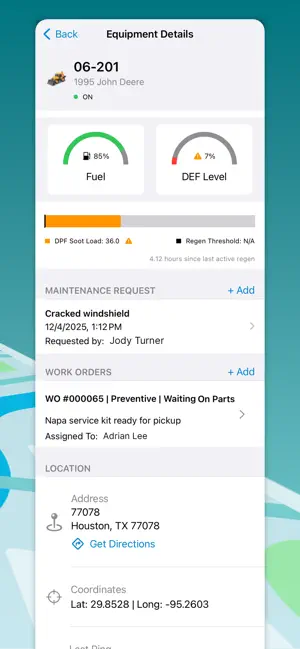
Get real-time visibility into your fleet while you’re on-the-go. Designed for fleet managers, mechanics, fuelers, operators, and other field personnel in heavy civil construction, this easy-to-use app provides live GPS tracking, equipment details, maintenance, and installation guidance for GPS devices. ~~~~~TRACKING~~~~~ Easily locate assets with just a few taps. • See which equipment are near you on the job site, shop, yard, or wherever the day’s tasks take you. This can be especially helpful for fuelers, mechanics, and other fleet personnel who can complete work faster by knowing exactly which assets are in the area and need to be serviced. • View all assets within a selected geofence. ~~~~~MAINTENANCE~~~~~ It’s everything you need to keep your equipment in the best shape, right at your fingertips. • Log new issues or review outstanding maintenance requests for every piece of equipment. • Manage work orders with ease. See assigned mechanics, required work items, services due, and relevant documents — all in one organized view. • Get critical equipment details to make the best on-site decisions, including fuel level, utilization stats, emissions metrics, and more. ~~~~~GPS INSTALLATION~~~~~ Got new GPS units? Let’s get them connected. We make it easy with step-by-step instructions, visuals, and instant verification right in the app. Only HCSS provides this type of assistance to get the critical start of your GPS solution just right. • No need to lug around manuals or flip through pages to figure out how to install your devices. Simply open this app, and we’ll step you through it with easy-to-follow checklists and diagrams. • Use the app to verify the device is properly installed and reporting as expected before you leave the installation site. • You’re not on your own. Use this guided process to save yourself time, money, and frustration. But if you need help anywhere along the way, just give HCSS Fleet Support a call!
What’s new
Version 2026.11.0 · Updated October 15, 2026
Work Orders can now be assigned to specific Business Units.
App privacy
The developer, Heavy Construction Systems Specialists, Inc., reported these privacy practices to Apple.
Data Linked to You
The following data, which may be collected and linked to your identity, may be used for the following purposes:
- Contact Info: Email Address
- User Content: Emails or Text Messages
Used for: App Functionality
Alternatives to HCSS Fleet: Monitor & manage
Looking for apps like HCSS Fleet: Monitor & manage? Here are 6 similar apps on the App Store. The highest rated is Earthworks Assistant (5.0/5), and all 6 are free to download.
-
 Earthworks Assistant
5.0
-
 OnStation - Digital Stationing
4.7
-
 United Rentals Trench Safety
5.0
-
 Diesel Repair Mobile
5.0
-
 Gibraltar Global
5.0
-
 PRYOR
3.7
| App | Rating | Price | Last updated | Compare |
|---|---|---|---|---|
| HCSS Fleet: Monitor & manage | 5.0 / 5 (2 ratings) | Free | October 15, 2026 | |
| Earthworks Assistant | 5.0 / 5 (2) | Free | Oct 7, 2026 | Compare |
| OnStation - Digital Stationing | 4.7 / 5 (961) | Free | Oct 15, 2026 | Compare |
| United Rentals Trench Safety | 5.0 / 5 (1) | Free | Apr 21, 2026 | Compare |
| Diesel Repair Mobile | 5.0 / 5 (3) | Free | Aug 28, 2026 | Compare |
| Gibraltar Global | 5.0 / 5 (1) | Free | Feb 4, 2026 | Compare |
| PRYOR | 3.7 / 5 (12) | Free | Oct 21, 2026 | Compare |