

RetroBoard - T9 Watch Keyboard
Adam Foot Productivity iPhoneiPadiPod touchApple Watch
RetroBoard - T9 Watch Keyboard is a free Productivity app for iPhone and iPad by Adam Foot. Rated 3.9/5 from 39 ratings. Requires iOS 17.0.
- Rating
- 3.9
- 39 ratings
- Price
- Free
- on the App Store
- Size
- 27 MB
- Age 4+
- Updated
- Oct 12
- 2026 · v5.3.1
Screenshots


About RetroBoard - T9 Watch Keyboard
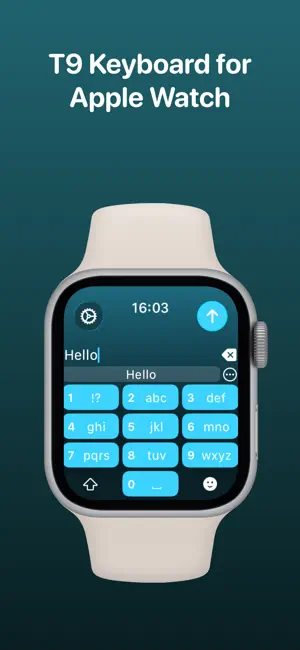
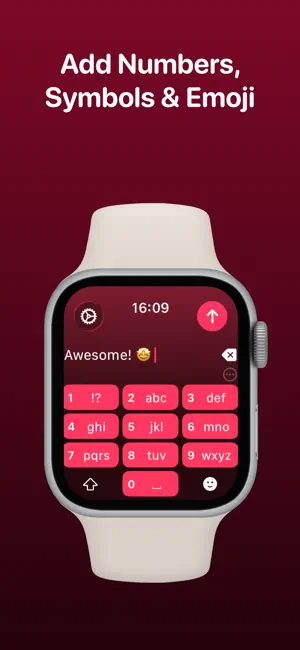
Type messages on your Apple Watch using a T9 style keyboard with RetroBoard. Typing messages on Apple Watch can be chore - Scribble doesn't always work and Dictation isn't great in public spaces. With RetroBoard, you get a classic T9 keyboard straight on your wrist, no awkward typos necessary! By adding a T9 keyboard to your Apple Watch, you can reply to iMessages quickly and privately. Autocorrect and smart text predictions quickly ensures what you type is accurate and makes sense. RetroBoard contains these great features: T9 KEYBOARD Add a T9 keyboard to your Apple Watch. Keys are easy to press and brings back the classic typing experience. SENDING RetroBoard uses the built-in Apple Messages app on your Apple Watch to send messages to your contacts. Type out your message, tap the send button and you’ll be taken to the Messages app with your message ready to go! There's support for the Apple Mail app too so you can emails all from your wrist! SUGGESTIONS As you’re typing, you can complete words using the suggestions bar above the keys. Tap on a suggestion to replace the current typed word with the full suggestion. Great for improving speed on the small screen! Access all suggestions by tapping the ellipsis icon next to the first suggestions. AUTOCORRECT (T9) Whilst typing, RetroBoard will make suggestions based on the keys pressed - just like predictive text. OTHER CHARACTERS RetroBoard has full support for adding symbols, numbers and other special characters. EMOJI RetroBoard supports adding an unlimited amount of emoji to a single message! Simply tap the emoji icon to get started and pick from Apple’s library, or one of your most recently used ones. THEMES Customize the look and feel of your keyboard with support for themes. MESSAGE PREVIEW Before sending your message, just tap the text field to view a full preview of your message. HAPTICS Choose to receive Haptic Feedback on actions like key presses and button actions. COMPLICATION For quick and easy access, you can add the RetroBoard Complication to your Watch Face. Just tap and the keyboard will launch. CURSOR Whilst typing on the keyboard, you can see exactly where you are with the pulsing blue cursor. Use the Digital Crown to move the cursor's position. SETTINGS Customize RetroBoard your way. Access the Settings menu by using the options button on the keyboard and you’ll be able to change the theme and toggle auto correct, suggestions & more. If you like this app, I’d really appreciate it if you could take the time to leave a positive review! Having issues? Please get in touch: Email: [email protected] Website: https://adamfoot.dev Please note, a supported Apple Watch is required for full app functionality. RetroBoard supports sending messages via SMS & iMessage through the Messages app or email through the Mail app. Some features may require a RetroBoard+ subscription which can be purchased in the app. You can cancel at anytime. Terms: https://adamfoot.dev/terms-of-use
Ratings & reviews
3.9
39 ratings
What’s new
Version 5.3.1 · Updated October 12, 2026
In this update: - Added full support for iPhone Duo. Content & toolbars have been adapted for both inner & outer displays. - Other bug fixes & improvements. If you like this app, please consider leaving a positive review! Having issues? Please get in touch: Email: [email protected] Website: https://adamfoot.dev
App privacy
The developer, Adam Foot, reported these privacy practices to Apple.
Data Not Linked to You
The following data, which may be collected but is not linked to your identity, may be used for the following purposes:
- Purchases: Purchase History
Used for: Analytics, App Functionality
Alternatives to RetroBoard - T9 Watch Keyboard
Looking for apps like RetroBoard - T9 Watch Keyboard? Here are 6 similar apps on the App Store. The highest rated is Minimalist Launcher: LessPhone (4.8/5), and all 6 are free to download.
-
 Daily Planner - Habit Builder
4.6
-
 Pomodoro Focus Timer: Krono
4.6
-
 Minimalist Launcher: LessPhone
4.8
-
 AI Detector & Humanizer・
4.5
-
 PDF Viewer: Reader and Editor
4.8
-
 Voice Notes: AI Transcribe
3.8
| App | Rating | Price | Last updated | Compare |
|---|---|---|---|---|
| RetroBoard - T9 Watch Keyboard | 3.9 / 5 (39 ratings) | Free | October 12, 2026 | |
| Daily Planner - Habit Builder | 4.6 / 5 (37) | Free | Mar 18, 2026 | Compare |
| Pomodoro Focus Timer: Krono | 4.6 / 5 (19) | Free | Aug 25, 2025 | Compare |
| Minimalist Launcher: LessPhone | 4.8 / 5 (61) | Free | Sep 29, 2026 | Compare |
| AI Detector & Humanizer・ | 4.5 / 5 (152) | Free | Oct 1, 2026 | Compare |
| PDF Viewer: Reader and Editor | 4.8 / 5 (243) | Free | Mar 4, 2026 | Compare |
| Voice Notes: AI Transcribe | 3.8 / 5 (193) | Free | Sep 28, 2026 | Compare |