

NEXGEN Mobile for iPhone
Nexgen Asset Management Business iPhoneiPadiPod touch
NEXGEN Mobile for iPhone is a free Business app for iPhone and iPad by Nexgen Asset Management. Rated 4.1/5 from 16 ratings. Requires iOS 15.0.
- Rating
- 4.1
- 16 ratings
- Price
- Free
- on the App Store
- Size
- 163 MB
- Age 17+
- Updated
- Aug 24
- 2026 · v2.1.0
Screenshots
About NEXGEN Mobile for iPhone
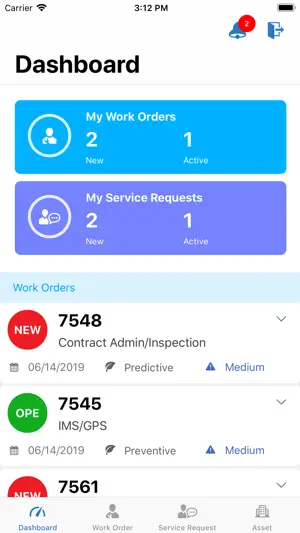
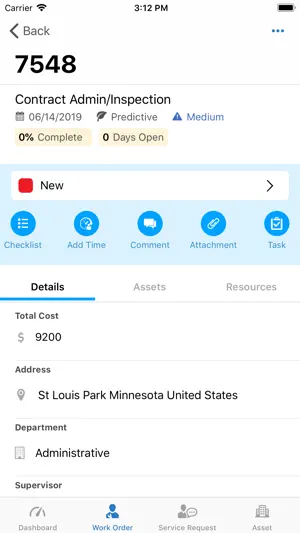
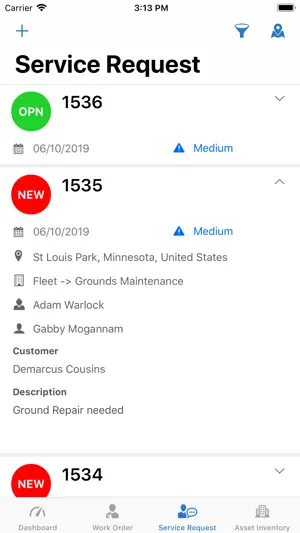
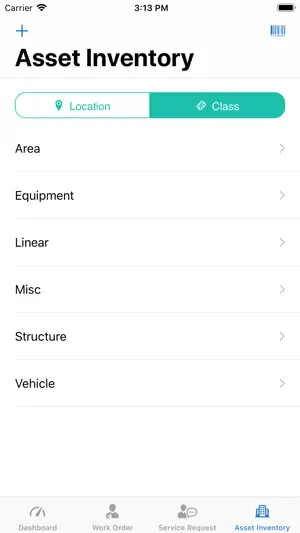
NEXGEN Mobile for iPhone brings our powerful EAM & CMMS software to the field, offering instant access to your organization’s entire asset database. In real time, maintenance managers can route work orders to field technicians who get instant notifications when work is assigned to them. Field users can easily open and close work orders, saving tremendous time, effort and resources. In addition to work orders this first edition of the NEXGEN Mobile for iPhone app provides an intuitively designed platform to manage service requests and asset inventory. If your assets are already mapped with ESRI, NEXGEN Mobile for iPhone will display your entire asset database on a map, complete with GIS attributes, layers and base maps. This first edition of the NEXGEN Mobile for iPhone app features: • DASHBOARD: Users can quickly view their top three work orders and service requests from the home screen with the ability to quickly view additional details on the go or get directions directly to the work site. • WORK ORDERS: Mobile work orders can transform the way your organization handles maintenance management. When work orders can be assigned, retrieved, edited and closed all from a mobile device then maintenance productivity and work efficiency is dramatically improved. • SERVICE REQUESTS: Improve responsiveness, transparency and accountability with service requests that show up on the GIS map the moment they’re submitted by a customer. Field staff can instantly respond to service requests and see which ones are nearest to their current location, color coded by priority. • ASSET INVENTORY: Users can search for asset inventory, add photos, modify information and create new assets. And everything gets updated in real time. • GIS: See all assets relative to your current location. View service requests and work orders on the map. Powerful mapping capabilities allow users to view, edit and report information from the field, saving time and improving efficiency. • NOTIFICATIONS: All push notifications work the same on the iPhone app just as they do on the iPad app. Note: You must have an NEXGEN Asset Management user account to login to the App. For help contact the NEXGEN Team at (888) 820-8880 or email us at [email protected].
Ratings & reviews
4.1
16 ratings
What’s new
Version 2.1.0 · Updated August 24, 2026
- Improvements and Fixes.
App privacy
The developer, Nexgen Asset Management, reported these privacy practices to Apple.
Data Linked to You
The following data, which may be collected and linked to your identity, may be used for the following purposes:
- Diagnostics: Crash Data, Performance Data
- Location: Precise Location, Coarse Location
- Identifiers: Device ID
Used for: Analytics, App Functionality
Data Not Linked to You
The following data, which may be collected but is not linked to your identity, may be used for the following purposes:
- Contact Info: Physical Address, Email Address, Name, Phone Number
- User Content: Photos or Videos
Used for: App Functionality
Alternatives to NEXGEN Mobile for iPhone
Looking for apps like NEXGEN Mobile for iPhone? Here are 6 similar apps on the App Store. The highest rated is SmartCover (5.0/5), and all 6 are free to download.


| App | Rating | Price | Last updated | Compare |
|---|---|---|---|---|
| NEXGEN Mobile for iPhone | 4.1 / 5 (16 ratings) | Free | August 24, 2026 | |
| BOSS811 | 4.0 / 5 (189) | Free | Sep 14, 2026 | Compare |
| Pulpstream 2025 | – | Free | May 23, 2026 | Compare |
| SmartCover | 5.0 / 5 (6) | Free | Sep 16, 2026 | Compare |
| WIMS Rio | 2.8 / 5 (14) | Free | Oct 13, 2026 | Compare |
| CBRE Tech | 3.1 / 5 (25) | Free | Sep 21, 2026 | Compare |
| SmartSights Mobile | 3.3 / 5 (6) | Free | Jan 31, 2026 | Compare |