

Soliton MailZen
Soliton Systems Europe N.V. Business iPhoneiPadiPod touch
Soliton MailZen is a free Business app for iPhone and iPad by Soliton Systems Europe N.V. Requires iOS 26.0. Updated June 15, 2026.
- Price
- Free
- on the App Store
- Size
- 241 MB
- Age 4+
- Updated
- Jun 15
- 2026 · v9.40.4
Screenshots


About Soliton MailZen
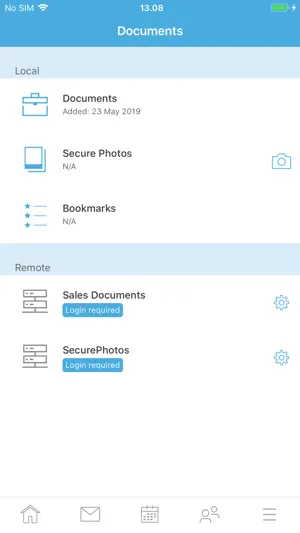
Soliton MailZen is the perfect solution to have secure access to the office workspace and applications, regardless of time and location, online and offline, without any MDM profile and restriction. All business applications and data are kept within an encrypted container. MailZen provides complete separation of business and personal data, the administrator can only control the secure container and not the private apps. PLEASE NOTE: The MailZen app is free, but requires signup for the MailZen services. Contact your IT department for further assistance. Security: - Secure container separating private and business data (required for COPE/BYOD) - Military-grade encryption based on industry standards (S/MIME, RSA, AES, EC) - Smartcard integration for highest security demands Infrastructure: - Supports MS Exchange - Supports HCL Domino - Supports various MDM systems (e.g. MobileIron and AirWatch) - Can also be managed without MDM - Provides integration with PKI and AD Email: - Send and receive end-to-end encrypted emails (S/MIME standard) - Messages are sender-verified through S/MIME signature - Send, receive, flag, navigate and organize emails easily - Notifications with background email fetching - Set custom “out of office” message - Open attached documents with Polaris Editor Calendar: - Easily manage events using a mobile device - Organize meetings and invite attendees to appointments - See meeting conflicts directly in email invitation with a one click-jump to calendar details - Display private appointments from the device calendar and appointments from other Exchange accounts and/or from IBM Traveler Contacts: - Manage business contacts quickly and easily - Access to corporate Global Address List, Domino Directory - Export of contacts for caller recognition (only phone number and email) - Other messenger apps (WhatsApp, Facebook, …) cannot access contact details inside the container Documents: - Documents and spreadsheets are stored inside the secure container - Documents are isolated from other apps and users - Send sensitive documents encrypted via email - Edit documents in Polaris Office Editor without leaving the secure container Tasks : - Synchronize and manage tasks Camera: - Sensitive pictures are stored securely inside the secure container - Pictures are isolated from other apps and users - Send pictures encrypted via email Browser: - Our new Browser has got a lot of cool features.
What’s new
Version 9.40.4 · Updated June 15, 2026
* Polaris Update: Extended License valid until June 30, 2027 (If you are missing the grey bar ;-) + New Features ++ Accessibility: Dynamic Text Sizes in the Team Mail Module, When Adding Shared Items, and on the Login Screen +++ Dynamic Text Sizes in the Team Mail Module +++ Dynamic Text Sizes When Adding Shared Folders, Mailboxes & Calendars +++ Dynamic Text Sizes on the Login Screen +++ Dynamic Text Sizes in the Time Picker in the Calendar, Tasks & Notes, and Contacts Modules ++ Adaptive User Interface for MailZen on iPad: Mail, Team Mail & Camera ++ Change the Design for Documents Independently of System Settings + Further Improvements ++ User-friendly Interface: Liquid Glass, Redesigned Buttons & Scalable Icons +++ Liquid Glass Effects in MailZen +++ Revised Buttons in MailZen Menu and Toolbars +++ Scalable SF Icons in the Tasks & Notes and Documents Modules ++ iOS Telephone App as Default Setting + Resolved Issues ++ General Resolved Issues +++ Navigation Bar not Visible After Login ++ Resolved Issues in the Mail Module +++ Changes to Attachments Not Saved When Forwarding in Team emails +++ Display Error When Forwarding and Replying to Emails With Classification +++ Error With Hyperlinks in Out-of-Office Notices +++ Registration Error With Mailboxes With Many Folders ++ Resolved Issues in the Calendar Module +++ Incorrect Error Message When Editing Events in Shared Calendars ++ Resolved Issues in the Documents Module +++ Polaris: Comment Function Unavailable After Update +++ Polaris: Word Attachments Can't be Opened +++ Polaris: Comments With Anonymous Authorship in Excel Documents
App privacy
The developer, Soliton Systems Europe N.V., reported these privacy practices to Apple.
Data Not Collected
The developer does not collect any data from this app.
Alternatives to Soliton MailZen
Looking for apps like Soliton MailZen? Here are 6 similar apps on the App Store. The highest rated is Monet Bank (5.0/5), and all 6 are free to download.
-
 SecurePIM
1.4
-
 Monet Bank
5.0
-
 Check Point Capsule Workspace
4.8
-
 CREFC Connect
5.0
-
 BlackBerry Work
1.7
-
 Check Point Capsule Connect
3.1
| App | Rating | Price | Last updated | Compare |
|---|---|---|---|---|
| Soliton MailZen | – | Free | June 15, 2026 | |
| SecurePIM | 1.4 / 5 (8) | Free | Sep 14, 2026 | Compare |
| Monet Bank | 5.0 / 5 (10) | Free | Apr 8, 2026 | Compare |
| Check Point Capsule Workspace | 4.8 / 5 (4) | Free | Jul 3, 2024 | Compare |
| CREFC Connect | 5.0 / 5 (2) | Free | Oct 20, 2026 | Compare |
| BlackBerry Work | 1.7 / 5 (643) | Free | Oct 23, 2026 | Compare |
| Check Point Capsule Connect | 3.1 / 5 (35) | Free | Oct 4, 2026 | Compare |
Compare Soliton MailZen with the top alternatives: ratings, updates, ASO score and keyword gaps →