

Watermark+ Photo Video
Orange Media CO.,Ltd Business iPhoneiPadiPod touch
Watermark+ Photo Video is a free Business app for iPhone and iPad by Orange Media CO.,Ltd. Rated 4.5/5 from 2,904 ratings. Requires iOS 15.0.
- Rating
- 4.5
- 2.9K ratings
- Price
- Free
- on the App Store
- Size
- 104 MB
- Age 4+
- Updated
- Aug 31
- 2026 · v7.0
Screenshots


About Watermark+ Photo Video
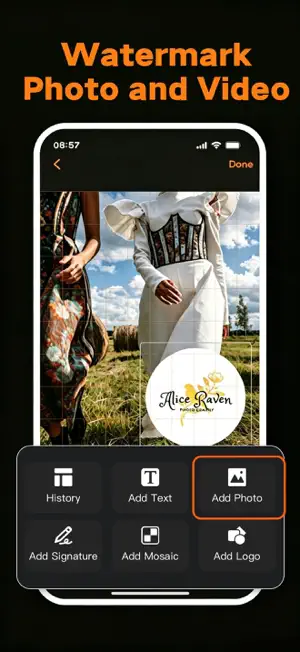
Watermark+ is the ultimate watermark maker for iPhone and iPad. Create professional watermarks for your photos and videos with ease. Whether you need to protect your photography, brand your business content, or add signatures to your artwork, Watermark+ has everything you need. KEY FEATURES • Logo Watermark — Design custom logos with built-in templates or import your own. Access a rich library of icons, shapes, and design elements. • Text Watermark — Add customizable text with full control over font, color, size, opacity, rotation, and alignment. Supports custom fonts and rich text styling. • Signature Watermark — Hand-draw your signature with an all-new GPU-accelerated drawing engine. Choose from 6 color presets and 3 line width options for ultra-smooth, responsive strokes. • Image Watermark — Overlay any image, logo, or icon as a watermark with precise positioning, scaling, and transparency controls. • QR Code Watermark — Generate QR codes from text or URLs and place them on your images and videos. • Mosaic Tool — Blur or pixelate sensitive areas with adjustable intensity. • Video Watermark — Add watermarks to videos with support for reverse playback, speed adjustment, and cover image editing. • Batch Processing — Watermark multiple photos simultaneously, saving time on bulk editing tasks. • Full-Screen Watermark — Apply tiled or repeating watermarks across the entire image for maximum protection. • Remove Watermark — Clean up unwanted marks or objects from your images. • Background Video — Set videos as dynamic backgrounds with overlaid watermarks. DESIGN TOOLS • Rich color palette with hex, RGB, and gradient support • Built-in custom font library with multiple typefaces • Precise positioning with drag, pinch, and zoom gestures • Adjustable opacity, rotation, scale, and alignment • Undo/Redo history for non-destructive editing • Save designs as templates for quick reuse • Export in high resolution without quality loss SUBSCRIPTION Watermark+ is free to download and use with basic features. Upgrade to Premium to unlock: • Batch watermarking • Video watermarking • Full-screen watermark • Remove watermark • Ad-free experience Two affordable plans: • Monthly: USD $3.99/month • Lifetime VIP: USD $21.99 one-time Privacy Policy:https://watermarklogo.blogspot.com/2021/07/privacy-policy.html Terms of service:https://watermarklogo.blogspot.com/2021/07/terms-of-service.html Website:https://watermarklogo.blogspot.com/2023/09/watermark.html Payment will be charged to your Apple ID account at confirmation of purchase. Subscription automatically renews unless auto-renew is turned off at least 24 hours before the end of the current period. You can manage subscriptions and turn off auto-renewal in your Apple ID account settings after purchase. Any unused portion of a free trial period will be forfeited when you purchase a subscription. Privacy Policy: Available within the app. Terms of Service: Available within the app. Download Watermark+ today and start creating beautiful watermarks!
Ratings & reviews
4.5
2.9K ratings
What’s new
Version 7.0 · Updated August 31, 2026
Watermark+ 7.0 is here — fewer crashes! • More Stable with Large Photos — Fixed a crash some users hit when adding watermarks to very large photos (48MP and panoramas). Your edits now finish safely. • Cleaner Selection Screens — Better readability for the photo/video picker hints, auto-hidden after you pick, and a fixed preview button placement. Thank you for using Watermark+! If you enjoy the app, please leave a review — it helps us keep improving.
App privacy
The developer, Orange Media CO.,Ltd, reported these privacy practices to Apple.
Data Used to Track You
The following data may be used to track you across apps and websites owned by other companies:
- Diagnostics: Crash Data
Data Not Linked to You
The following data, which may be collected but is not linked to your identity, may be used for the following purposes:
- Identifiers: User ID
- Diagnostics: Crash Data
Used for: Third-Party Advertising, App Functionality
Alternatives to Watermark+ Photo Video
Looking for apps like Watermark+ Photo Video? Here are 6 similar apps on the App Store. The highest rated is Add Watermark -Batch Process (4.8/5), and all 6 are free to download.
-
 Watermark - Watermark Maker
4.3
Watermark - Watermark Maker
4.3
-
 Watermark Maker & Creator Pro
4.6
Watermark Maker & Creator Pro
4.6
-
 Add Watermark -Batch Process
4.8
Add Watermark -Batch Process
4.8
-
 PhotoMarks - Watermark Photos
4.6
PhotoMarks - Watermark Photos
4.6
-
 Watermark Maker: Photo & Video
-
 Add Watermark to Pics & Video
| App | Rating | Price | Last updated | Compare |
|---|---|---|---|---|
| Watermark+ Photo Video | 4.5 / 5 (2,904 ratings) | Free | August 31, 2026 | |
| Watermark - Watermark Maker | 4.3 / 5 (397) | Free | Oct 29, 2024 | Compare |
| Watermark Maker & Creator Pro | 4.6 / 5 (193) | Free | Oct 16, 2024 | Compare |
| Add Watermark -Batch Process | 4.8 / 5 (5,876) | Free | Oct 19, 2026 | Compare |
| PhotoMarks - Watermark Photos | 4.6 / 5 (655) | Free | Oct 31, 2026 | Compare |
| Watermark Maker: Photo & Video | – | Free | Jul 6, 2026 | Compare |
| Add Watermark to Pics & Video | – | Free | Jul 14, 2026 | Compare |