

Photo Finish++
James Spencer Productivity iPhoneiPadiPod touch
Photo Finish++ is a free Productivity app for iPhone and iPad by James Spencer. Rated 5.0/5 from 3 ratings. Requires iOS 15.0. Updated September 24, 2026.
- Rating
- 5.0
- 3 ratings
- Price
- Free
- on the App Store
- Size
- 41 MB
- Age 4+
- Updated
- Sep 24
- 2026 · v1.0.6
Screenshots


About Photo Finish++
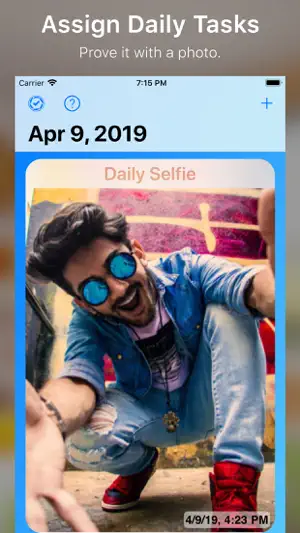
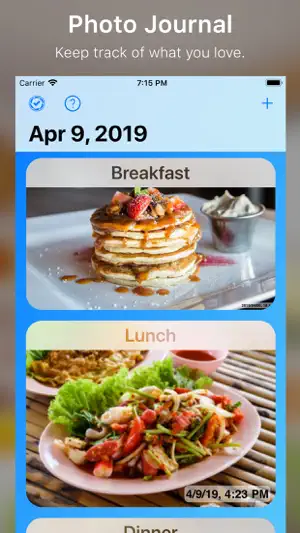
Prove it with a Photo. Photo Finish++ at its core is a daily task tracking app that you prove things get done by taking a photo. However, the usefulness of Photo Finish++ goes well beyond this. Photo Finish++ can be used for a number of different tasks - depending on your needs. Below are some examples. - Daily Selfie - Food Journal - Log your breakfast, lunch and dinner. - Daily Chores - Not only for yourself but for others in your family. - Peace of mind - It’s great for showing you that you finished a task that might otherwise bother you - like turning off the stove or shutting the garage door. *Today View & Today Widget Whenever you launch Photo Finish++, you will be showed the today screen. You can quickly review the photos you got done and see what else you have to compete for the day. From here you can add new tasks and reorder the tasks in any order you like. Once upgraded, you aren’t limited by the number of tasks you can assign. *Pop Up Buttons The main goal of Photo Finish++ is to let your photos do the talking. For this reason, the action buttons will only appear the you need them too. Simply tap the photo and pick from the pop up list of actions. *Reminders & Push Notifications Whenever a task is completed, all the devices using your account will get a push notification. This is great for a child to automatically communicate to a parent when something was done. If you want to be reminded at a set time, you can set each task a reminder time and Photo Finish++ will send you a push alert. When your alert triggers, you will have the option to snooze your alert in case you aren’t in a good place to take care of the task. * Siri Shortcuts Use Siri Shortcuts to help you complete your tasks quickly and with your voice. * Calendar You can see all your photos for a task in a convenient calendar view. This is great to see your progress over time. * Automatic Sync When you launch Photo Finish++, you will be asked to create an account. This will allow your data to be stored in the cloud and automatically synced to all devices using your account. this account also makes the push notification system possible. * Themes Photo Finish++ has many color themes to choose from. Don’t like the default blue? Pick something that better suits your style. We are certain that Photo Finish++ will meet all your needs. So, make the leap with Jump Gap Software's Photo Finish++.
What’s new
Version 1.0.6 · Updated September 24, 2026
Updates for iOS 27
App privacy
The developer, James Spencer, reported these privacy practices to Apple.
Data Used to Track You
The following data may be used to track you across apps and websites owned by other companies:
- Identifiers: Device ID
Data Not Linked to You
The following data, which may be collected but is not linked to your identity, may be used for the following purposes:
- Identifiers: Device ID
- User Content: Photos or Videos
- Diagnostics: Crash Data
Used for: Third-Party Advertising, Analytics, App Functionality
Alternatives to Photo Finish++
Looking for apps like Photo Finish++? Here are 6 similar apps on the App Store. The highest rated is BITReminder (5.0/5), and all 6 are free to download.
-
 BITReminder
5.0
BITReminder
5.0
-
 Crescent Keys: Video Time Note
-
 Looksee: Social + Productivity
5.0
Looksee: Social + Productivity
5.0
-
 Looksee Solo Visual To Do List
5.0
Looksee Solo Visual To Do List
5.0
-
 Lekotech
-
 Elite: unique fonts & symbols
| App | Rating | Price | Last updated | Compare |
|---|---|---|---|---|
| Photo Finish++ | 5.0 / 5 (3 ratings) | Free | September 24, 2026 | |
| BITReminder | 5.0 / 5 (1) | Free | Oct 17, 2024 | Compare |
| Crescent Keys: Video Time Note | – | Free | Oct 29, 2023 | Compare |
| Looksee: Social + Productivity | 5.0 / 5 (9) | Free | Nov 12, 2025 | Compare |
| Looksee Solo Visual To Do List | 5.0 / 5 (2) | Free | Mar 14, 2026 | Compare |
| Lekotech | – | Free | Sep 18, 2026 | Compare |
| Elite: unique fonts & symbols | – | Free | Mar 21, 2024 | Compare |
Compare Photo Finish++ with the top alternatives: ratings, updates, ASO score and keyword gaps →