

AlbumSlim: AI Photo Cleaner
深圳市义缘聚网络科技有限公司 Utilities iPhoneiPadiPod touch
AlbumSlim: AI Photo Cleaner is a free Utilities app for iPhone and iPad by 深圳市义缘聚网络科技有限公司. Rated 1.0/5 from 1 ratings. Requires iOS 17.0.
- Rating
- 1.0
- 1 ratings
- Price
- Free
- on the App Store
- Size
- 2 MB
- Age 4+
- Updated
- Apr 30
- 2026 · v1.3
Screenshots


About AlbumSlim: AI Photo Cleaner
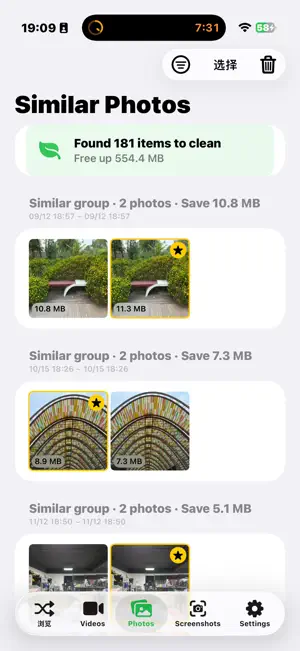
AlbumSlim frees up iPhone storage by finding the photos and videos you don't need — using on-device AI. Nothing ever leaves your phone. ■ SMART CLEANUP IN ONE TAP Scan your entire library and get instant suggestions: blurry shots, duplicates, oversized videos, and forgotten screenshots. ■ FREE YOUR STORAGE • Similar Photos — Groups near-identical shots and picks the sharpest. • Burst Cleanup — Keeps the best frame from every burst. • Bad Photo Detection — Finds blurry, black, white, or finger-blocked shots. • Large Video Compression — HEVC encoding saves 50–70% space with no visible quality loss. • Screenshot Manager — Auto-classifies by content; bulk-delete old ones. • Video Suggestions — Long, low-quality, or duplicate videos flagged automatically. ■ 100% PRIVATE All analysis runs locally using Apple's Vision framework. No uploads. No tracking. No account needed. ■ BEAUTIFUL STORAGE DASHBOARD See exactly what's taking up space — category breakdowns, potential savings, at-a-glance charts. Requires iOS 17. Optimized for iPhone and iPad. Privacy Policy: https://chunbingtang.com/privacy.html
What’s new
Version 1.3 · Updated April 30, 2026
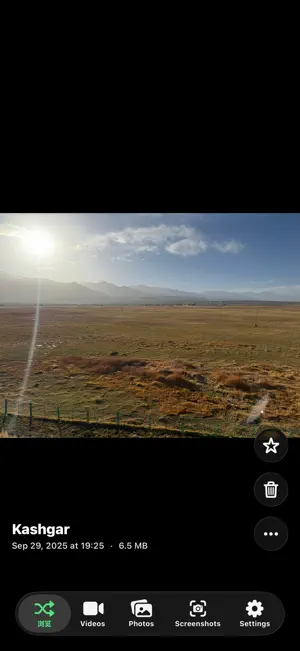
AlbumSlim 1.3 · Major Update All-New "Random Browse" Home Swipe up and down like short videos to rediscover your photo library. Videos autoplay, Live Photos toggle on a single tap, pinch to zoom for details. Location, date, and file size appear automatically in the bottom-left; favorite, delete, or share with one tap in the bottom-right. Global Trash · Delete Without Regret All cleanup actions are now soft deletes — videos, similar photos, blurry shots, bursts, screenshots, and oversized photos all go to the AlbumSlim Trash. Restore anything within 30 days. No more accidental permanent losses. Screenshot Detail Page Fully Upgraded Aligned with the system Photos app: pinch to zoom, double-tap to enlarge, swipe down to dismiss, full-screen immersive view — seamless and familiar. Unified Visuals & Interactions Native 5-tab navigation with a clean, intuitive layout. Buttons, copy, icons, toasts, and haptic feedback are fully consistent across all modules. Multi-select, delete, and edit modes feel exactly the same everywhere.
App privacy
The developer, 深圳市义缘聚网络科技有限公司, reported these privacy practices to Apple.
Data Not Collected
The developer does not collect any data from this app.
Alternatives to AlbumSlim: AI Photo Cleaner
Looking for apps like AlbumSlim: AI Photo Cleaner? Here are 6 similar apps on the App Store. The highest rated is GoodPhotos:Photo Cleaner (5.0/5), and all 6 are free to download.
-
 巨鲨闪图
-
 GoodPhotos:Photo Cleaner
5.0
-
 极简删图
-
 Swipe Clean Photos: Free Space
-
 MemFree - AI Photo Cleaner
-
 AI Gallery Cleaner
| App | Rating | Price | Last updated | Compare |
|---|---|---|---|---|
| AlbumSlim: AI Photo Cleaner | 1.0 / 5 (1 rating) | Free | April 30, 2026 | |
| 巨鲨闪图 | – | Free | Jun 4, 2026 | Compare |
| GoodPhotos:Photo Cleaner | 5.0 / 5 (4) | Free | Oct 16, 2026 | Compare |
| 极简删图 | – | Free | Aug 31, 2026 | Compare |
| Swipe Clean Photos: Free Space | – | Free | Aug 31, 2026 | Compare |
| MemFree - AI Photo Cleaner | – | Free | Jun 24, 2026 | Compare |
| AI Gallery Cleaner | – | Free | Oct 29, 2025 | Compare |