

Quick Timer: The Fastest Timer
Takeshi Ejiri Productivity iPhoneiPadiPod touch
Quick Timer: The Fastest Timer is a free Productivity app for iPhone and iPad by Takeshi Ejiri. Rated 3.0/5 from 5 ratings. Requires iOS 15.6.
- Rating
- 3.0
- 5 ratings
- Price
- Free
- on the App Store
- Size
- 9 MB
- Age 4+
- Updated
- Dec 15
- 2025 · v1.3.1
Screenshots


About Quick Timer: The Fastest Timer
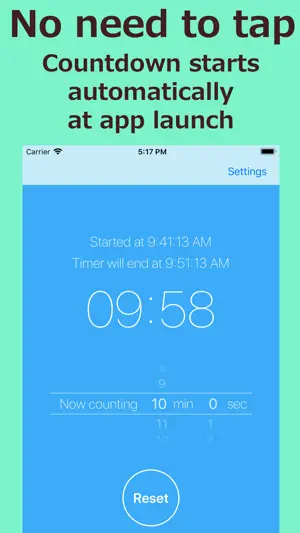
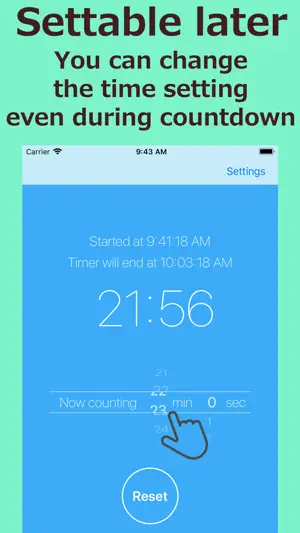
Timer starts at the same time as app launch. Time setting can be changed later! - The fastest timer app to launch - Just start this app when timer is needed. Countdown starts automatically! - You can always change the time setting - Even during countdown, you can freely change the time setting! The count is adjusted without affecting the countdown start time. - The default time can be set freely - You can freely set the default time which is automatically set at app launch. In the case of using on the fixed time setting, even tap is not required after app launch! Also it can be set to not start timer automatically. - Notification tells you even in the background - You do not need to keep the app open. Some notifications tell you the timer finish certainly. [The background of Quick Timer development] After filling hot water in the cup ramen, or after putting pasta in the pot ..., "How much time should I measure...?" I am often faced with such situation.... I think there should be app like "at first the timer launch, and settable later", and I made it. Actually this "settable later" function is more convenient than I had expected; there is no need to hurry to set time before timer launch, and also it can be corrected if there is any mistake, it works quite good. As such a timer, this have slightly unusual operation, however it will be soon got used to. If you like Quick Timer, please post a review. It helps my development greatly. Thank you! ■■■ About paid upgrade ■■■ All ads will be hidden in the upgraded version. ● About Auto-Renewing Subscription Subscription automatically renews unless auto-renewing is turned off at least 24-hours before the current period ends. Your Apple ID account will be charged for auto-renewing within 24-hours before the end of the current period. ● Manage and Cancel Subscriptions You can manage your subscriptions and turn off auto-renewing from App Store account settings after purchase. ● Notes ・ If you turn off auto-renewing you will have access to your subscribed content until the end of the current period. ・ Current subscriptions cannot be canceled while active. ・ Payments will be charged to your Apple ID account at confirmation of purchase. ● Terms of Use / Privacy Policy http://take-e.sblo.jp/article/185509242.html
Ratings & reviews
3.0
5 ratings
What’s new
Version 1.3.1 · Updated December 15, 2025
Now updated for the latest iOS.
App privacy
The developer, Takeshi Ejiri, reported these privacy practices to Apple.
Data Used to Track You
The following data may be used to track you across apps and websites owned by other companies:
- Location: Coarse Location
- Identifiers: Device ID
- Usage Data: Advertising Data, Other Usage Data
- Diagnostics: Crash Data, Performance Data
Data Not Linked to You
The following data, which may be collected but is not linked to your identity, may be used for the following purposes:
- Location: Coarse Location
- Identifiers: Device ID
- Usage Data: Advertising Data, Other Usage Data
- Diagnostics: Crash Data, Performance Data
Used for: Third-Party Advertising