

JumpEye
株式会社S-CADE Sports iPhoneiPadiPod touchMac
JumpEye is a paid Sports app for iPhone and iPad by 株式会社S-CADE. Rated 4.7/5 from 3 ratings. Requires iOS 16.6. Updated December 20, 2025.
- Rating
- 4.7
- 3 ratings
- Price
- 2.99 USD
- on the App Store
- Size
- 5 MB
- Age 4+
- Updated
- Dec 20
- 2025 · v7.2.2
Screenshots

About JumpEye
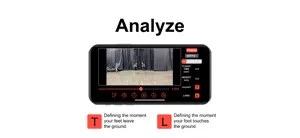
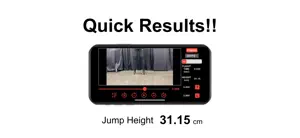
JUMP EYE ◆Attention on using slow videos in the camera roll◆ The playback speed of slow videos saved in the camera roll will be edited to normal speed forcibly instead of slow at the beginning and the end of the video. If you load the video as it is, the playback speed at the beginning and end of the video will not be slow in JumpEye as well, so you will not be able to measure the video accurately. To fix this issue, go to the Photos app, select the video you want to import and tap the Edit button in the upper right corner of the playback screen. The barcode white lines displayed at the bottom of the video on the edit screen will be narrower at the left and right edges than at the center. By widening the spacing between the rightmost and leftmost white lines, you can slow down the playback speed of all of your videos. After editing, please load the video in JumpEye for measurement. In addition, if you can not start the camera application in JumpEye, please open the settings application and search "JumpEye" in the search window. Tap "JumpEye" in the search results, you will go to the privacy settings screen of JumpEye. After that, please give permission for all photos, microphone, camera. □General Information□ JUMP EYE has been developed to calculate the vertical jump height by using the flight time. Use your iPhone's high-speed camera to measure the flight time during a vertical jump. □Procedure□ 1. Open JUMP EYE and adjust the camera’s focus on an athlete's feet. 2. Simply record videos of a vertical jump using Slo-Mo (120/240 fps) or import the ones you want from the Photo Library. 3. Once we playback the video, we have to then manually go through frame by frame to identify and mark the takeoff and landing frames (press “start” and “stop”). 4. The formula then automatically calculates the duration of the flight and the jump height. □Main characteristics□ ・Videos are given an automatic file name (hh:mm:ss), which can be edited by holding down on the icon for one second, then we can rename or delete the file. ・After marking the frames, the jump height is automatically labelled after the file name. ・You can also import movies from the Photo Library. ・Manual focus makes feet and floor easily identifiable and precise. ・You can playback the movie in 3 ways (manual slider, frame by frame, and 10 frame mode). ・The pinch-to-zoom feature is available. ・The Rebound Jump Index (RJI) can be calculated by continuous jumping (press “RJindex”). □Note□ The equation to calculate jump height is justified only if the center of mass height is the same at takeoff and landing. Therefore, if you land on the ground in a crouched position, your jump height will be overestimated.
What’s new
Version 7.2.2 · Updated December 20, 2025
Minor fixed
App privacy
The developer, 株式会社S-CADE, reported these privacy practices to Apple.
Data Not Linked to You
The following data, which may be collected but is not linked to your identity, may be used for the following purposes:
- Location: Coarse Location
- Identifiers: User ID
- Usage Data: Product Interaction
- Diagnostics: Crash Data, Performance Data
Used for: Analytics, App Functionality
Alternatives to JumpEye
Looking for apps like JumpEye? Here are 6 similar apps on the App Store. The highest rated is バスケットスコアシート 〜デジタルスコアシート〜 (1.0/5), and 4 of the 6 are free to download.
-
 JUMP! - Measure your jump
-
 FAST!
FAST!
-
 Chrono Tap
-
 SPEED! - Measure your speed
-
 バスケットスコアシート 〜デジタルスコアシート〜
1.0
バスケットスコアシート 〜デジタルスコアシート〜
1.0
-
 モバイルマルチジャンプテスタ
| App | Rating | Price | Last updated | Compare |
|---|---|---|---|---|
| JumpEye | 4.7 / 5 (3 ratings) | 2.99 USD | December 20, 2025 | |
| JUMP! - Measure your jump | – | Free | Jul 25, 2025 | Compare |
| FAST! | – | Free | Jul 25, 2025 | Compare |
| Chrono Tap | – | 9.99 USD | Feb 17, 2026 | Compare |
| SPEED! - Measure your speed | – | Free | Sep 5, 2025 | Compare |
| バスケットスコアシート 〜デジタルスコアシート〜 | 1.0 / 5 (1) | 1.99 USD | Oct 2, 2026 | Compare |
| モバイルマルチジャンプテスタ | – | Free | Feb 6, 2026 | Compare |
Compare JumpEye with the top alternatives: ratings, updates, ASO score and keyword gaps →