

Sound Drop AR
Philippe Zay Games iPhoneiPadiPod touch
Sound Drop AR is a paid Games app for iPhone and iPad by Philippe Zay. Rated 4.3/5 from 4 ratings. Requires iOS 15.6. Updated October 9, 2025.
- Rating
- 4.3
- 4 ratings
- Price
- 0.99 USD
- on the App Store
- Size
- 133 MB
- Age 4+
- Updated
- Oct 9
- 2025 · v2.0.0
Screenshots
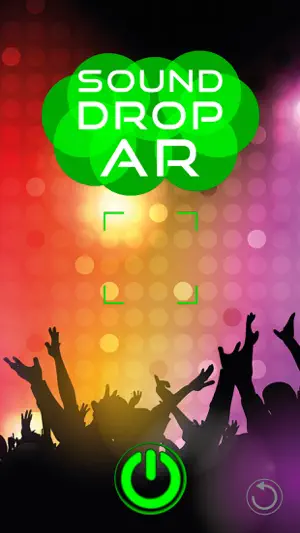
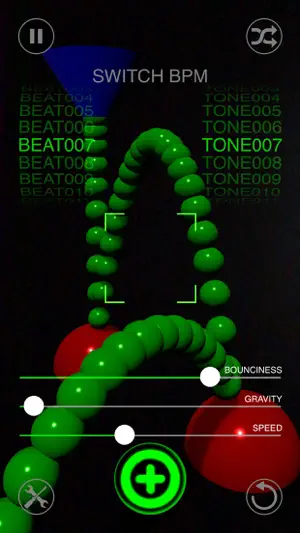
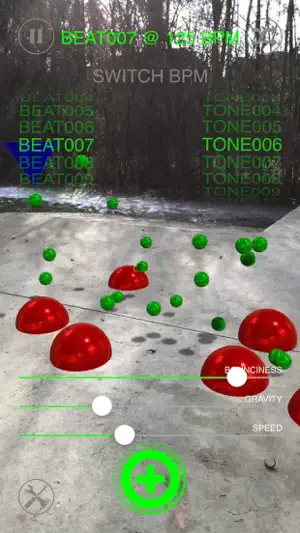

About Sound Drop AR
Sound Drop AR - Build beats in your space. Turn any surface into a playful drum machine. Place reactors in AR, drop bouncing balls, and let physics create evolving rhythms. Every reactor carries its own sound—tap to pick one from 100+ effects, or shuffle for happy accidents. Add beat loops and tone sequences, tweak speed, bounciness, and gravity, and watch (and hear) your room groove. How it works - Move your device to scan—use the focus brackets to place your first reactor. - Tap + to add more reactors and shape the rhythm in space. - Tap a reactor to choose its sound from the built-in library (or randomize). - Adjust Speed, Bounciness, and Gravity to sculpt the feel. - Blend in beat loops and tone sequences at 125 or 130 BPM. Highlights - 100+ sound effects for reactors, plus curated loops & tone lines - Real physics = natural grooves (balls live ~10s for constant motion) - Tap-to-assign sounds with searchable picker & instant preview - Quick BPM switch (125 / 130) and global speed control - Glass UI (iOS 26) — cleaner, brighter, more touch-friendly - Pause/Resume, randomize sets, long-press to delete reactors - Works offline. No logins. No ads. What’s New - Complete UI redesign with the new iOS 26 Glass style - New coaching overlay & focus square for faster placement - Rebuilt audio engine & sound browser (search, preview, tap-to-apply) - Record an audio session and share by mail or Air-Drop - Snappier performance, smoother animations - Pan on empty space to move the directional light (orbit + height) for dynamic shadows - General polish across AR placement, labels, shadows, and controls Tip: Spread reactors at different heights and tweak gravity for polyrhythms. Short bounces = tighter grooves; higher throws = airy, evolving patterns. Enjoy exploring rhythms in 3D
What’s new
Version 2.0.0 · Updated October 9, 2025
What’s New (2.0.0) - Complete UI redesign with the new iOS 26 Glass style - New coaching overlay & focus square for faster placement - Rebuilt audio engine & sound browser (search, preview, tap-to-apply) - Record an audio session and share by mail or Air-Drop - Snappier performance, smoother animations - Pan on empty space to move the directional light (orbit + height) for dynamic shadows - General polish across AR placement, labels, shadows, and controls
App privacy
The developer, Philippe Zay, reported these privacy practices to Apple.
Data Not Collected
The developer does not collect any data from this app.
Alternatives to Sound Drop AR
Looking for apps like Sound Drop AR? Here are 6 similar apps on the App Store. The highest rated is i Classic Piano 3D (5.0/5), and 4 of the 6 are free to download.
-
 KlangGarten
-
 Math Challenge - Math Game
-
 i Classic Piano 3D
5.0
i Classic Piano 3D
5.0
-
 Fit Beats: Music Game EDM Beat
4.1
Fit Beats: Music Game EDM Beat
4.1
-
 Color Rush: Smash Rhythm 3D
4.1
Color Rush: Smash Rhythm 3D
4.1
-
 hyperPad Hub
3.5
hyperPad Hub
3.5
| App | Rating | Price | Last updated | Compare |
|---|---|---|---|---|
| Sound Drop AR | 4.3 / 5 (4 ratings) | 0.99 USD | October 9, 2025 | |
| KlangGarten | – | 0.29 USD | Dec 19, 2024 | Compare |
| Math Challenge - Math Game | – | Free | Sep 29, 2025 | Compare |
| i Classic Piano 3D | 5.0 / 5 (2) | 2.99 USD | Dec 1, 2023 | Compare |
| Fit Beats: Music Game EDM Beat | 4.1 / 5 (19) | Free | Sep 1, 2025 | Compare |
| Color Rush: Smash Rhythm 3D | 4.1 / 5 (87) | Free | Nov 7, 2024 | Compare |
| hyperPad Hub | 3.5 / 5 (113) | Free | Sep 21, 2026 | Compare |
Compare Sound Drop AR with the top alternatives: ratings, updates, ASO score and keyword gaps →