

GoPiano
Elliott Griffin Music iPhoneiPadiPod touch
GoPiano is a free Music app for iPhone and iPad by Elliott Griffin. Rated 5.0/5 from 4 ratings. Requires iOS 17.0. Updated October 25, 2026.
- Rating
- 5.0
- 4 ratings
- Price
- Free
- on the App Store
- Size
- 6 MB
- Age 4+
- Updated
- Oct 25
- 2026 · v2.0
Screenshots

About GoPiano
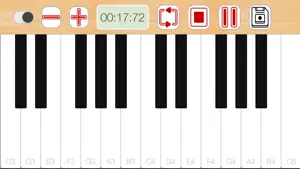
A piano you can actually play with both hands. GoPiano opens straight onto the keyboard. No menu, no setup, no account — touch a key and it sounds. PLAY • Multi-touch keys: hold a chord, slide between notes, play with both hands • How hard a note sounds depends on where you strike the key • A sustain pedal, for letting notes ring • One to three octaves depending on your screen, and shift the range with a tap • Note names on the keys, until you no longer need them RECORD • Tap record and play. Tap again to stop. • Play it back on the keyboard itself and watch the keys light up exactly as you pressed them • Keep the take or scrub it and go again KEEP AND SHARE • Saved melodies stay on your device and show up in the Files app, under GoPiano • Share the audio anywhere — Messages, Mail, AirDrop, anything that takes a file • Or export a video of the keyboard playing your melody back, keys lighting up, audio underneath. It is drawn fresh rather than screen-recorded, so there is no status bar, no fingers in the way and nothing to crop. PRIVATE BY DEFAULT • No account, no sign-in, no tracking, no analytics • No microphone access. GoPiano records its own sound from inside the app, so it never asks to listen to the room. • Nothing you play leaves your device unless you share it yourself Piano samples from the Piano FF pack by jobro on Freesound, used under CC BY 3.0 and modified.
What’s new
Version 2.0 · Updated October 25, 2026
GoPiano has been rebuilt from the ground up. • A new piano, sampled across the keyboard and tuned to concert pitch • How hard a note sounds now depends on where you strike the key • A sustain pedal • Record a take, then watch it play back on the keyboard with the keys lighting up • Export a melody as a video: the keyboard animating, your audio underneath, nothing screen-recorded • Melodies are saved as ordinary .m4a files — find them in the Files app, share them anywhere • A wider keyboard on iPad • Rebuilt in SwiftUI for current iPhones and iPads • GoPiano no longer asks for microphone access
App privacy
The developer, Elliott Griffin, reported these privacy practices to Apple.
Data Not Collected
The developer does not collect any data from this app.
Alternatives to GoPiano
Looking for apps like GoPiano? Here are 6 similar apps on the App Store. The highest rated is ArtPiano - Piano simulator (5.0/5), and 5 of the 6 are free to download.
-
 The portable piano
-
 Pianovera: Falling Note Piano
-
 ArtPiano - Piano simulator
5.0
-
 Beat Blocks - Rhythm Practice
4.9
-
 Watch Metronome with Haptics
4.3
-
 MIDI Piano
4.7
| App | Rating | Price | Last updated | Compare |
|---|---|---|---|---|
| GoPiano | 5.0 / 5 (4 ratings) | Free | October 25, 2026 | |
| The portable piano | – | Free | Aug 18, 2026 | Compare |
| Pianovera: Falling Note Piano | – | Free | Nov 2, 2026 | Compare |
| ArtPiano - Piano simulator | 5.0 / 5 (1) | Free | Aug 20, 2026 | Compare |
| Beat Blocks - Rhythm Practice | 4.9 / 5 (8) | 1.99 USD | Jun 5, 2026 | Compare |
| Watch Metronome with Haptics | 4.3 / 5 (3) | Free | Nov 3, 2026 | Compare |
| MIDI Piano | 4.7 / 5 (7) | Free | Aug 4, 2026 | Compare |
Compare GoPiano with the top alternatives: ratings, updates, ASO score and keyword gaps →