

Video Audio Editor VideoMaster
Future Moments Photo & Video iPhoneiPadiPod touchMac
Video Audio Editor VideoMaster is a free Photo & Video app for iPhone and iPad by Future Moments. Rated 4.3/5 from 603 ratings. Requires iOS 17.6.
- Rating
- 4.3
- 603 ratings
- Price
- Free
- on the App Store
- Size
- 83 MB
- Age 4+
- Updated
- Sep 22
- 2026 · v4.1
Screenshots
About Video Audio Editor VideoMaster
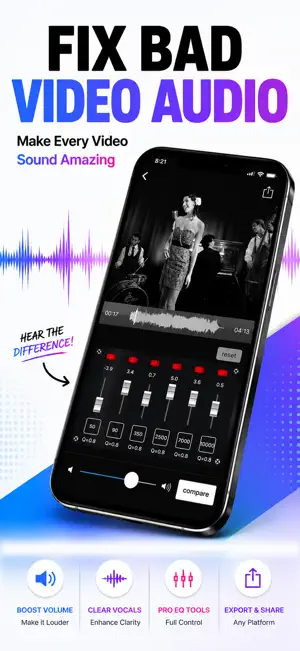
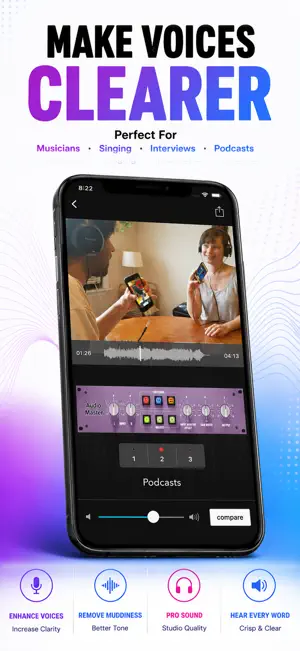
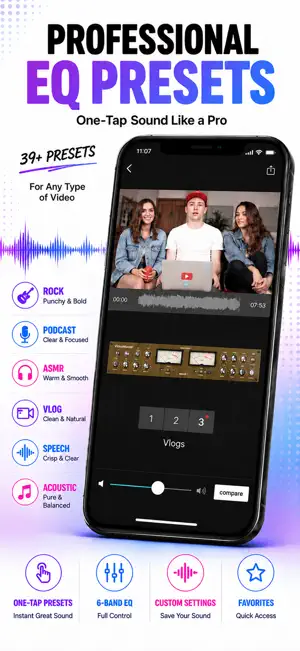
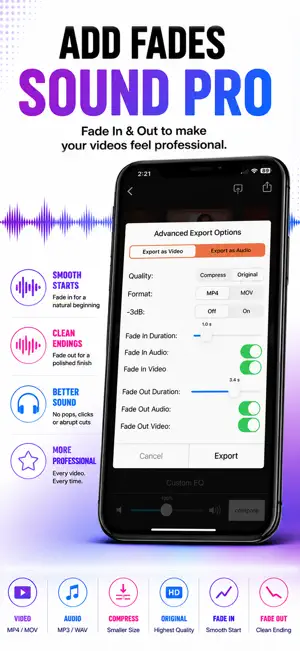
VideoMaster is the only app with an equalizer and volume boost to fully adjust the sound of your videos. Import a video and use a 6-band equalizer or the many presets to improve the sound. No video quality is lost. Export the video as the same size, smaller size for easy sharing, or just extract the audio. Geared towards filmmakers, Youtubers, Vloggers, Instagram, tiktok users, music lovers, musicians who record live videos, voiceover artists, podcasters and more, VideoMaster is the video sibling to our AudioMaster app. Our apps come with full customer support through the side menu. This is a subscription app. If you'd like to own it with a one time purchase please download VideoMaster Pro. The different subscription options are given when you tap the export icon on the top right of the main screen. A great tool to get your videos sounding better than they ever were. Buy one version and own it on all of your iPhones and iPads. FEATURES ▪ Fully adjustable 6-Band Equalizer ▪ Adjust the Frequency, Gain and Q. ▪ Tap Numeric Box to Type Exact Freq, Gain or Q. ▪ Extract the Audio from Your Video ▪ Mute the Audio in your Video ▪ Save as Original Size or Compress for Sharing ▪ Easily Compare to your Original Video ▪ Press and Hold an EQ Module to Bypass It ▪ It Never Overwrites Your Original File 39 EQ PRESETS ▪ Vlog ▪ ASMR ▪ Narrative ▪ Podcasts ▪ Rock ▪ Folk ▪ Blues ▪ Classical ▪ Country ▪ Hip Hop ▪ Electronic ▪ Jazz ▪ Latin ▪ New Age ▪ Pop ▪ R&B / Soul ALSO BY FUTURE MOMENTS: Jam Recorder You Jam. We Split into Stems Podcast Cleaner Remove Noise from Audio Video Audio Splitter MSV Remix Remix the Audio of Your Video MicSwap Remix AI Audio Stem Separator Audio Cleaner AI Audio Cleanup Magic MAIVE AI Video Generator VideoVerb Add Reverb to Your Videos Hear Boost Get Super Hearing & Recording MicSwap Mic Modeler & Recorder MicSwap MultiTrack Multitrack Mic Modeler & Recorder MicSwap Video Edit Video Audio with Mic Models & FX MicSwap Camera The Best Sounding Video Camera AudioFix Denoise & Clean the Sound of Your Video VideoMaster Instant Audio Post-Production for Videos AudioVerb Add Reverb & Delay to Your Audio AudioMaster Audio Mastering for Podcasts & Music Volume Booster Easily Boost the Sound of Your Audio or Video Any questions just email us: [email protected] www.future-moments.com We answer every message. VideoMaster is free to download. We offer 3 subscription plans: Monthly Unlimited Use $4.99 USD 6 Month Unlimited Use $9.99 USD Yearly Unlimited Use $14.99 USD If you choose to subscribe, your subscriptions will automatically renew at the end of the selected time and will charge your credit card through your iTunes account. You can turn off auto-renew at any time from your iTunes account settings. Payment will be charged to iTunes Account at confirmation of purchase. Subscription automatically renews unless auto-renew is turned off at least 24-hours before the end of the current period. Account will be charged for renewal within 24-hours prior to the end of the current period, and identify the cost of the renewal. If you choose to subscribe, your subscriptions will automatically renew at the end of the selected time and will charge your credit card through your iTunes account. You can turn off auto-renew at any time from your Apple account settings. Future Moments LLC privacy policy: http://future-moments.com/faq Future Moments LLC terms of use: http://future-moments.com/faq
Ratings & reviews
4.3
603 ratings
What’s new
Version 4.1 · Updated September 22, 2026
NEW! - 1/2/3 on Presets are now Low/Med/High (same sound) - Added a spectrogram so you can now see the frequencies and amplitude. - Videos no longer remain in the app after closing so they open more quickly. Want more magic? Check out Video Audio Splitter! Split the audio of your video into stems, mute or solo tracks, remix. Add more by recording or importing new audio. Any features you'd like us to add? We're listening! Please email us through the side menu of the app! Check out our other apps. We’ve got an app to help you! Search ‘Future Moments’ in the App Store. www.Future-Moments.com
App privacy
The developer, Future Moments, reported these privacy practices to Apple.
Data Not Linked to You
The following data, which may be collected but is not linked to your identity, may be used for the following purposes:
- Usage Data: Product Interaction
- Diagnostics: Performance Data, Crash Data
Used for: Analytics, App Functionality
Alternatives to Video Audio Editor VideoMaster
Looking for apps like Video Audio Editor VideoMaster? Here are 6 similar apps on the App Store. The highest rated is KLIN: AI Video Sound Cleaner (4.7/5), and all 6 are free to download.
-
 ByeNoise - Video Audio Editor
4.4
ByeNoise - Video Audio Editor
4.4
-
 KLIN: AI Video Sound Cleaner
4.7
KLIN: AI Video Sound Cleaner
4.7
-
 Denoise.FX for Audio & Video
4.5
Denoise.FX for Audio & Video
4.5
-
 Noise Eraser
4.7
Noise Eraser
4.7
-
 Tube EQ:Equalizer Video Player
3.8
Tube EQ:Equalizer Video Player
3.8
-
 Voice Changing Video Vox ReMix
4.2
Voice Changing Video Vox ReMix
4.2
| App | Rating | Price | Last updated | Compare |
|---|---|---|---|---|
| Video Audio Editor VideoMaster | 4.3 / 5 (603 ratings) | Free | September 22, 2026 | |
| ByeNoise - Video Audio Editor | 4.4 / 5 (2,185) | Free | Oct 13, 2026 | Compare |
| KLIN: AI Video Sound Cleaner | 4.7 / 5 (519) | Free | Oct 13, 2026 | Compare |
| Denoise.FX for Audio & Video | 4.5 / 5 (425) | Free | Jun 10, 2026 | Compare |
| Noise Eraser | 4.7 / 5 (428) | Free | Sep 24, 2026 | Compare |
| Tube EQ:Equalizer Video Player | 3.8 / 5 (50) | Free | Oct 3, 2026 | Compare |
| Voice Changing Video Vox ReMix | 4.2 / 5 (2,606) | Free | Oct 23, 2024 | Compare |