

Pablo Brush - Art Your Photo
Hikaru Tsuyumine Photo & Video iPhoneiPadiPod touch
Pablo Brush - Art Your Photo is a free Photo & Video app for iPhone and iPad by Hikaru Tsuyumine. Rated 4.8/5 from 4 ratings. Requires iOS 16.6.
- Rating
- 4.8
- 4 ratings
- Price
- Free
- on the App Store
- Size
- 59 MB
- Age 4+
- Updated
- Jan 12
- 2026 · v2.1
Screenshots
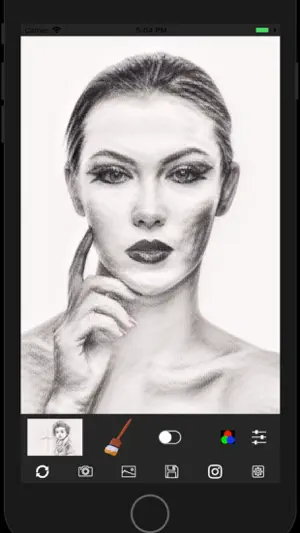
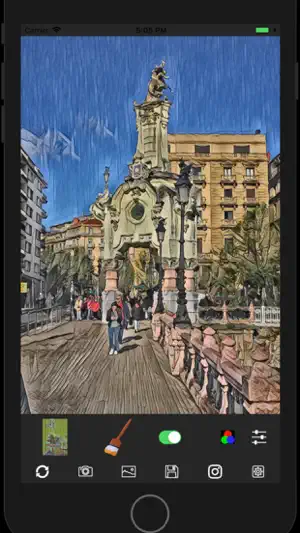
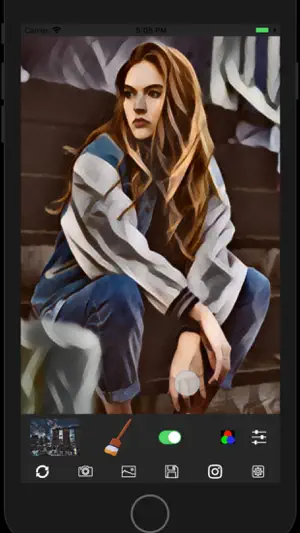
About Pablo Brush - Art Your Photo
Pablo Brush makes your photo images become Art. It's extremely easy to use. Just take a photo on your iPhone, choose one of styles, press a brush icon on the main screen, then you will get the artistic photo instantaneously. You can adjust color, contrast and etc, and post it on Instagram by simple operations. You can choose the style from more than 20 styles including pencil, water color, abstract arts in addition to masterpieces by historical great artists. Of course, you can save stylized photo images in Camera Roll on your device. After the initial installation, the free trial period starts. You can access full features during the period. Once the free trial period finishes, you will see the in-app purchase screen. The price is about $2 to continue to use the app. As It's a one time purchase, NO additional cost such as monthly subscription fee is required. Feature overview - It has more than 20 styles including styles of masterpieces by historical artists such as Picasso, Renoir, Gogh. In addition, some well known Japanese artists such as Hiroshige Utagawa, Taro Okamoto, Yayoi Kusama, and Hokusai Katsushika are included. - In addition to the artworks of well known artists, you can also choose styles of pencil drawing, water color, ink painting and etc. - The color independent style transfer can be used. It allows while you retain the color of your photo image and apply other styles such as brush stroke of the artwork. - You can adjust contrast, brightness, mixing ratio, RGB values of the stylized images to make a final image. - The final images can be posted on Instagram or saved in the photo library on your iPhone - The main part of this app uses Neural Style Transfer , one of AI technologies and is implemented on the latest CoreML ** Some icons on the main screen are derived from Icons8 (https://icons8.com)
What’s new
Version 2.1 · Updated January 12, 2026
New features of this version (2.1) - bug fix New features of this version (2.0) - bug fix New features of this version (1.9) - bug fix New features of this version (1.8) - bug fix New features of this version (1.7) - bug fix New features of this version (1.6) - conform to App Tracking Transparency on iOS 14.5 or later New features of this version (1.5) - All features are now free of charge You can save and share generated images unlimited times. ad-free version continues to be available with in-app purchase - Easier way to export images to other apps in addition to Instagram New features of this version (1.4) - implemented an easy way to review and rate the app - longer free trial period with Ads. - Bug fix New features of this version (1.3) - added new styles New features of this version (1.2) - UI layout update for better usability - added new styles New features of this version (1.1) - A new style is added - A few small bug fixes
App privacy
The developer, Hikaru Tsuyumine, reported these privacy practices to Apple.
Data Used to Track You
The following data may be used to track you across apps and websites owned by other companies:
- Location: Coarse Location
- Identifiers: Device ID
- Usage Data: Product Interaction, Advertising Data, Other Usage Data
- Diagnostics: Crash Data, Performance Data, Other Diagnostic Data
Data Linked to You
The following data, which may be collected and linked to your identity, may be used for the following purposes:
- Location: Coarse Location
- Identifiers: Device ID
- Usage Data: Product Interaction, Advertising Data, Other Usage Data
- Diagnostics: Performance Data, Other Diagnostic Data
Used for: Third-Party Advertising
Data Not Linked to You
The following data, which may be collected but is not linked to your identity, may be used for the following purposes:
- Diagnostics: Crash Data
Used for: Third-Party Advertising
Alternatives to Pablo Brush - Art Your Photo
Looking for apps like Pablo Brush - Art Your Photo? Here are 6 similar apps on the App Store. The highest rated is Artistica - Photo Art Filter (5.0/5), and all 6 are free to download.
-
 Artistica - Photo Art Filter
5.0
Artistica - Photo Art Filter
5.0
-
 Photo To Artwork
3.1
Photo To Artwork
3.1
-
 Impressionism Camera
4.3
Impressionism Camera
4.3
-
 Paintation: Famous Art Filters
4.8
Paintation: Famous Art Filters
4.8
-
 Fotorist: Art Photo Editor
4.7
Fotorist: Art Photo Editor
4.7
-
 Oil Painting-Photo to Art
4.4
Oil Painting-Photo to Art
4.4
| App | Rating | Price | Last updated | Compare |
|---|---|---|---|---|
| Pablo Brush - Art Your Photo | 4.8 / 5 (4 ratings) | Free | January 12, 2026 | |
| Artistica - Photo Art Filter | 5.0 / 5 (6) | Free | Aug 18, 2025 | Compare |
| Photo To Artwork | 3.1 / 5 (100) | Free | Oct 17, 2025 | Compare |
| Impressionism Camera | 4.3 / 5 (381) | Free | Oct 20, 2023 | Compare |
| Paintation: Famous Art Filters | 4.8 / 5 (490) | Free | Aug 9, 2026 | Compare |
| Fotorist: Art Photo Editor | 4.7 / 5 (173) | Free | Aug 15, 2026 | Compare |
| Oil Painting-Photo to Art | 4.4 / 5 (25) | Free | Mar 29, 2026 | Compare |