

Safepoint: Lone Worker Safety
Techshift Limited Business iPhoneiPadiPod touch
Safepoint: Lone Worker Safety is a free Business app for iPhone and iPad by Techshift Limited. Requires iOS 15.1. Updated September 15, 2026.
- Price
- Free
- on the App Store
- Size
- 96 MB
- Age 4+
- Updated
- Sep 15
- 2026 · v1.41.0
Screenshots


About Safepoint: Lone Worker Safety
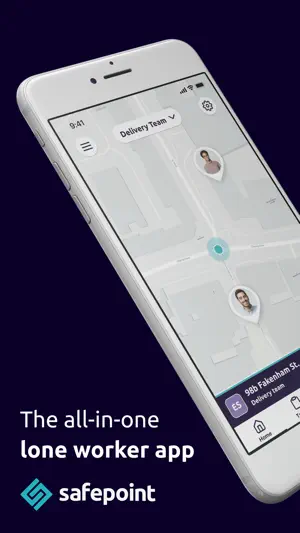
When your staff use our easy-to-use app, their daily tasks are instantly synced with their supervisors as well as with our accredited, 24/7 monitoring team. If a staff member runs into trouble, is unresponsive, or has a fall*, an emergency alert is sent out, as well as real-time location and safety data. Emergency responses are handled by our dedicated response team, who are accredited at the highest standards, so you can rest assured that your staff’s safety is in hand. When your staff use the Safepoint app you can also see all their activity, as well as their live location, through the Safepoint web portal. This browser-based dashboard is perfect for seeing your staff’s location and status, as well as for coordinating your team. You can even see a history of your staffs’ entire activity –which makes auditing a breeze. The app also works with Safepoint’s range of wearable hardware, which allows users to discreetly and easily call for emergency help, and can even detect if the wearer has had a fall (sometimes called a man-down function). So if you employ lone workers or any staff that work remotely, directly with clients, or in high-risk roles, give Safepoint a try. It has a 14-day free trial and has a simple pricing structure that scales with your business. *Fall detection is only available when paired with Safepoint’s wearable devices. About Safepoint Safepoint provides award-winning safety solutions. Whether you work in construction, health and social care, property, retail, logistics, or many other industries, we make protecting and overseeing your team easy and stress-free. We are perfect for lone workers, but also for anyone that wants more protection and oversight when they’re on the job. Unlike many companies, we focus on providing the best app-based protection experience. Our app is beautifully designed and easy to use and connects seamlessly with our web portal, our dedicated emergency alert response team (ARC), and our wearable devices. We also provide an unmatched customer response so if you have any trouble setting up, we’re just a phone call, email, or web chat away.
What’s new
Version 1.41.0 · Updated September 15, 2026
Behind the scenes fixes and improvements
App privacy
The developer, Techshift Limited, reported these privacy practices to Apple.
Data Linked to You
The following data, which may be collected and linked to your identity, may be used for the following purposes:
- Identifiers: Device ID, User ID
- Location: Precise Location
- Contact Info: Email Address, Name
- User Content: Audio Data, Other User Content
- Diagnostics: Crash Data, Performance Data, Other Diagnostic Data
Used for: Analytics, App Functionality
Data Not Linked to You
The following data, which may be collected but is not linked to your identity, may be used for the following purposes:
- Usage Data: Product Interaction
Used for: Analytics, App Functionality
Alternatives to Safepoint: Lone Worker Safety
Looking for apps like Safepoint: Lone Worker Safety? Here are 6 similar apps on the App Store. The highest rated is StaySafe Lone Worker (4.7/5), and all 6 are free to download.


| App | Rating | Price | Last updated | Compare |
|---|---|---|---|---|
| Safepoint: Lone Worker Safety | – | Free | September 15, 2026 | |
| myTIME WORKSuite | – | Free | Sep 30, 2026 | Compare |
| StaySafe Lone Worker | 4.7 / 5 (3) | Free | Oct 26, 2026 | Compare |
| Safe Hub | – | Free | Feb 14, 2024 | Compare |
| SoloProtect Mobile | – | Free | Apr 29, 2026 | Compare |
| Arthur Manager | – | Free | Sep 25, 2026 | Compare |
| Vatix | – | Free | Oct 29, 2026 | Compare |