

Stats tester mini
Hideki Ono Education iPhoneiPadiPod touch
Stats tester mini is a free Education app for iPhone and iPad by Hideki Ono. Requires iOS 15.0. Updated July 29, 2026.
- Price
- Free
- on the App Store
- Size
- 4 MB
- Age 4+
- Updated
- Jul 29
- 2026 · v3.8
Screenshots


About Stats tester mini
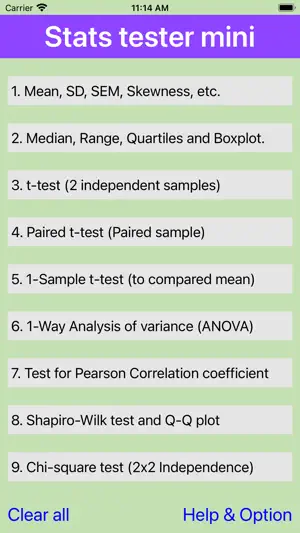
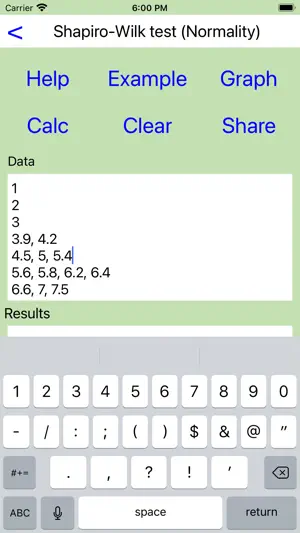
### Features of this app ### 1. By using Stats tester mini, you can perform some statistics tests and obtain graphs by an easy operation. 2. Since one sample group (multiple data) is entered in one window, it is very easy to enter or edit the data. 3. Unlike other test apps, not only final conclusions such as p-values, but also intermediate results are shown. 4. Input data and test results can be recorded by sharing (mail, memo). There is no need to make notes on paper. 5. You can import data by copy/paste from apps such as Excel, Numbers, memo, etc. 6. Numerical input is very easy with the built-In ten-keyboard (phone and calculator layouts). 7. This app has been fully verified to work with the M1 Mac. The M1 Mac makes it easy to work with other apps (Numbers, Excel etc.). ## how to use ## Each test screen has [Help], [Example], [Graph], [Calc], [Clear] and [Share] Buttons. On the "How to use this app" screen, details such as its features and specifications are written. ### Statistic methods ### Below are the statistical methods in Stats tester mini. (The upgraded version "Stats tester plus" offers 18 more methods.) 1. Mean, SD, Skewness, Kurtosis, etc. 1) Arithmetic, Geometric and Harmonic means 2) Standard Deviation (2) 3) Standard Error of the mean (sem) 4) 95 and 99% Confidence interval (CI) 5) Sum 6) Sum of Square 7) Variance, Unbiased variance 8) Coefficient of variation (%CV) 9) Skewness (2) 10) Kurtosis (3) 11) Graph 2. Median, Range, Quartiles and Boxplot. 1) Median 2) Maximum 3) Minimum 4) 1st Quartile 5) 3rd Quartile 6) Quartile Deviation 7) Boxplot Graph 3. One-Sample t-Test (to Specified Mean) 1) Mean 2) Standard deviation (2) 3) Standard error of the mean (sem) 4) One-sample t-test --> p value 5) Confidence interval (CI) 6) Graph 4. Two-Sample t-Test (Student's and Welch's t-Tests) 1) Mean 2) Standard deviation (2) 3) Standard error of the mean (sem) 4) Student t-test --> p value 5) Welch's procedure --> p value 6) Graph 5. Paired-Sample t-test 1) Mean 2) Standard error of the mean (sem) 3) Paired t-test --> p value 4) Graph 6. One-Way Analysis of Variance (ANOVA) 1) Mean 2) Standard error of the mean (sem) 3) Analysis of variance --> p value 4) ANOVA table 5) Graph 7. Linear Regression and Test for Pearson Correlation Coefficient 1) Correlation coefficient 2) Regression coefficient (Linear Regression) 3) Coefficient of determination 4) Test for correlation coefficient --> p value 5) Graph 8. Shapiro-Wilk Test (Normality) and Q-Q Plot 1) Kurtosis α4 (α4=3 --> normal distribution) 2) Shapiro-Wilk test --> p value 3) Q-Q Plot (Normal probability plot) graph 9. Chi-Square Test (2X2 Independence) ### Acknowledgment ## DGChartst library distributed under the Apache 2.0 license was utilized to make graphs. https://github.com/danielgindi/Charts http://www.apache.org/licenses/LICENSE-2.0.html
What’s new
Version 3.8 · Updated July 29, 2026
Supports iOS 27
App privacy
The developer, Hideki Ono, reported these privacy practices to Apple.
Data Not Collected
The developer does not collect any data from this app.
Alternatives to Stats tester mini
Looking for apps like Stats tester mini? Here are 6 similar apps on the App Store. The highest rated is Art of Stat: Inference (5.0/5), and all 6 are free to download.
-
 Art of Stat: Inference
5.0
Art of Stat: Inference
5.0
-
 Art of Stat: Concepts
5.0
Art of Stat: Concepts
5.0
-
 Art of Stat: Explore Data
4.9
Art of Stat: Explore Data
4.9
-
 Art of Stat: Resampling
5.0
Art of Stat: Resampling
5.0
-
 Probability Distribution
4.5
Probability Distribution
4.5
-
 Art of Stat: Distributions
4.8
Art of Stat: Distributions
4.8
| App | Rating | Price | Last updated | Compare |
|---|---|---|---|---|
| Stats tester mini | – | Free | July 29, 2026 | |
| Art of Stat: Inference | 5.0 / 5 (20) | Free | Feb 13, 2026 | Compare |
| Art of Stat: Concepts | 5.0 / 5 (12) | Free | Sep 8, 2025 | Compare |
| Art of Stat: Explore Data | 4.9 / 5 (24) | Free | Feb 4, 2026 | Compare |
| Art of Stat: Resampling | 5.0 / 5 (6) | Free | Sep 5, 2025 | Compare |
| Probability Distribution | 4.5 / 5 (16) | Free | May 10, 2026 | Compare |
| Art of Stat: Distributions | 4.8 / 5 (53) | Free | Feb 4, 2026 | Compare |
Compare Stats tester mini with the top alternatives: ratings, updates, ASO score and keyword gaps →