

Photo Compressor: AI Cleaner
Ngac Thi Tuyet Mai Photo & Video iPhoneiPadiPod touch
Photo Compressor: AI Cleaner is a free Photo & Video app for iPhone and iPad by Ngac Thi Tuyet Mai. Rated 4.8/5 from 78 ratings. Requires iOS 16.0.
- Rating
- 4.8
- 78 ratings
- Price
- Free
- on the App Store
- Size
- 37 MB
- Age 9+
- Updated
- Oct 13
- 2026 · v1.5.6
Screenshots



About Photo Compressor: AI Cleaner
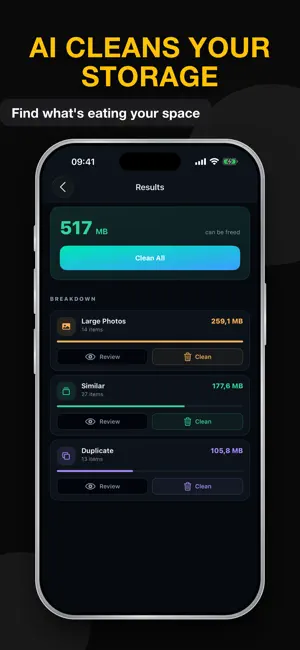
Shrink your photos and free up gigabytes of iPhone storage in seconds. Photo Compressor is the all-in-one media compressor that shrinks photos, videos, and audio without sacrificing quality — built for people who actually need the space back. WHY PHOTO COMPRESSOR • Compress photos, video, and audio in a single app — no need to juggle three tools • Shrink photos and cut video file size by up to 90% without visible quality loss • Built-in AI Cleaner finds big photos, large videos, and storage hogs automatically • Batch compression: queue your whole camera roll at once and let the app handle the rest • 100% on-device — your files are never uploaded to a server • No watermarks. Ever. PERFECT FOR • Anyone seeing the "Storage Almost Full" warning on their iPhone • Creators shrinking photos and videos for TikTok, Instagram, YouTube, and Reels • Professionals sending media via email, WhatsApp, Slack, or Messages • Anyone who wants to back up more before the next iOS update PHOTO COMPRESSION • Smart photo compression that reduces image size without visible quality loss • Resize picture dimensions or compress in place • Works with JPG, PNG, HEIC images and Photo Library imports • Batch process and compress pictures across your entire camera roll VIDEO COMPRESSION • Quality presets and a percentage slider for fine control • Resolution scaling: 4K → 1080p → 720p → 480p, or pick any custom size • Frame rate adjustment (60 / 30 / 24 fps) • Bitrate control via industry-standard libx264 CRF encoding • Supports MP4, MOV, M4V, and other common iPhone formats • Preview output before you commit AUDIO COMPRESSION • Shrink audio files for messaging and sharing • Adjustable quality settings • A feature most "video compressors" don't even offer AI CLEANER — BUILT-IN STORAGE TOOL • Smart Scan automatically finds your biggest photos, largest videos, and clutter • Find and remove duplicate photos and junk files that quietly eat your storage • Quick Clean by category: Large Photos, Large Videos, Screenshots, and more • See exactly how much space you'll save before you delete anything • Free, no extra app to install WIFI TRANSFER • Send compressed files straight to your Mac or PC over WiFi — no cables, no cloud • Drag-and-drop simple, works in any browser PRIVACY FIRST • All compression happens on your device • Nothing is uploaded, shared, or analyzed in the cloud • No tracking your media, no selling your data Upgrade to Premium: • Subscribe for unlimited access to all features and content offered for purchases within the app. • Payment will be charged to your iTunes Account at confirmation of purchase. • Subscription automatically renews unless auto-renew is turned off at least 24 hours before the end of the current period. • Manage subscriptions and turn off auto-renewal in your Account Settings after purchase. Let us know about any bugs, questions, feature requests or any other suggestions. Thank you! For more information, please visit: Terms of Use: https://www.apple.com/legal/internet-services/itunes/dev/stdeula/ Privacy Policy: https://www.vnios.com/privacy
Ratings & reviews
4.8
78 ratings
What’s new
Version 1.5.6 · Updated October 13, 2026
Version 1.5.6 • All-new AI Cleaner — a faster engine finds duplicates, similar shots, screenshots, large videos and more, and suggests the best photo to keep in every group • Real numbers, no guesswork — each cleaner category shows how many items it found, and the delete total matches exactly what you remove • Smooth with big libraries — review thousands of photos without lag, and the photo picker now scrolls smoothly too • More reliable compression — one problem file no longer stops the whole batch, and you see the estimated size before you start • Compressed files are saved to Photos as-is, with no extra quality loss, and you get a notification when a batch finishes in the background • Compress from anywhere — share videos and photos to Photo Compressor straight from other apps • Bug fixes and stability improvements Thanks for using Photo Compressor. If this update helps you free up space, please leave a quick rating — it genuinely helps us keep building.
App privacy
The developer, Ngac Thi Tuyet Mai, reported these privacy practices to Apple.
Data Used to Track You
The following data may be used to track you across apps and websites owned by other companies:
- Usage Data: Advertising Data, Other Usage Data
Data Not Linked to You
The following data, which may be collected but is not linked to your identity, may be used for the following purposes:
- Usage Data: Advertising Data, Other Usage Data
Used for: Third-Party Advertising
Alternatives to Photo Compressor: AI Cleaner
Looking for apps like Photo Compressor: AI Cleaner? Here are 6 similar apps on the App Store. The highest rated is Video Compressor Shrink Video (4.8/5), and all 6 are free to download.
-
 Video Compressor .
4.5
-
 Video Compressor: reduce size
4.4
-
 Video Compressor: 4K Compress
4.5
-
 reduce video size - resizer
4.3
-
 Video Compressor Shrink Video
4.8
-
 Video Compressor & Resizer
4.0
| App | Rating | Price | Last updated | Compare |
|---|---|---|---|---|
| Photo Compressor: AI Cleaner | 4.8 / 5 (78 ratings) | Free | October 13, 2026 | |
| Video Compressor . | 4.5 / 5 (94) | Free | Mar 1, 2026 | Compare |
| Video Compressor: reduce size | 4.4 / 5 (40) | Free | Jul 25, 2026 | Compare |
| Video Compressor: 4K Compress | 4.5 / 5 (16) | Free | Jun 4, 2025 | Compare |
| reduce video size - resizer | 4.3 / 5 (6) | Free | Jul 18, 2024 | Compare |
| Video Compressor Shrink Video | 4.8 / 5 (27) | Free | Oct 21, 2026 | Compare |
| Video Compressor & Resizer | 4.0 / 5 (4) | Free | Jul 22, 2026 | Compare |