

StaffPad
StaffPad Ltd. Music iPad
StaffPad is a paid Music app for iPad by StaffPad Ltd. Rated 4.0/5 from 640 ratings. Requires iOS 14.5. Updated November 10, 2023.
- Rating
- 4.0
- 640 ratings
- Price
- 49.99 USD
- on the App Store
- Size
- 1020 MB
- Age 4+
- Updated
- Nov 10
- 2023 · v1.6.4
Screenshots
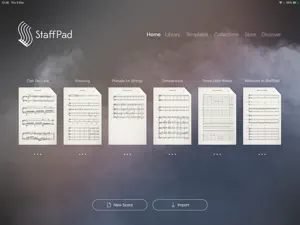


About StaffPad
MADE FOR COMPOSERS ------------------------- StaffPad is designed for composers who want to write music effortlessly, using music notation and audio. Write your music using Apple Pencil, and the app will transform your writing into beautifully typeset notation that can be edited, played back, printed and shared. Record or import audio directly onto your score and edit it intuitively with Apple Pencil. Magically convert your real piano playing or existing recordings into notation using advanced on-device machine learning. Add video, smart symbols and use world leading sample libraries and mix your score with a suite of studio effects. From basic idea to a full film score; StaffPad is the easiest, most powerful and most intuitive way to compose music on iPad. WRITE NATURALLY ------------------- Write your score with the fluidity of natural handwriting. Use touch and Apple Pencil to quickly edit your notation. Transpose, repeat and structure your score with intuitive gestures and tools. Customise the tempo with a unique tempo staff (or import a tempo map from a MIDI file), add chords either manually or automatically with the chord staff. You can even copy music written in StaffPad into other apps, simply using the normal copy and paste functions. HEAR YOUR MASTERPIECE ---------------------------- With a groundbreaking playback engine and over 55 included instruments, StaffPad is ready to perform your written piece instantly. Add industry-standard sample libraries, adapted and customised for StaffPad, from some of the world's leading sample developers. This is a leap forward for composers working at the highest levels. SHARE WITH SCORESYNC --------------------------- Once you're ready to perform or record your work, tap the ScoreSync button in StaffPad and your score is instantly shared across a Wi-Fi network to any device running the free StaffPad Reader app (available in the App Store). The Readers present each individual musical part beautifully formatted, update in realtime with any changes you make to your score, handle automatic page turns, and play back in perfect time with a synchronised metronome, for capturing the perfect recording every time. IMPORT AND EXPORT --------------------------- StaffPad imports and exports MusicXML and MIDI files for easily working with other music apps. You can also export your playback as WAV, AAC or MP3. You can import audio files into your score, with support for most major audio formats. WORK WITH AUDIO AND VIDEO -------------------------------- For the first time, you can seamlessly mix audio with your notated score. Record directly onto the score canvas using your device's in-built microphones, or import loops, Tempo map freeform/rubato performances using the tempo staff. Add shine to your production with a suite of studio quality DSP effects, and polish with precise automation. PIANO AND MIDI CAPTURE --------------------------- Record your real piano and convert it into notation. Don't have a real piano? Don't worry - you can connect a USB or Bluetooth MIDI keyboard and record your performance in realtime, converting to notation as you play. PRINT / PDF ------------ As well as digital parts via ScoreSync, StaffPad will automatically format and print parts or export PDFs for you. Customise the paper size, bar number styles, number of bars per line, scaling, margins, multi-bar consolidation and more. StaffPad automatically formats the score for consistent presentation.
Ratings & reviews
4.0
640 ratings
What’s new
Version 1.6.4 · Updated November 10, 2023
This update contains fixes and enhancements - Fixes a problem with display of tuplets when using Piano Capture - Fixes an issue with the Muse Solo Cello - Fixes an issue that could affect playback if a tempo point was created at the very end of the score - Eliminates clicks/artifacts that could sometimes be present in score audio export. - Fixes an issue with symbol placement above the stave in certain situations. - Improved the way that instrument changes are represented in the "ghost staff" - i.e when scrolling past the initial instrument name - Fixed an issue that can cause the score to continue playing even after the document has been closed - Fixed some silent notes that could occur when using the built-in Oboe sound
App privacy
The developer, StaffPad Ltd., reported these privacy practices to Apple.
Data Not Linked to You
The following data, which may be collected but is not linked to your identity, may be used for the following purposes:
- Diagnostics: Crash Data, Other Diagnostic Data
Used for: App Functionality
Alternatives to StaffPad
Looking for apps like StaffPad? Here are 6 similar apps on the App Store. The highest rated is forScore (4.8/5), and 4 of the 6 are free to download.
-
 Dorico - Compose Music
4.6
Dorico - Compose Music
4.6
-
 MusicPad – Music Writing
4.2
MusicPad – Music Writing
4.2
-
 forScore
4.8
forScore
4.8
-
 Henle Library
3.0
Henle Library
3.0
-
 Pianoteq 8
4.6
Pianoteq 8
4.6
-
 Cubasis 3 - DAW & Music Studio
4.6
Cubasis 3 - DAW & Music Studio
4.6
| App | Rating | Price | Last updated | Compare |
|---|---|---|---|---|
| StaffPad | 4.0 / 5 (640 ratings) | 49.99 USD | November 10, 2023 | |
| Dorico - Compose Music | 4.6 / 5 (2,209) | Free | Jun 10, 2026 | Compare |
| MusicPad – Music Writing | 4.2 / 5 (59) | Free | Sep 14, 2026 | Compare |
| forScore | 4.8 / 5 (43,093) | 24.99 USD | Sep 22, 2026 | Compare |
| Henle Library | 3.0 / 5 (92) | Free | May 18, 2026 | Compare |
| Pianoteq 8 | 4.6 / 5 (133) | Free | Oct 10, 2025 | Compare |
| Cubasis 3 - DAW & Music Studio | 4.6 / 5 (3,500) | 29.99 USD | Sep 4, 2026 | Compare |
Compare StaffPad with the top alternatives: ratings, updates, ASO score and keyword gaps →