

What's Your Dream
Noriaki Murao Productivity iPhoneiPadiPod touch
What's Your Dream is a free Productivity app for iPhone and iPad by Noriaki Murao. Rated 4.0/5 from 1 ratings. Requires iOS 12.0. Updated December 24, 2025.
- Rating
- 4.0
- 1 ratings
- Price
- Free
- on the App Store
- Size
- 10 MB
- Age 4+
- Updated
- Dec 24
- 2025 · v1.3
Screenshots



About What's Your Dream
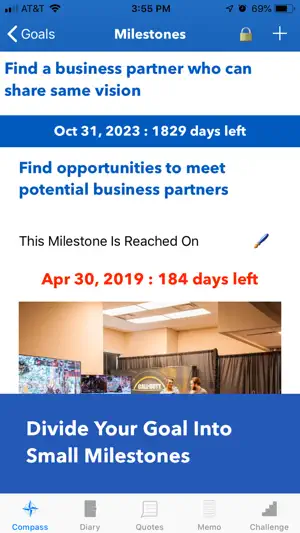
--- Basic Structure of The App --- The app consists of 5 features. 1. Compass: Create a roadmap to make your dreams come true. Write your dreams and set the target dates. Divide your dreams into small steps you can take now. Schedule the To-Do List into your Calendar. Read the dreams, goals, milestones, and To-Do List every day. 2. Diary: Check accomplishments of To-Do List and write a diary to reflect on the day. 3. Quotes: Add favorite quotes that inspire you. Add them to Reminders. 4. Memo: Write down ideas when they come up. 5. Challenge: List challenges that you need to overcome and think of the solutions. --- How To Use Compass --- The 5 steps to use Compass: 1. Write your dreams and set the dates to make your dreams come true. 2. Divide your dreams into specific goals to make your dreams come true. 3. Set milestones to achieve each goal. 4. Create a To-Do List to reach the nearest milestone. 5. Add To-Do List to your Calendar to schedule them. --- Write your dreams --- Write your dreams and set dates to make them come true. Try to write your dreams as specifically as possible. Add an image to help you visualize your dreams. --- Divide your dream into goals --- Think about what goals you must accomplish to make your dream come true. The goal should have a cause-and-effect relationship with your dreams. Write your goals and set the dates for achievement. Add an image to visualize your goal. --- Set milestones to achieve each goal --- Think about what steps you need to take to achieve the goal. Divide the goal into small milestones and set a date for each milestone. The milestones must be measurable. Set a specific numerical target on each milestone. --- Create To-Do List --- Think about what tasks you must accomplish to reach your nearest milestone. To-Do Items must be measurable. Try to add a numerical target to each To-Do Item. Determine how often you must do the To-Do Item. --- Add To-Do Items to your Calendar --- To ensure you accomplish the To-Do Item, add each item to your Calendar. --- How to use Diary --- A diary should be used not only to reflect on the day at night, but also to check the progress of accomplishment of the To-Do List during the daytime. --- How to use Quotes, Memo, Challenge --- To add a new item, tap + on each page. Quotes can be added to Reminders by tapping the quote. To edit, tap the pen sign. To delete, swipe the cell. Tap “?” on the app to see more instructions.
What’s new
Version 1.3 · Updated December 24, 2025
Updates and bug fixes.
App privacy
The developer, Noriaki Murao, reported these privacy practices to Apple.
Data Not Collected
The developer does not collect any data from this app.
Alternatives to What's Your Dream
Looking for apps like What's Your Dream? Here are 6 similar apps on the App Store. The highest rated is Shopping List: Simple List (5.0/5), and all 6 are free to download.
-
 CardVault Digital
-
 Narrate: Text to Speech Reader
-
 Dot Timer | Focus Timer
-
 Shopping List: Simple List
5.0
Shopping List: Simple List
5.0
-
 FastPoll - Live Poll Platform
-
 Tend+
4.6
Tend+
4.6
| App | Rating | Price | Last updated | Compare |
|---|---|---|---|---|
| What's Your Dream | 4.0 / 5 (1 rating) | Free | December 24, 2025 | |
| CardVault Digital | – | Free | Jun 29, 2026 | Compare |
| Narrate: Text to Speech Reader | – | Free | Feb 17, 2026 | Compare |
| Dot Timer | Focus Timer | – | Free | Jun 3, 2026 | Compare |
| Shopping List: Simple List | 5.0 / 5 (4) | Free | Sep 8, 2025 | Compare |
| FastPoll - Live Poll Platform | – | Free | Dec 5, 2025 | Compare |
| Tend+ | 4.6 / 5 (9) | Free | Oct 1, 2026 | Compare |
Compare What's Your Dream with the top alternatives: ratings, updates, ASO score and keyword gaps →