

Countdown! Reminders and Timer
霞 王 Utilities iPhoneiPadiPod touchApple Watch
Countdown! Reminders and Timer is a paid Utilities app for iPhone and iPad by 霞 王. Rated 4.5/5 from 75 ratings. Requires iOS 13.0.
- Rating
- 4.5
- 75 ratings
- Price
- 0.99 USD
- on the App Store
- Size
- 110 MB
- Age 4+
- Updated
- Sep 18
- 2026 · v5.2.1
Screenshots



About Countdown! Reminders and Timer
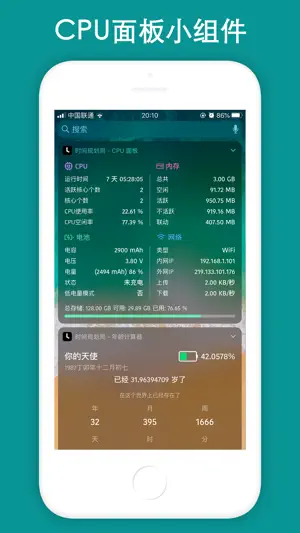
Countdown is a reminder and time management app, it will remind you to cherish your time at all times, which can be accurate to the second. Support lunar calendar display, support classification management function, support custom widget background, support percentage form, change percentage accuracy, so that you can see the time change every minute and every second, remind you to cherish time. At the same time, it supports "CPU Panel", "Hourly Reporting", "Age Calculator", "Full Screen clock", "Date cCalculator", "QR Code Generation" and other tools. It can help you make project plans, set reminders for meetings, arrange your schedule, and keep you focused. It can also be used to record memo events and help you better manage your time. [Features] # 70+ Lock Screen Widgets and 100+ Desktop Widgets; # Full support for Apple Watch. Enjoy a clean‑looking interface with a rich selection of watch complications; # Can be accurate to the second, always remind you to cherish the time and see the time change; # Support reminders, remind you of upcoming events through push notifications; # Supports holiday and leave information; # Support dynamic wallpapers; # Support lunar calendar selection, do not miss every lunar festival; # Customizable widget backgrounds, custom widget colors, and custom widget definitions; # Support recalculation every day, every week, every month; # Built-in multiple tools, including "CPU Panel", "Dynamic Island", "Hourly Reporting", "Device Panel", "Age Calculator", "Full Screen clock", "Date cCalculator", "QR Code Generation" and other tools; # Desktop widgets can customize the background, font, font color, transparency and blur; # Support event pin; # Support automatic event sequencing; # Support classification management function, better help you manage all event reminders; # You can set the background for each event, small and beautiful time reminder application; # Support the function of backing up data to iCloud, no longer have to worry about data loss; # Provide a variety of cool animations to give you a different mood; # Customizable push notification ringtones to make you unique; # Support network search to provide you with richer content; # New and concise operation interface makes operation more concise; # Supports percentage form. VIP features include: All Widgets, all Tools, all Static wallpapers and Dynamic wallpapers, 100% pure ad-free and automatic data backup, and can enjoy all future VIP features. 【Monthly VIP Instructions】 1. Subscription period: 1 month 2. Subscription price: 3 yuan per month 3. Payment: After the user confirms the purchase and pays, it will be credited to the itunes account 4. Cancellation of payment: If you need to cancel the renewal, please manually turn off the automatic renewal function in the iTunes/Apple ID settings management 24 hours before the current subscription expires 5. Renewal: Apple iTunes account will be debited within 24 hours before expiration, and the subscription period will be extended by one month after the deduction is successful 【Yearly VIP Instructions】 1. Subscription period: 1 year 2. Subscription price: 24 yuan per year 3. Payment: After the user confirms the purchase and pays, it will be credited to the itunes account 4. Cancellation of payment: If you need to cancel the renewal, please manually turn off the automatic renewal function in the iTunes/Apple ID settings management 24 hours before the current subscription expires 5. Renewal: Apple iTunes account will be debited within 24 hours before expiration, and the subscription period will be extended by one year after the deduction is successful 【Permanent VIP】 Unlimited permanent use of VIP features, all Widgets, all Tools, all Static wallpapers and Dynamic wallpapers, 100% pure ad-free and automatic data backup, and can enjoy all future VIP features. Privacy Policy: https://shijianguihuaju.cn/2020/01/01/countdown-law/ User Agreement: https://shijianguihuaju.cn/2020/01/01/countdown-law/
Ratings & reviews
4.5
75 ratings
What’s new
Version 5.2.1 · Updated September 18, 2026
Countdown version 5.2.1 is officially launched. 1. Full support for Apple Watch. Enjoy a clean‑looking interface with a rich selection of watch complications. 2. Add sorting function on the home page. 3. Add the "Pomodoro Timer" tool to the mini toolbox. 4. Optimize the overall desktop calendar feature. Add leave information to the desktop calendar, so holidays and leave data can be displayed clearly and intuitively. 5. Adapt to the latest iOS version and new iPhone models. RRecently added the Desktop Calendar · Schedule and Desktop Calendar · Upcoming Overview features. Add the Dynamic Island function, add CPU Panel Widget, add List • Year Month Day Desktop Widget, iOS 17 standby mode has been supported, added the "Floating window" function, which can be used for floating clock, network speed, CPU, timing, countdown and other functions, and added a custom repeat function, The new "Traffic statistics", "Nucleic acid records", "Punch", "Time Remaining" and "Remaining Year" widgets have been added. "Magic Puzzle", "Live Photo", "Timer" and many other widgets, and optimize user experience. Widgets such as "Weather" and "List-Classic" have been added. Now desktop widgets can customize the background, font, font color, transparency and blurriness. More widgets are working overtime to adapt, and the overall performance of the App is also optimized. It supports single events and list events, as well as various styles. Added the full-screen clock desktop widget, now it supports widgets in units of day, day, hour, minute, and year, month, and day. Age calculator and birthday widget have been added, more gadgets are being developed overtime. Recent updates: 1. Added the Desktop Calendar · Schedule feature at the top-right corner of the homepage, medium and large-sized Desktop Calendar · Schedule desktop widgets, and the Custom Alert Ringtone feature. 2. Optimized the functions of Data Backup, Category Management, Event Reminder and Notification Alert. 3. Added Dynamic Island adaptation, which can display real-time data including network speed, CPU usage, RAM and storage on the Dynamic Island. 4. Added the CPU Panel tool (available for widget addition, with background customization supported now); added the Age Calculator and Birthday Lifespan Tracker tools (also widget-supported with editable backgrounds); added the Hourly Voice Time Announcement tool to broadcast the current hour audibly. 5. Add "Full Screen Clock" tools, support various style customization, including modifying background, font color, style, etc .; 6. Add "Date Calculator" tools to help you calculate accurately; 7. Add "QR Code Generation" and "QR Code Scan" tools; [Features] # 70+ Lock Screen Widgets and 100+ Desktop Widgets; # Full support for Apple Watch. Enjoy a clean‑looking interface with a rich selection of watch complications. View key information directly on your watch face without launching the app. # Can be accurate to the second, always remind you to cherish the time and see the time change; # Support reminders, remind you of upcoming events through push notifications; # Support dynamic wallpapers; # Support lunar calendar selection, do not miss every lunar festival; # Customizable widget backgrounds, custom widget colors, and custom widget definitions; # Support recalculation every day, every week, every month; # Built-in multiple tools, including "CPU Panel", "Hourly Reporting", "Pomodoro Timer", "Device Panel", "Magic Puzzle", "Live Photo", "Timer", "Age Calculator", "Full Screen clock", "pedometer", "Date cCalculator", "QR Code Generation" and other tools; # Desktop widgets can customize the background, font, font color, transparency and blur; # Support classification management function, better help you manage all event reminders; # You can set the background for each event, small and beautiful time reminder application; # Customizable push notification ringtones to make you unique;
App privacy
The developer, 霞 王, reported these privacy practices to Apple.
Data Used to Track You
The following data may be used to track you across apps and websites owned by other companies:
- Identifiers: Device ID
Data Not Linked to You
The following data, which may be collected but is not linked to your identity, may be used for the following purposes:
- Identifiers: Device ID
- Usage Data: Product Interaction
- Diagnostics: Crash Data
Used for: Third-Party Advertising, Analytics
Alternatives to Countdown! Reminders and Timer
Looking for apps like Countdown! Reminders and Timer? Here are 6 similar apps on the App Store. The highest rated is ToDesk远程控制 (4.4/5), and all 6 are free to download.
-
 京东快递-又快又准
4.0
京东快递-又快又准
4.0
-
 身份见证
1.2
身份见证
1.2
-
 ToDesk远程控制
4.4
ToDesk远程控制
4.4
-
 SystemBatteryAnalysis
4.4
SystemBatteryAnalysis
4.4
-
 TP-LINK物联
2.3
TP-LINK物联
2.3
-
 Sixfast-留学生华人玩游戏看剧听歌
4.4
Sixfast-留学生华人玩游戏看剧听歌
4.4
| App | Rating | Price | Last updated | Compare |
|---|---|---|---|---|
| Countdown! Reminders and Timer | 4.5 / 5 (75 ratings) | 0.99 USD | September 18, 2026 | |
| 京东快递-又快又准 | 4.0 / 5 (16) | Free | Oct 23, 2026 | Compare |
| 身份见证 | 1.3 / 5 (16) | Free | Oct 20, 2026 | Compare |
| ToDesk远程控制 | 4.4 / 5 (494) | Free | Oct 27, 2026 | Compare |
| SystemBatteryAnalysis | 4.4 / 5 (211) | Free | Oct 28, 2026 | Compare |
| TP-LINK物联 | 2.3 / 5 (59) | Free | Sep 18, 2026 | Compare |
| Sixfast-留学生华人玩游戏看剧听歌 | 4.4 / 5 (236) | Free | Oct 23, 2026 | Compare |