

My PdfConverter: Scan & Sign
Anzar Narmawala Productivity iPhoneiPadiPod touch
My PdfConverter: Scan & Sign is a free Productivity app for iPhone and iPad by Anzar Narmawala. Rated 1.0/5 from 1 ratings. Requires iOS 15.0.
- Rating
- 1.0
- 1 ratings
- Price
- Free
- on the App Store
- Size
- 198 MB
- Age 4+
- Updated
- Oct 15
- 2026 · v3.0.1
Screenshots



About My PdfConverter: Scan & Sign
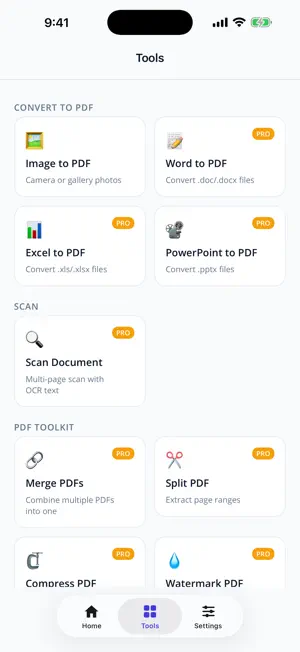
Convert, scan, sign, and manage every document in one place — right on your iPhone or iPad. CONVERT TO PDF • Turn Word, Excel, and PowerPoint files into clean, shareable PDFs • Combine photos from your camera or photo library into a multi-page PDF • Reorder, crop, and edit images before you create the document SCAN DOCUMENTS • Scan receipts, contracts, and notes with your camera • On-device text recognition (OCR) makes your scans searchable, so you can find and copy text later PDF TOOLKIT • Merge several PDFs into a single file • Split out just the pages you need • Compress large PDFs to make them easier to share • Add a text watermark to protect your work • Password-protect a PDF, or remove a password you know FILL & SIGN • Fill out forms without printing anything • Add text, today's date, and checkmarks anywhere on the page • Draw your signature once and place it where it belongs ORGANIZE AND SHARE • Every document you create is saved in your library, ready to open, rename, or share • Built-in PDF viewer with search and annotation tools PRIVATE BY DESIGN Your files are processed on your device and are never uploaded to our servers. PDF CONVERTER PRO Image to PDF is free, with a page limit and watermark. PDF Converter Pro unlocks Office conversion, Scan with OCR, the full PDF Toolkit, and Fill & Sign, and removes the page limit and watermark. • Payment is charged to your Apple ID account at confirmation of purchase. • The subscription renews automatically unless it is canceled at least 24 hours before the end of the current period. • Your account is charged for renewal within 24 hours before the end of the current period. • You can manage or cancel your subscription in your App Store account settings. Privacy Policy: https://wonderful-forest-0add10d10.5.azurestaticapps.net/privacy.html Terms of Use: https://www.apple.com/legal/internet-services/itunes/dev/stdeula/
What’s new
Version 3.0.1 · Updated October 15, 2026
Minor improvements and stability fixes
App privacy
The developer, Anzar Narmawala, reported these privacy practices to Apple.
Data Not Linked to You
The following data, which may be collected but is not linked to your identity, may be used for the following purposes:
- Diagnostics: Crash Data
- User Content: Photos or Videos
Used for: App Functionality, Other Purposes
Alternatives to My PdfConverter: Scan & Sign
Looking for apps like My PdfConverter: Scan & Sign? Here are 6 similar apps on the App Store. The highest rated is Tolga Jarvis (5.0/5), and all 6 are free to download.
-
 PDF Converter: Scan & Merge
4.3
-
 PDF Converter & PDF Reader
3.0
-
 OneToRise
-
 PDF Converter: Scanner
-
 Daylogue: AI Task Tracker
-
 Tolga Jarvis
5.0
| App | Rating | Price | Last updated | Compare |
|---|---|---|---|---|
| My PdfConverter: Scan & Sign | 1.0 / 5 (1 rating) | Free | October 15, 2026 | |
| PDF Converter: Scan & Merge | 4.3 / 5 (15) | Free | Mar 10, 2026 | Compare |
| PDF Converter & PDF Reader | 3.0 / 5 (4) | Free | Jun 5, 2025 | Compare |
| OneToRise | – | Free | Oct 19, 2026 | Compare |
| PDF Converter: Scanner | – | Free | Aug 1, 2026 | Compare |
| Daylogue: AI Task Tracker | – | Free | Mar 6, 2026 | Compare |
| Tolga Jarvis | 5.0 / 5 (1) | Free | Dec 15, 2025 | Compare |