

ReadMe - Novel & Comic Reader
GwangBeom Park Book iPhoneiPadiPod touch
ReadMe - Novel & Comic Reader is a free Book app for iPhone and iPad by GwangBeom Park. Rated 4.6/5 from 38 ratings. Requires iOS 18.0.
- Rating
- 4.6
- 38 ratings
- Price
- Free
- on the App Store
- Size
- 75 MB
- Age 12+
- Updated
- Oct 13
- 2026 · v2.11.1
Screenshots


About ReadMe - Novel & Comic Reader
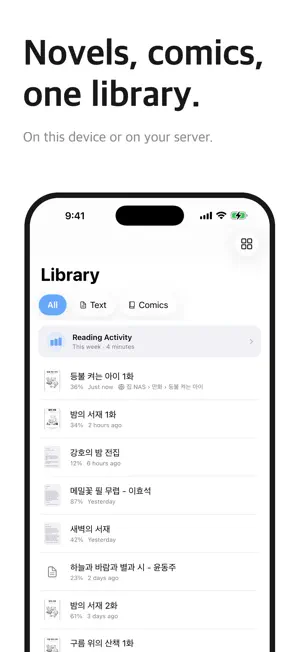
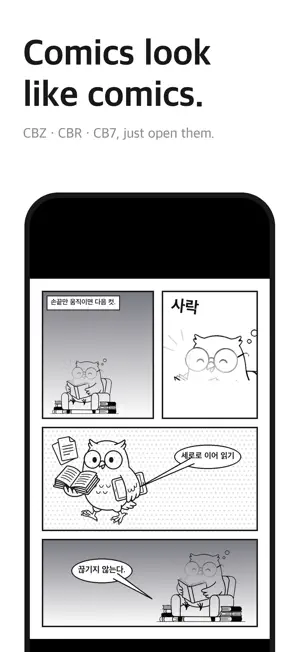
A viewer focused on one thing: reading. Enjoy novels and comics in one app with Readme. Less clutter. Just what you need to enjoy your next page. [Supported Formats] Novels — TXT, EPUB, SMI Comics — CBZ, CBR, CB7, PDF, TIF, JPG and PNG images Have your files in a ZIP archive? Add it to Readme, and the app will extract it for you. [An Expanded Remote Library] From NAS to the cloud — Connect to SMB, WebDAV, and OPDS servers, as well as Dropbox, OneDrive, Komga, and Kavita. Start reading while it loads — With supported comic files, you can start reading before the entire download finishes. Readme loads the content you need as you go. Choose a volume inside an archive — If a ZIP contains multiple comic archives, browse the volumes and open the one you want. Save for offline reading — Download books in advance and enjoy them without an internet connection. Downloaded books remain readable even after your Pro access ends. Pick up where you left off — Books you read remotely stay in your library, so you can open them again without searching through folders. Opening books from remote libraries and saving them offline require Pro. Depending on the file format and server, a file may need to be downloaded before it opens. [Comfortable Reading for Novels and Comics] Comic viewer — Scroll vertically, view two pages side by side, automatically trim margins, and enhance image clarity. Cover grid — See your library at a glance, with your reading progress displayed below each cover. Automatic series organization (Pro) — Readme identifies titles and volume numbers in filenames and groups books into series. Reading statistics (Pro) — View daily, weekly, and monthly reading time, along with records for individual books. Face ID lock — Lock the entire app. With Pro, you can also lock individual files and folders. [The Essentials, Refined] Continue reading — Your library remembers your reading position and progress. Make it yours — Choose from eight themes: Light, Paper, Sepia, Sage, Lavender, Dark, Midnight, and Black. Adjust fonts, text size, line spacing, margins, and page-turning or scrolling modes. Large files welcome — Open collections spanning tens of megabytes. For long text files, start reading the first pages while Readme prepares the rest. Automatic encoding detection — Readme recognizes a variety of text encodings, including UTF-8 and EUC-KR. Filename recovery — Recover garbled Korean filenames when extracting archives. iCloud sync — Continue on your iPad from where you stopped on your iPhone. Available with a separate in-app purchase or Pro. Import from the cloud — Bring in files from iCloud Drive, Google Drive, Dropbox, OneDrive, and more. Transfer from your computer — Add files using Finder file sharing and other supported transfer methods. [Readme Pro] Get remote libraries, streaming, offline saving, automatic series organization, reading statistics, and individual file and folder locks. Pro also removes ads and includes iCloud sync while your access is active. Choose a monthly, annual, or lifetime plan. [iCloud Sync] Start a novel on your iPhone and continue from the same place on your iPad. Keep files, reading positions, and bookmarks in sync across your devices. Available as a one-time purchase or included with Readme Pro. [Importing Cloud Files] To import files from a cloud service, install its app on your iPhone and sign in. Supported options include Google Drive, Dropbox, and OneDrive. For NAVER MYBOX, use Send → Open in Another App to copy files to Readme. You can also connect Dropbox and OneDrive directly through Readme’s remote library. Something getting in the way of your reading? Let us know through Settings > Contact Us. We’re listening! Terms of Use: https://www.apple.com/legal/internet-services/itunes/dev/stdeula/ Privacy Policy: https://parkgwangbeom.github.io/privacy/
Ratings & reviews
4.6
38 ratings
What’s new
Version 2.11.1 · Updated October 13, 2026
• Fixed an issue that prevented the app from launching on iOS 27. • Improved app launch stability.
App privacy
The developer, GwangBeom Park, reported these privacy practices to Apple.
Data Used to Track You
The following data may be used to track you across apps and websites owned by other companies:
- Identifiers: Device ID
Data Not Linked to You
The following data, which may be collected but is not linked to your identity, may be used for the following purposes:
- Location: Coarse Location
- Identifiers: Device ID
- Usage Data: Product Interaction, Advertising Data
- Diagnostics: Performance Data, Crash Data, Other Diagnostic Data
Used for: Third-Party Advertising, Analytics, App Functionality
Alternatives to ReadMe - Novel & Comic Reader
Looking for apps like ReadMe - Novel & Comic Reader? Here are 6 similar apps on the App Store. The highest rated is TTReader - Text Reader, OCR (4.8/5), and 5 of the 6 are free to download.
-
 TecViewer - Text Viewer
4.7
TecViewer - Text Viewer
4.7
-
 TTReader - Text Reader, OCR
4.8
TTReader - Text Reader, OCR
4.8
-
 Text Viewer - txt file viewer
4.6
Text Viewer - txt file viewer
4.6
-
 Komi Reader - TXT & PDF
4.8
Komi Reader - TXT & PDF
4.8
-
 TxtReader Pro
3.9
TxtReader Pro
3.9
-
 EBook Viewer - ePub Novel File
4.0
EBook Viewer - ePub Novel File
4.0
| App | Rating | Price | Last updated | Compare |
|---|---|---|---|---|
| ReadMe - Novel & Comic Reader | 4.6 / 5 (38 ratings) | Free | October 13, 2026 | |
| TecViewer - Text Viewer | 4.7 / 5 (26) | Free | Sep 15, 2026 | Compare |
| TTReader - Text Reader, OCR | 4.8 / 5 (10) | Free | Aug 30, 2026 | Compare |
| Text Viewer - txt file viewer | 4.6 / 5 (174) | Free | Sep 22, 2026 | Compare |
| Komi Reader - TXT & PDF | 4.8 / 5 (194) | 3.99 USD | Sep 22, 2026 | Compare |
| TxtReader Pro | 3.9 / 5 (8) | Free | Sep 2, 2025 | Compare |
| EBook Viewer - ePub Novel File | 4.0 / 5 (1) | Free | Aug 19, 2026 | Compare |