

MyBase - Simple notepad app -
fumio ueda Utilities iPhoneiPadiPod touch
MyBase - Simple notepad app - is a free Utilities app for iPhone and iPad by fumio ueda. Rated 4.4/5 from 7 ratings. Requires iOS 15.6.
- Rating
- 4.4
- 7 ratings
- Price
- Free
- on the App Store
- Size
- 4 MB
- Age 4+
- Updated
- Nov 6
- 2025 · v3.6
Screenshots



About MyBase - Simple notepad app -
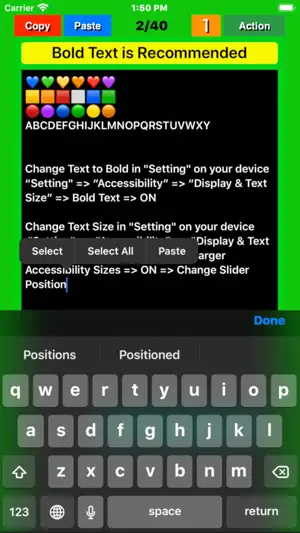
Description of functions and features (1) Notepad function ● This app“My Base” will be displayed from the page that ended last time and will be editable. ● Swipe the screen left / right or tap the left / right frame to page forward/backward. If the mode has been set to “5” with the “Mode” button, the page is turned 5 pages at a time, and if it has been set to “1”, the page is turned 1 page at a time. ● On each page, tap the position in the title / body where you want to enter text and set the cursor there. Type characters using the keyboard that pops up. The cursor will automatically move to the next position each time you enter a character. ● The entered text is stored in the memory of the device (iPhone/iPad) by pressing the "Done” button. (2) Character number display function ● The number of characters in the text of each page is displayed in the light blue label at the bottom of the screen. The number of characters is counted again when the "Done" button is tapped or the page is turned, and the display is updated. ● The display / non-display of the number of characters with the label can be switched by pressing a few seconds the "mode" button . (v1.4) (3) "Copy" function By tapping the “Copy” button in a page, the entered title and text will be stored in the device memory. The text is also copied to the clipboard. (4) "Paste" function ● Tapping the “Paste” button in a page overwrites the title and text stored in the memory into the title and body field of that page, respectively. If you tap "Overwrite" on the pop upped confirmation screen that appears before overwriting, that will be executed. ● Copying a blank page and pasting it on any other page to delete all characters at once. (5) Table of contents creation function Pressing a few seconds the “Paste” button, a message pops up asking if you want to create a table of contents. Select "Create" to create a table of contents. (6) "Mail" function On any page, pressing a few seconds the “Action” button, a screen pops up to select email or print . Select “E-Mail” and follow its instructions on the email control screen that will popup next. (7) "Print" function (Supported in v1.4) On any page, pressing a few seconds the “Action” button, a screen pops up to select email or print. Select “Print” and follow its instructions on the print control screen that will popup next. (8) Support Dynamic Type Text. (v1.4) The text size for the title and body can dynamically be changeable through device's “Settings” . "Setting" => “Accessibility” => “Display & Text Size” => Larger Text => ON => Larger Accessibility Sizes => ON => Change Slider Position "Setting" => “Accessibility” => “Display & Text Size” => Bold Text => ON (9) Text size temporary change function The text size can be temporarily enlarged / reduced by pinching (v2.3,v2.5).
Ratings & reviews
4.4
7 ratings
What’s new
Version 3.6 · Updated November 6, 2025
Confirmed to work properly on iPhone with the latest IOS26.0.1.
App privacy
The developer, fumio ueda, reported these privacy practices to Apple.
Data Used to Track You
The following data may be used to track you across apps and websites owned by other companies:
- Purchases: Purchase History
- Location: Coarse Location
- Search History: Search History
- Browsing History: Browsing History
- Identifiers: User ID, Device ID
- Usage Data: Product Interaction, Advertising Data, Other Usage Data
- Diagnostics: Crash Data, Performance Data
- Other Data: Other Data Types
Data Not Linked to You
The following data, which may be collected but is not linked to your identity, may be used for the following purposes:
- Purchases: Purchase History
- Location: Coarse Location
- Search History: Search History
- Browsing History: Browsing History
- Identifiers: User ID, Device ID
- Usage Data: Product Interaction, Advertising Data, Other Usage Data
- Diagnostics: Crash Data, Performance Data
- Other Data: Other Data Types
Used for: Third-Party Advertising, Developer’s Advertising or Marketing, Analytics, Product Personalization, App Functionality, Other Purposes
Alternatives to MyBase - Simple notepad app -
Looking for apps like MyBase - Simple notepad app -? Here are 6 similar apps on the App Store. The highest rated is Tab Notepad Cut and Paste (5.0/5), and all 6 are free to download.
-
 Easy - Simple Notepad
4.9
-
 EZ Notepad
4.7
-
 XL Notes
3.9
-
 Tab Notepad Cut and Paste
5.0
-
 Sticky Notes - Sticky Widget
4.7
-
 LOCK MEMO - Secure Notes
4.7
| App | Rating | Price | Last updated | Compare |
|---|---|---|---|---|
| MyBase - Simple notepad app - | 4.4 / 5 (7 ratings) | Free | November 6, 2025 | |
| Easy - Simple Notepad | 4.9 / 5 (13) | Free | Jan 30, 2024 | Compare |
| EZ Notepad | 4.7 / 5 (3) | Free | Aug 11, 2026 | Compare |
| XL Notes | 3.9 / 5 (9) | Free | Mar 3, 2024 | Compare |
| Tab Notepad Cut and Paste | 5.0 / 5 (4) | Free | Apr 17, 2025 | Compare |
| Sticky Notes - Sticky Widget | 4.7 / 5 (3) | Free | Jun 15, 2026 | Compare |
| LOCK MEMO - Secure Notes | 4.7 / 5 (495) | Free | Sep 25, 2026 | Compare |