

Speech to Text Voice Typing
Mudasser Khalid Productivity iPhoneiPadiPod touch
Speech to Text Voice Typing is a free Productivity app for iPhone and iPad by Mudasser Khalid. Rated 3.5/5 from 66 ratings. Requires iOS 14.0.
- Rating
- 3.5
- 66 ratings
- Price
- Free
- on the App Store
- Size
- 30 MB
- Age 17+
- Updated
- May 17
- 2026 · v3.4
Screenshots
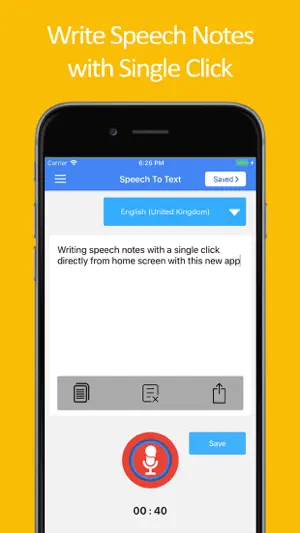


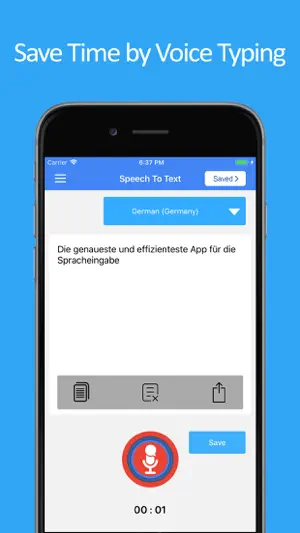
About Speech to Text Voice Typing
Speech to text and text to speech app brings you the best audio recognizer that detects your speech in various languages and converts audio to text. This audio to text feature helps you create accurate voice notes that can then be used as texts and shared across different chat and text platforms. This audio talk recognizer and text to speech converter comes with various options and features. The major features of this audio to text transcription app are as follows: Speech to Text: The primary offering of this free audio to text converter app is the speech to text feature. With this audio conversion feature, all you have to do is speak text and it converts it into notes. The audio notes can be copied and used for voice text chat purposes. This way this easy text converter can help you convert your voice into speech text. Text to Speech: The other major offering of this audio converter app is text to speech. With this feature of audio transcriber app is to take your text and then convert it into audio. You can easily use this audio converter feature to help convert text to audio. In addition to converting dictated text into audio you can also paste text and convert it into audio form. Speak Notes: The speech to text converter can also work best for speak notes. You can dictate audio, and it converts it into notes. This way you can avoid all the text typing hassle and easily speak notes, and it converts them into text form. This is especially beneficial for students and professionals who like to take speech notes and convert them into text for later use. Voice Text Chat: The third use of this speech to text and text to speech transcription app is that it can be used as a voice text chat app. If you do extensive chatting then you can do away with the worry of typing for longs hours, all you need to do is simply speak text and it converts voice to chat. You can easily take the converted audio text and paste it on your multiple chat platforms. Voice Notes: This free text to speech transcription and voice recognition app can also be used for the sake of voice notes. Working professionals want to convert audio to text notes to share with their working colleagues. This app allows you to create voice text notes by giving in the audio input and then sharing it in your workspace. Furthermore, if you do not wish to share voice notes, you can easily save your audio transcription in the form of notes and use them as reminders for future references. All Languages Text to Speech Support: The most amazing feature of this free text to speech and speech to text converter app is that it supports all the languages. You can speak in any language, and it detects the audio and converts it into the text of the desired language. So, when you want to convert audio to text, and you have difficulty related to your language you can easily do that by using this app. Download the speech to text and text to speech audio notes writing app and use less of your keyboard in future. You can simply transcribe audio and use the text notes for the purpose of sharing or building up your personal voice notes directory.
Ratings & reviews
3.5
66 ratings
What’s new
Version 3.4 · Updated May 17, 2026
Animation issue fixed, Now app shoes clear bubble animation.
App privacy
The developer, Mudasser Khalid, reported these privacy practices to Apple.
Data Used to Track You
The following data may be used to track you across apps and websites owned by other companies:
- Usage Data: Advertising Data
Data Not Linked to You
The following data, which may be collected but is not linked to your identity, may be used for the following purposes:
- Usage Data: Advertising Data
Used for: Third-Party Advertising, Analytics
Alternatives to Speech to Text Voice Typing
Looking for apps like Speech to Text Voice Typing? Here are 6 similar apps on the App Store. The highest rated is Speech To Text & Whisper (4.7/5), and all 6 are free to download.
-
 Speech to Text - Voice Notes
3.9
-
 Speech to Text: Voice memos
4.4
-
 Speech to Text: AI Voice Notes
4.4
-
 Speech to Text+
3.0
-
 Transcriber: Offline speech
4.3
-
 Speech To Text & Whisper
4.7
| App | Rating | Price | Last updated | Compare |
|---|---|---|---|---|
| Speech to Text Voice Typing | 3.5 / 5 (66 ratings) | Free | May 17, 2026 | |
| Speech to Text - Voice Notes | 3.9 / 5 (88) | Free | Jun 2, 2025 | Compare |
| Speech to Text: Voice memos | 4.4 / 5 (128) | Free | Aug 20, 2026 | Compare |
| Speech to Text: AI Voice Notes | 4.4 / 5 (147) | Free | May 28, 2026 | Compare |
| Speech to Text+ | 3.0 / 5 (2) | Free | May 18, 2026 | Compare |
| Transcriber: Offline speech | 4.3 / 5 (87) | Free | Oct 12, 2026 | Compare |
| Speech To Text & Whisper | 4.7 / 5 (87) | Free | Jul 14, 2026 | Compare |