

Trimal: Travel Companion
Hongfei Zhou Travel iPhoneiPadiPod touch
Trimal: Travel Companion is a paid Travel app for iPhone and iPad by Hongfei Zhou. Requires iOS 26.0. Updated September 28, 2026.
- Price
- 1.99 USD
- on the App Store
- Size
- 4 MB
- Age 4+
- Updated
- Sep 28
- 2026 · v2.5
Screenshots


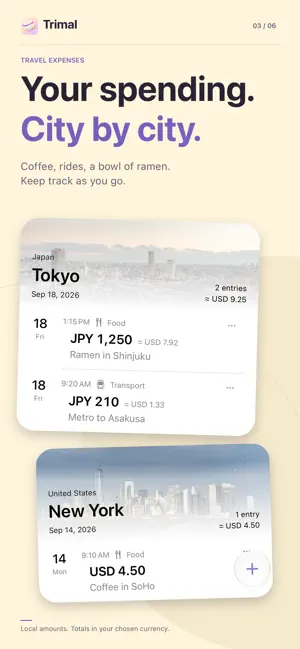

About Trimal: Travel Companion
Know when to call home, what a local price means, and where your travel money goes. Trimal is your lightweight travel companion for iPhone: world time, currency conversion and expenses, connected by the places you visit. Add your cities once to get helpful currency suggestions. Choose home and a destination to bring their currencies to the front. Keep your own choices, and start recording expenses without creating a trip. KNOW THE TIME, HOME AND AWAY Compare your saved cities at a glance. Drag any city's timeline to see the others change with it, and use the green overlap to find a shared time to call. Contact hours follow each city's local time, including daylight saving changes. Weather and sunrise or sunset times help you plan your day when available. MAKE SENSE OF LOCAL PRICES Enter an amount in any currency row and see the others update together. Add up prices with +, −, × and ÷ right where you type. Keep the currencies you need, arrange them your way and copy a result. Reference rates show their dates. SEE WHAT YOU SPEND, CITY BY CITY Record an amount, category, date, city and note. Your latest expenses appear first, grouped along a city or country timeline. Keep original amounts and view reference totals in your chosen currency. Edit or delete entries whenever you need. Choose a city yourself, or allow location access to fill in your current city. LESS TYPING WITH RECEIPT PHOTOS On eligible iOS 27 devices with Apple Intelligence enabled and a receipt model ready, Camera or Photos can suggest expense details. Check every field before saving. When recognition is unavailable, the app opens manual entry directly. READY FOR THE OFFLINE PARTS OF YOUR TRIP Saved-city time calculations, manual expense tracking and conversions using previously downloaded rates work offline. No account is needed. Cities, preferences and expenses stay saved on your device; the app does not sync your expenses. Receipt recognition may send selected images and necessary context to Apple Private Cloud Compute, which needs a connection and available quota, with an available on-device model as a fallback. Receipt images are not saved with entries. New city lookups, weather, rate updates and place photos use external services; see the privacy policy for details. Requires iOS 26 or later. Reference conversions are estimates, not bank or card charges. A saved quote may be dated differently from the expense.
What’s new
Version 2.5 · Updated September 28, 2026
A fresh look for your travels: Trimal has a new globe icon, with a matching tinted appearance for your Home Screen.
App privacy
The developer, Hongfei Zhou, reported these privacy practices to Apple.
Data Not Collected
The developer does not collect any data from this app.
Alternatives to Trimal: Travel Companion
Looking for apps like Trimal: Travel Companion? Here are 6 similar apps on the App Store. The highest rated is Snapclock - World TimeZone (5.0/5), and 5 of the 6 are free to download.
-
 LocalTimePlus
-
 Snapclock - World TimeZone
5.0
Snapclock - World TimeZone
5.0
-
 Microneering Internet Time
-
 Elsewhere: World Clock
5.0
Elsewhere: World Clock
5.0
-
 World Clock Plus Widgets
-
 Time Zone Converter ۬
5.0
Time Zone Converter ۬
5.0
| App | Rating | Price | Last updated | Compare |
|---|---|---|---|---|
| Trimal: Travel Companion | – | 1.99 USD | September 28, 2026 | |
| LocalTimePlus | – | 0.99 USD | Oct 23, 2026 | Compare |
| Snapclock - World TimeZone | 5.0 / 5 (1) | Free | Feb 9, 2026 | Compare |
| Microneering Internet Time | – | Free | Aug 29, 2026 | Compare |
| Elsewhere: World Clock | 5.0 / 5 (3) | Free | Sep 2, 2026 | Compare |
| World Clock Plus Widgets | – | Free | Apr 25, 2025 | Compare |
| Time Zone Converter ۬ | 5.0 / 5 (5) | Free | Oct 16, 2026 | Compare |