

DashCam HUD
Ayumu Kinoshita Navigation iPhoneiPad
DashCam HUD is a free Navigation app for iPhone and iPad by Ayumu Kinoshita. Rated 4.7/5 from 9 ratings. Requires iOS 17.0. Updated September 26, 2026.
- Rating
- 4.7
- 9 ratings
- Price
- Free
- on the App Store
- Size
- 7 MB
- Age 17+
- Updated
- Sep 26
- 2026 · v2.2.0
Screenshots


About DashCam HUD
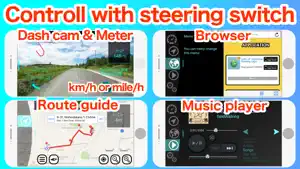
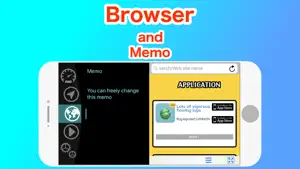
Drive recorder, speed meter, navigation, browser, music player all wanted while driving. You can switch these displays with the steering switch or the earphone switch. Also, corresponds Head up display. Comforts traveling by car, bike, road bike. · Recording function Drive record mode for automatically saving recorded data from 15 to 45 seconds before shock detection, and meter recording mode for recording meters and routes overlapping with images. · Meter support km/h and mile/h. The indication of speed meter can be selected from 80, 180, 320 km/h scale. Traction circle display by accelerometer. Display angle of car body (pitch, bank angle, direction). In addition to the current height, the altimeter also displays the amount of change from the reference. During route guidance, instructions of the whole route and navigation are also displayed. ·navigation Route guide by voice guidance. You can register your favorite locations. During the route guidance, the scale is automatically adjusted so that the turning point is easy to understand. With the following option function depending on setting item > Speed-linked zoom that the scale automatically changes in conjunction with the speed. > Switch to map display automatically when approaching the turning point. > An offset that shifts the center and displays the traveling direction large. · Browser With standard browser and memo pad. Can be able to leave notes when searching little things. · Music player With speed interlocking volume function to adjust the volume in conjunction with the speed. The shuffle function is easy to know the next song.
Ratings & reviews
4.7
9 ratings
What’s new
Version 2.2.0 · Updated September 26, 2026
bug fix
App privacy
The developer, Ayumu Kinoshita, reported these privacy practices to Apple.
Data Used to Track You
The following data may be used to track you across apps and websites owned by other companies:
- Identifiers: Device ID
Data Not Linked to You
The following data, which may be collected but is not linked to your identity, may be used for the following purposes:
- Identifiers: Device ID
- Diagnostics: Crash Data
Used for: Third-Party Advertising, Analytics
Alternatives to DashCam HUD
Looking for apps like DashCam HUD? Here are 6 similar apps on the App Store. The highest rated is Cuspart: Dash Cam Lite (5.0/5), and all 6 are free to download.
-
 DashMap: Smart Dash Cam
4.6
-
 dashcamUa
4.0
-
 Head-Up Display - Speedometer
-
 Cuspart: Dash Cam Lite
5.0
-
 CamCarDer Lite
4.4
-
 Car HUD: Speed & Navigation
3.0
| App | Rating | Price | Last updated | Compare |
|---|---|---|---|---|
| DashCam HUD | 4.7 / 5 (9 ratings) | Free | September 26, 2026 | |
| DashMap: Smart Dash Cam | 4.6 / 5 (5) | Free | Oct 12, 2026 | Compare |
| dashcamUa | 4.0 / 5 (2) | Free | Mar 27, 2026 | Compare |
| Head-Up Display - Speedometer | – | Free | Jul 4, 2026 | Compare |
| Cuspart: Dash Cam Lite | 5.0 / 5 (1) | Free | Jul 29, 2024 | Compare |
| CamCarDer Lite | 4.4 / 5 (160) | Free | Jun 2, 2025 | Compare |
| Car HUD: Speed & Navigation | 3.0 / 5 (2) | Free | Oct 2, 2026 | Compare |
Compare DashCam HUD with the top alternatives: ratings, updates, ASO score and keyword gaps →