

OfficeAutomated Hub
Robert Barton Business iPhoneiPadiPod touch
OfficeAutomated Hub is a free Business app for iPhone and iPad by Robert Barton. Rated 4.7/5 from 3 ratings. Requires iOS 16.4. Updated September 21, 2026.
- Rating
- 4.7
- 3 ratings
- Price
- Free
- on the App Store
- Size
- 50 MB
- Age 4+
- Updated
- Sep 21
- 2026 · v3.0.0
Screenshots


About OfficeAutomated Hub
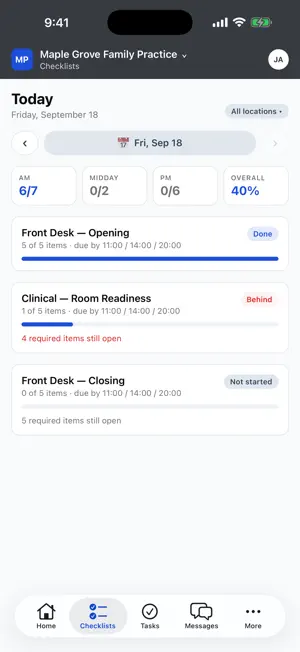
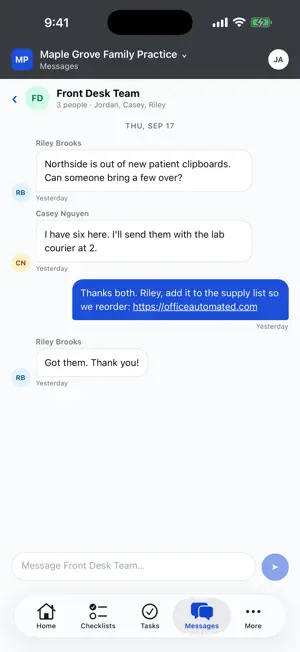
OfficeAutomated Hub (OA Hub for short) is the mobile companion to Office Automated, the workforce operations platform built for medical practices and small businesses. It puts the work that happens standing up on your team's phones: finishing today's checklist, clocking in, snapping a photo of the broken otoscope, answering a message, checking this week's numbers. Office Automated rests on three ideas: set a standard, hold people accountable to it, and measure the results. The desktop platform is where you build the standard. OA Hub is where your team lives up to it. DAILY CHECKLISTS • Today's lists for your role and location, one tap to complete • Attach a photo on completion, or require one for the items that matter • Keeps working when the clinic wifi drops and syncs when it returns • Look back at previous days TASKS • Create a task in seconds: a title, a photo, an assignee • Comment, attach photos, complete and reopen • Managers see every open task across the team, filtered by person, with overdue work on top MESSAGES • Direct messages, group threads and office-wide announcements • Push notifications that open straight to the conversation • Send photos from the camera TIME CLOCK, TIMESHEET AND PTO • Clock in and out from your phone • Your location is recorded only at the moment you punch, to confirm you're at the office. The app never tracks you in the background • Review your own timesheet, including any punch that was flagged • Check PTO balances and request time off. Managers approve or deny from their phone SCHEDULE • Your upcoming shifts, with a notification when the schedule is published or changes • Tell your manager you can't work a shift OFFICE MANUAL AND TRAINING • Read and search your office manual, even offline • Take assigned courses, watch the lesson videos and complete assessments • Record a video or photo straight into the manual or a course when you have permission to edit it STATISTICS • Enter today's numbers from a keypad-sized screen • See your key stats against target, with trend charts BUILT FOR A SHARED WORKPLACE • Face ID or Touch ID unlock • Each employee sees only what their role allows • Your practice's logo and colors • Work for more than one office? Switch between companies without signing out OA Hub requires an Office Automated account, which is provided by your employer. Building the manual, courses, checklist templates, schedules and permissions is done on the desktop platform. Learn more at officeautomated.com
What’s new
Version 3.0.0 · Updated September 21, 2026
OfficeAutomated Hub, or OA Hub on your home screen, is an entirely new app, rebuilt from the ground up for the new Office Automated platform. • Daily checklists with photo proof and offline completion • Tasks you can create, assign and discuss from your phone • Direct messages, group threads and announcements with push notifications • Time clock, timesheet, PTO requests and approvals • Your schedule, office manual, training courses and statistics • Face ID unlock and your practice's own branding Sign in with the same email and password you use on the web.
App privacy
The developer, Robert Barton, reported these privacy practices to Apple.
Data Linked to You
The following data, which may be collected and linked to your identity, may be used for the following purposes:
- Location: Precise Location
- Contact Info: Email Address, Name, Phone Number
- User Content: Emails or Text Messages, Photos or Videos, Audio Data, Other User Content
- Identifiers: User ID, Device ID
Used for: App Functionality
Alternatives to OfficeAutomated Hub
Looking for apps like OfficeAutomated Hub? Here are 6 similar apps on the App Store. The highest rated is Stealth Automate (5.0/5), and all 6 are free to download.
-
 Medi Narrate
-
 Ai Notes: Summaries & Meetings
-
 My Chief of Staff
-
 Stealth Automate
5.0
Stealth Automate
5.0
-
 Arzan Automation
-
 Intellicheck (Mobile)
| App | Rating | Price | Last updated | Compare |
|---|---|---|---|---|
| OfficeAutomated Hub | 4.7 / 5 (3 ratings) | Free | September 21, 2026 | |
| Medi Narrate | – | Free | Dec 7, 2023 | Compare |
| Ai Notes: Summaries & Meetings | – | Free | Sep 17, 2026 | Compare |
| My Chief of Staff | – | Free | Oct 22, 2026 | Compare |
| Stealth Automate | 5.0 / 5 (1) | Free | May 4, 2026 | Compare |
| Arzan Automation | – | Free | Oct 25, 2026 | Compare |
| Intellicheck (Mobile) | – | Free | Jun 23, 2026 | Compare |