

Bacharach Combustion
MSA - The Safety Company Business iPhoneiPadiPod touch
Bacharach Combustion is a free Business app for iPhone and iPad by MSA - The Safety Company. Rated 3.6/5 from 5 ratings. Requires iOS 14.0.
- Rating
- 3.6
- 5 ratings
- Price
- Free
- on the App Store
- Size
- 13 MB
- Age 4+
- Updated
- May 15
- 2026 · v2.9
Screenshots

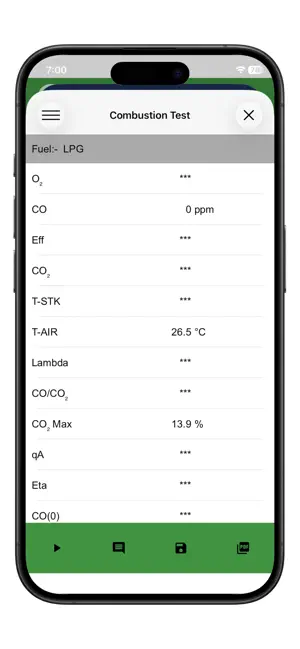
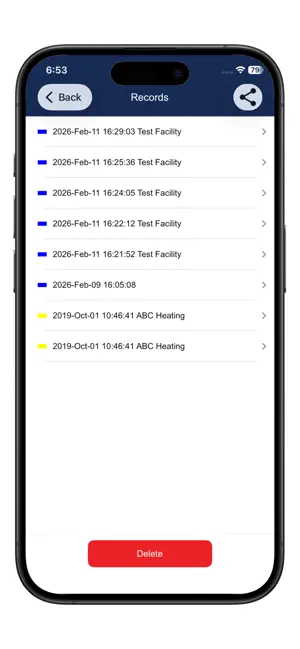

About Bacharach Combustion
The Bacharach Combustion app enables users of the Fyrite InTech®, Fyrite Insight® Plus, and PCA 400 combustion analyzers to generate and send customizable combustion reports from their smartphones and tablets. Features Include: · QR Code Scanner (Intech, Insight Plus, Monoxor XR and Monoxor Plus only): Scan a QR code generated on the analyzer display screen for immediate creation and transmission of combustion reports · Wireless Bluetooth Connectivity (PCA 400 only): View real-time combustion data from your device, simultaneously save data to the mobile app and to the analyzer memory, and remotely start/stop the analyzer sampling pump · Set up customer profiles with facility and equipment information · Save and view records of test data · Generate reports in PDF, CSV, or XML format using saved records · Send or share a report file as an email attachment or to a cloud storage service · Include up to 10 data records in a single report · Insert comments for each data record in a report The Bacharach Combustion app is compatible with the following instrument firmware versions: Fyrite InTech® (V1.30 or later) Fyrite Insight® Plus (V1.30 or later) PCA® 400 (V1.17.4594 or later) Monoxor XR Monoxor Plus If your PCA 400 has a previous firmware version, please follow the below instructions to upgrade your firmware: 1. Go to the PCA 400 product page on the Bacharach website (https://www.mybacharach.com/product-view/pca-400/?ref=138). 2. Scroll down and click on “Technical Library”. 3. Click on “Firmware V1.17.4594” and the .pkg file will download. Save the .pkg file to your desktop. 4. Open the PCA 400 Reporting Software if you have previously installed it. If you have not previously installed it, return to the “Technical Library” on the PCA 400 product page and click on “PCA Reporting Software” to install the program. 5. Once the PCA 400 Reporting Software program is open, connect the PCA 400 unit to your computer using the USB cable provided with the analyzer. 6. On the right side of the software window, click the button that says “Update Instrument”. Then, select the .pkg file that you have saved to your desktop. 7. The analyzer screen will now display “BOOT”. 8. Wait approximately 1 minute for the update to finish, and then you can begin using the new mobile app. If your Intech or Insight Plus has a previous firmware version, please follow the below instructions to upgrade your firmware: 1. Go to Bacharach website (https://www.mybacharach.com/product-view/pca-400/?ref=138), and then go to the product page for the analyzer that you have (Intech or Insight Plus). 2. Scroll down and click on “Technical Library”. 3. Click on “Fyrite® InTech® Firmware Upgrade (v1.30)” and the zip file will download. 4. Unzip the file to access the firmware upgrade instructions, the .pkg file, and the “Upgrade Utility” program required to upgrade the firmware. 5. Follow the procedure described in the firmware upgrade instructions. If you require technical assistance, please contact Bacharach at 800-736-4666.
Ratings & reviews
3.6
5 ratings
What’s new
Version 2.9 · Updated May 15, 2026
Support for iOS 26
App privacy
The developer, MSA - The Safety Company, reported these privacy practices to Apple.
Data Not Collected
The developer does not collect any data from this app.
Alternatives to Bacharach Combustion
Looking for apps like Bacharach Combustion? Here are 6 similar apps on the App Store. The highest rated is TrueFlow HVAC Air Flow (5.0/5), and all 6 are free to download.
-
 Servicefactor
2.4
Servicefactor
2.4
-
 TEC Auto Test
4.5
TEC Auto Test
4.5
-
 Hancock MINT
2.9
Hancock MINT
2.9
-
 TrueFlow HVAC Air Flow
5.0
TrueFlow HVAC Air Flow
5.0
-
 Seitron Smart Analysis
5.0
Seitron Smart Analysis
5.0
-
 smartHMI
| App | Rating | Price | Last updated | Compare |
|---|---|---|---|---|
| Bacharach Combustion | 3.6 / 5 (5 ratings) | Free | May 15, 2026 | |
| Servicefactor | 2.4 / 5 (37) | Free | Oct 7, 2026 | Compare |
| TEC Auto Test | 4.5 / 5 (4) | Free | Aug 8, 2024 | Compare |
| Hancock MINT | 2.9 / 5 (14) | Free | Sep 5, 2026 | Compare |
| TrueFlow HVAC Air Flow | 5.0 / 5 (4) | Free | Oct 19, 2026 | Compare |
| Seitron Smart Analysis | 5.0 / 5 (1) | Free | May 7, 2026 | Compare |
| smartHMI | – | Free | Sep 9, 2026 | Compare |